Updated October 15, 2026.
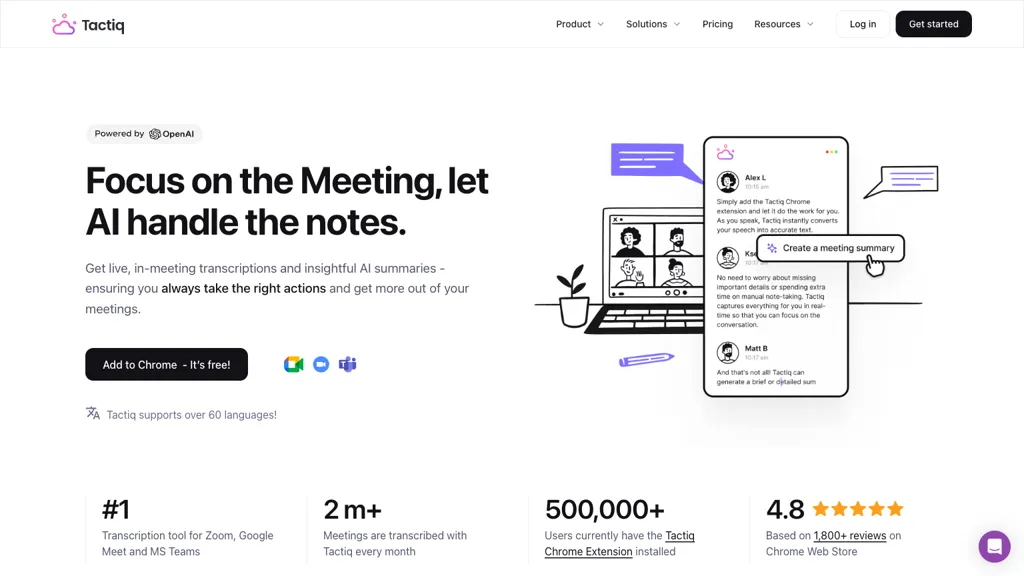
Image note: Historical Tactiq homepage image retained from the original article. Its promotional figures and interface may differ from the current product; it is not a GPTOnline product test.
Tactiq turns supported online meetings into text that you can review, summarize, and use for follow-up work. Its browser extension captures live transcripts without adding a separate meeting bot. AI tools then help extract decisions and action items. The practical buying questions are which meeting setup you use, how many transcripts you need, and how you will manage the resulting information.
What Tactiq does
The official Tactiq website describes live transcription with speaker identification, meeting summaries, custom AI questions, reusable prompts, and workflows. These features can help turn a long conversation into a shorter working record. A transcript is still worth checking before its contents become a customer promise, project deadline, or assignment.
For example, a useful summary separates a confirmed decision from an idea someone merely suggested. Ask for supporting context when a generated action item seems ambiguous. Real-time transcription describes when text appears; it should not be read as a guarantee that every name, number, or speaker attribution will be correct.
Supported meetings and apps
Tactiq’s extension guide supports Google Chrome and Microsoft Edge on a computer, with Google Meet, Zoom, and Microsoft Teams meetings running in the browser. Check the actual route your team uses before installing: an invitation to a Zoom meeting does not tell you whether it will open in a browser or desktop client.
There is also a Mac app for Zoom Desktop, Microsoft Teams desktop calls, and Slack desktop huddles. It requires microphone and screen/system-audio access. Its guide says transcripts appear in the dashboard after processing. Google Meet and browser-based Teams still use the extension. The same guide describes Windows support as being explored and says this Mac app does not run on iPhone or iPad.
Language and capture limits
Consult the platform-specific language list rather than assuming every meeting service offers identical coverage. Tactiq uses one selected transcription language at a time. It does not automatically follow a conversation that switches languages, and changing the setting only affects subsequent speech. A mismatch can produce incomplete or inaccurate text.
Zoom users should also check captions: the Zoom setup guide explains that the browser workflow depends on available live captions. This is worth checking before an important call rather than discovering a missing transcript afterward. This overview is based on documentation; GPTOnline did not run a meeting or benchmark transcription accuracy.
Pricing and billing
The official plan guide lists these USD prices per user:
- Free: $0, with 10 transcripts and five AI credits monthly.
- Pro: $12 monthly, or $8 per month with annual billing; unlimited transcripts and 10 monthly AI credits.
- Team: $20 monthly, or $16.67 per month with annual billing; unlimited transcripts and AI credits.
- Business: $40 monthly, or $29.16 per month with annual billing; intended for companies with 20 or more users.
- Enterprise: custom pricing, positioned for organizations with 200 or more users.
Annual subscriptions are paid upfront for the year. Localized prices can differ, so confirm the currency, billing period, seats, and final total at checkout. These are standard published plan rates checked on the update date.
How credits work
Meeting credits and AI credits are separate. The meeting-credit guide says new Free-plan meetings can become preview-only after credits run out. Monthly renewal does not unlock a transcript already restricted to preview; upgrading restores access. Do not assume a captured meeting will be fully accessible merely because text appeared during the call.
There is a documentation discrepancy for AI usage. The detailed AI-credit guide says most users and actions use at most one AI credit per meeting, including repeated questions about that meeting. The pricing-page FAQ describes a credit per action. Check your account’s usage before estimating costs from either rule. The detailed guide says unused credits do not roll over and renewal follows the account’s monthly reset date.
Storage and privacy
Tactiq stores meeting text. Its Google Meet guide says the transcript is saved to the Tactiq dashboard when the meeting ends. The privacy policy identifies Google Cloud storage and settings that control storage destinations. This is cloud processing to evaluate before a confidential discussion, not a promise that nothing is stored until you manually save it.
Tactiq’s AI privacy explanation says its generation features use Microsoft Azure OpenAI and that submitted data is not used to train those models. That provider statement does not mean meeting transcripts disappear from Tactiq. Review storage, sharing, and deletion separately.
Check participant consent and your organization’s rules before capture. Tactiq offers an automatic chat notification; a notification alone should not be treated as proof of permission. Its deletion guide says archived transcripts are automatically deleted after 30 days, with an option to delete them permanently sooner.
An example workflow
Imagine a small packaging company reviewing a delayed product launch. This is a fictional workflow, not a tested Tactiq session. The project lead wants to distinguish approved changes from proposals and identify what still needs a decision.
- Before the call: agree on transcription, confirm the meeting platform and language, and decide who should receive the notes.
- During the review: state decisions explicitly. If a supplier date is tentative, say so; avoid treating silence as approval.
- Afterward: ask AI to list confirmed decisions, unresolved questions, and proposed tasks separately. Request an owner or deadline only when the transcript contains one.
- Review the result: check the packaging dimensions, supplier name, and launch date against the discussion. Leave missing owners unassigned instead of accepting an invented name.
- Share selectively: send a checked action summary to the project group and limit the full transcript to people who need the detail.
Tactiq’s sharing controls include invited access and a broader link-access option. It also documents connected destinations including Google Drive, Slack, Notion, and Confluence. Review the audience before enabling automatic sharing, especially when a single discussion mixes internal decisions with customer information.
Who should consider it
Tactiq is worth evaluating when the main output you need is a searchable meeting record and a reviewed follow-up summary. Start with the meeting route and credit limits, then assess whether its sharing controls fit your team.
If audio or video playback is central to your process, compare the recording workflow in our Fireflies.ai overview. Fireflies documents recording and downloadable meeting media among its features. This is a workflow distinction, not an accuracy ranking. Whichever tool you choose, keep a human review step between generated notes and consequential decisions.