Updated October 15, 2026. This overview is based on Krea’s public product pages, documentation and terms. It is not a hands-on performance test.
Krea is an AI creative suite for generating and editing visual media. Its tools cover images, short videos, a live creative canvas, upscaling and custom visual styles. You can move between models and production steps within the same service, making it worth considering when a project involves more than generating a single picture. Krea’s official website presents the current product range.
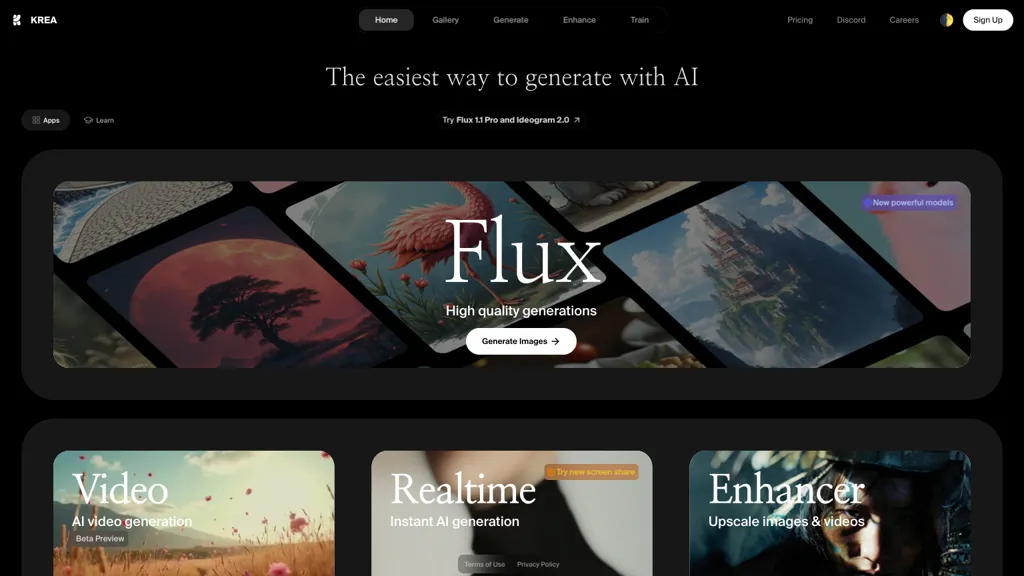
Image note: the featured screenshot is an archived view of Krea’s homepage, with a Flux banner and Video, Realtime and Enhancer cards. Current menus, models and offers may differ.
What can you do with Krea?
Generate images and choose a model
Krea Image accepts text prompts and provides a model picker, aspect-ratio controls and model-dependent reference options. Its documentation lists Krea’s own models alongside options from other providers. The picker displays an approximate compute cost, so changing models can affect both the result and how quickly you spend your allowance. Generated images can be sent onward for editing, enhancement or animation. See the image-generation guide.
For example, Krea 2 offers Medium, Large and Turbo variants, plus style references, moodboards and controls for intensity, complexity and movement. A saved moodboard can guide a group of images toward a shared palette or visual direction. Available controls vary across model families, so a setting described for Krea 2 should not be assumed to exist everywhere in the service. See Krea 2’s documentation.
Explore ideas on a live canvas
Realtime updates an image or video as you change a prompt, draw or move elements on a canvas. It supports drawing, text-only input, webcam input and screen input. Krea documents fast image modes at 512 pixels and higher-quality modes at 1024 pixels. That makes the canvas useful for working out a composition before deciding which version deserves further processing. Its Realtime guide also explains how to send a result for upscaling or download it.
Create video from text or images
The Video tool supports prompt-based generation, animating a still image and extending supported clips. Its catalog includes model families such as Veo, Kling, Runway and Seedance. Duration, resolution, reference inputs and audio support depend on the selected model. Check those settings before building a sequence around a particular capability; there is no single duration or resolution limit that describes every option. The video documentation explains the workflow and model differences.
Edit and upscale existing assets
Krea Edit supports regional changes, annotations, canvas expansion and adjustments to lighting or color. You can start from an uploaded image or a previous generation. This can be useful when a composition is close to what you need but one area needs revision. See the editing guide.
Enhancer offers several image and video processing models. Krea lists image upscaling up to 22K with a supported Topaz option and video upscaling up to 8K with suitable models. Those are model-specific ceilings. The output size available to you also depends on your plan and settings. Crucially, enhancement can invent detail: Krea cautions that it cannot establish what was actually present in a blurry original. Compare faces, lettering and product details against the source. See the Enhancer documentation.
Reuse styles and build workflows
The Training tool lets users create custom styles or character models from image datasets. This is relevant when the same visual identity must recur across a campaign, although each output still needs inspection. Training also consumes resources, and you need appropriate rights to the images you supply. See Krea’s training guide.
For repeated work, Nodes connects model inputs, processing steps and outputs in a visual workflow. It can combine image, video and audio operations; the App Builder can turn a workflow into a reusable interface. This is a separate learning step from writing one prompt, so it is sensible to prove a small workflow before expanding it. See the Nodes guide.
Krea pricing and compute limits
This monthly-billing snapshot was checked October 15, 2026. Prices are in US dollars (USD). Max and Business show the selected compute tier; confirm taxes and the final charge before subscribing.
| Plan | Displayed monthly price | Included compute |
|---|---|---|
| Free | $0 | 100 units per day |
| Basic | $9 | 5,000 units per month |
| Pro | $35 | 20,000 units per month |
| Max | $105 | 60,000 units per month at the displayed selection |
| Business | $200 | 80,000 units per month at the displayed selection |
| Enterprise | Custom quote | Custom package |
Krea also offers annual billing and configurable compute tiers. Basic includes selected video models; Pro includes all video models. The pricing FAQ lists commercial licenses for Basic, Pro, Max, Business and Enterprise. Check the billing period: an annual plan’s monthly equivalent is not a monthly installment.
Compute units measure usage across generation, enhancement, editing and training. They are not a fixed number of finished deliverables. Model choice and settings affect consumption, so a budget that covers many exploratory stills may cover relatively few demanding video jobs. Review the displayed cost before running a batch.
- Individual-plan rollover: unused monthly units on Basic, Pro and Max do not carry forward.
- Team rollover: Business and Enterprise have rollover provisions; confirm the applicable period for your agreement.
- Extra compute: one-time packs expire after 90 days and do not replenish.
These usage rules are explained in Krea’s compute-unit guide. Paid subscriptions renew automatically unless canceled, according to its subscription-management guide. Developers should budget separately for API use: Krea’s API pricing page says API billing is independent of consumer subscriptions.
Commercial use and privacy
A paid commercial license does not remove the need to check the rights in reference images, recognizable people, brands or other material. Krea’s general terms make users responsible for their submissions and say visibility can depend on the subscription tier. They also grant Krea broad rights in user submissions. Review those conditions before uploading unreleased client work.
The Business terms, dated January 1, 2026, explicitly say Krea will not train its models on Business customers’ inputs or outputs. They still permit specified processing, including service delivery, security and legal compliance, and warn that generated outputs may be non-unique. Do not extend that plan-specific promise to every account. For confidential projects, confirm the governing plan, visibility settings and any relevant provider conditions. Krea’s privacy policy covers personal-data collection and disclosure; privacy involves more than whether content is used for training.
Example: a pottery workshop poster
Illustrative workflow, not a tested result. Imagine designing a poster for a fictional adult pottery workshop called Clay After Hours. The goal is a warm still-life image with empty space for a date, venue and booking details that will be added later.
- Define the layout first. Decide where the headline belongs. Try a portrait composition with a handmade bowl low in the frame and quiet space above it.
- Write a focused prompt. For example: “An imperfect terracotta bowl on a flour-dusted workbench, evening window light, muted rust and cream palette, editorial still-life photograph, clear empty space in the upper third, no lettering or logos.” This prompt is an original example for this article.
- Compare directions economically. Check the selected model’s compute cost, then change one compositional choice at a time. Judge whether the image leaves usable space before paying for more detailed versions.
- Inspect before expanding the project. Check the bowl rim, shadow and surrounding objects. Edit a localized problem if needed, then consider an upscale only after the composition is approved.
- Finish the real information separately. Add verified event details in your design layout. If a short animated version would help, test the approved still as a video input and inspect the motion before using it.
A useful acceptance test is whether the same visual still works at phone size and poster size. Reject versions with distracting invented tools, inconsistent shadows or insufficient text space. Keep the original and the final export so later edits do not depend on reconstructing an earlier generation.
Where is Krea available?
Krea has a web application and an official app for iPhone and iPad. Its iOS download page links directly to the App Store and describes using the same account across mobile and web. Model access can depend on plan and region. Follow that official link when installing rather than relying on a similarly named app.
Who should consider it?
Krea is worth evaluating for designers, illustrators and content teams who want to explore visual directions, refine an image and potentially animate it within one service. Start with a small, representative brief and assess usable results, revision effort and compute consumption together. A large model catalog is only valuable if its tools fit the work you actually need to deliver.
For a related creative workflow, compare the token, privacy and output-review requirements in our Leonardo.ai overview. Use the same brief and acceptance criteria when comparing services rather than treating model counts as a quality ranking.
For exact product depictions, confidential client assets or evidence-sensitive restoration, set stricter review criteria before uploading anything. This overview verifies documented capabilities and conditions; it does not establish output accuracy, turnaround times or production suitability for your project.