
Updated October 16, 2026. This is a documentation-based overview. We reviewed public vendor information without creating an account, installing the software, running an AI model, or testing a robot.
PictoBlox is STEMpedia’s educational platform for block coding, Python, AI experiments and robotics. The product overview describes projects ranging from animations and games to hardware control.
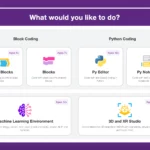
Image note: the retained mode-selection screenshot is historical. Its age recommendations and beta badges are vendor interface labels, not verified suitability ratings or a record of today’s feature availability.
What can you build?
The documentation hub covers coding, computer vision, face recognition, text detection, speech recognition and machine learning. Block coding and Python provide different ways to create projects; the presence of both does not establish that every extension works in both environments.
The ChatGPT extension documentation, for example, lists Block Coding, Stage Mode and an internet requirement. Its Python compatibility fields are inconsistent with that availability label, so check the actual extension before planning a Python lesson. Generated answers still need checking for accuracy and appropriateness.
Desktop, web and mobile access
| Platform | Documented access and limits |
|---|---|
| Windows, macOS and Linux | Desktop installers are available from the vendor. |
| Web browser | An online editor is available at pictoblox.ai. |
| Android and iOS | The download page links to mobile block-coding apps. |
| Chromebook | The vendor documents a Linux-environment installation, with additional steps for board connections, Bluetooth and webcam access. |
See the platform-specific download instructions. Crucially, the ML image-classifier guide restricts model creation to desktop Windows, macOS and Linux; it explicitly excludes web, Android and iOS versions.
Check the requirements for your particular operating system before a class. Camera-based activities need a working camera, and the vendor lists internet access for activation and some AI extensions. Hardware connections and ML dependencies can add setup time; a simple coding activity is a useful first check before a larger project.
Robotics and hardware limits
STEMpedia lists support for hardware including Quarky, Arduino, ESP32 and micro:bit. Compatibility depends on the extension, coding environment, board and connection method; a supported-board name is not a promise that every AI feature runs on that board.
The Quarky sensor documentation explains the practical distinction: Stage Mode keeps the board connected to PictoBlox for interaction, while Upload Mode can run a supported program on the board after disconnection. The uploaded program cannot interact with the stage. Check each extension’s mode requirements before designing an untethered robot, rather than assuming that a computer-based AI activity transfers unchanged.
Pricing and account conditions
The product FAQ describes free use for individuals and non-commercial purposes. It directs commercial users and organizations planning bulk educational use to contact STEMpedia. A school rollout should confirm its access terms before treating the software as a universally free classroom license.
Some AI actions consume credits. The credit help page names text and speech recognition, says successful account verification provides 1,000 free credits, and directs users to purchase more through the credit option. This is the published allowance, not an account balance we verified.
STEMpedia’s teacher-program FAQ also identifies ChatGPT queries and some cloud AI computations as credit-consuming services. We did not verify current paid credit-pack prices or a universal subscription tariff. Check the purchase screen for the rate and conditions relevant to your account; budget separately for any required robotics equipment or paid teaching materials.
Children’s accounts and privacy
Read the privacy policy for the specific product being used. Its summary says STEMpedia does not knowingly collect information from under-13s on its website, Dabble and PictoBlox software. Separately, its PictoBlox App section describes in-app-course accounts for under-16s using a guardian’s email, a username, age and profile picture. These differently scoped statements do not establish a single permission rule for every version.
The policy also describes collection of project/course information and device or usage data, with service-provider involvement. Parents and schools should clarify the intended account flow and data handling before enrolling children. For an introductory activity, use non-identifying objects rather than student faces, voices or attendance records. This overview does not verify child-safety compliance or learning outcomes.
A fictional classroom workflow
Example: a teacher wants an on-screen character to distinguish a paper triangle from a paper circle. This is a planning example, not a project we ran.
- Choose a desktop version supported by the image-classifier guide and create the two classes.
- Prepare varied, non-identifying images for each shape. Keep some separate for later checks instead of reusing every training picture.
- Train the model, then try the held-out pictures under different lighting and backgrounds. Record mistakes rather than treating the training score as proof of reliability.
- Export to the coding environment and make the character display the predicted label. Keep the first activity on screen; add a robot only after checking its supported connection and execution mode.
Is PictoBlox a good fit?
PictoBlox is worth evaluating for a guided coding or robotics project when you can match the lesson to a supported device and extension. Before committing a whole class, check the exact workflow, account requirements, credit costs and privacy expectations. Its educational positioning does not remove the need for supervision, troubleshooting or independent evaluation of AI results.