App Store Screenshots is a free skill that asks your AI coding agent to build an editable screenshot workspace inside a project. It is aimed at developers who want to turn their own app captures into organized store-marketing images, then revise the layout, copy and languages without starting over.
This overview uses official sources checked October 29, 2026. The workflow below is illustrative; we did not build or submit a screenshot set as part of this review.
What is App Store Screenshots?
App Store Screenshots, maintained by Parth Jadhav, works with skill-compatible coding agents such as Claude Code, Codex and Cursor. Rather than providing a hosted design subscription, it scaffolds a local editor that you run and adjust.
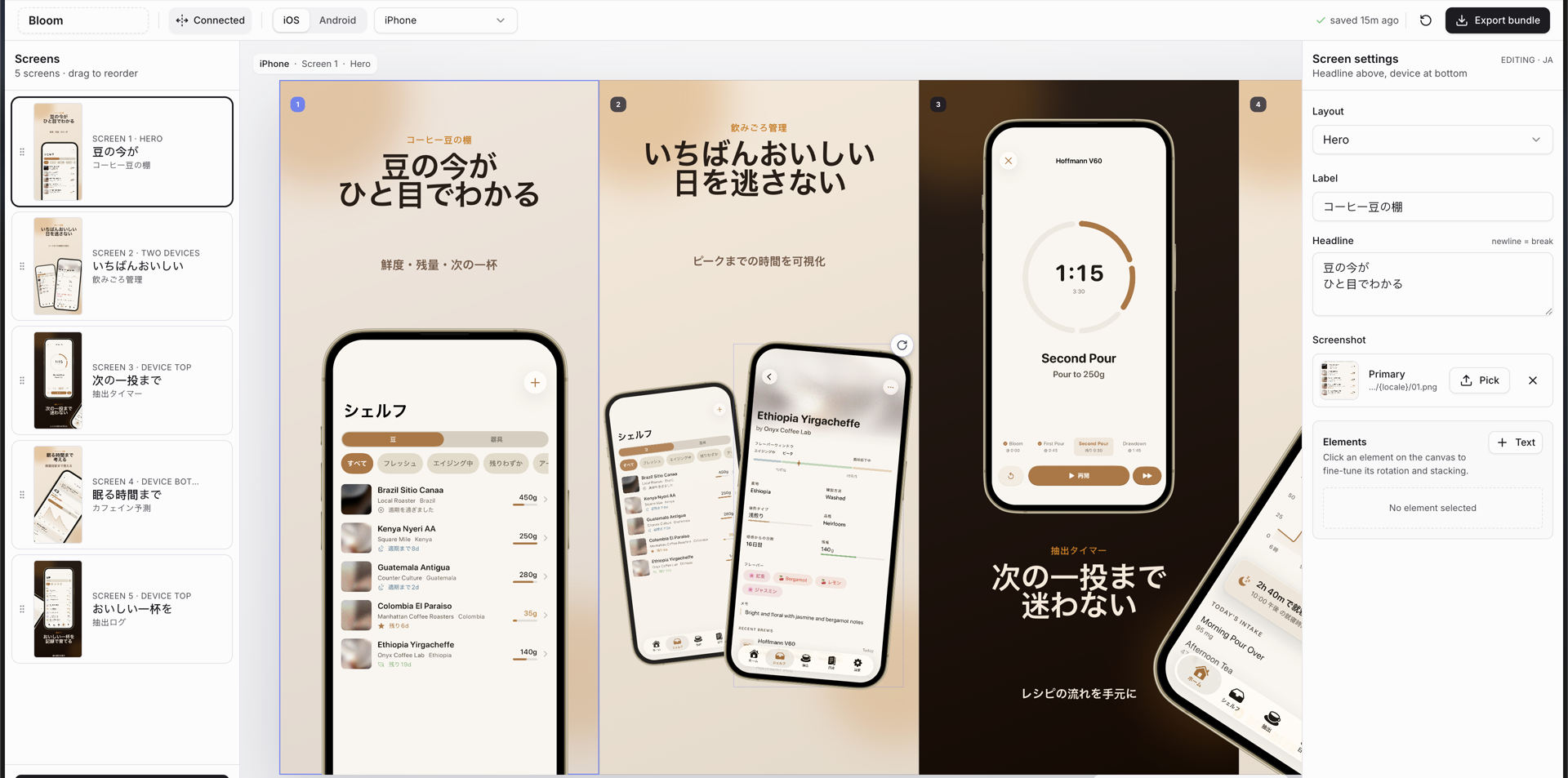
The official repository describes a Next.js workspace with a connected canvas, device frames, inspector controls and export bundles. Elements can extend across adjacent screenshots. Project state is saved in a JSON file, making it possible to retain the deck with the project and return to it later.
What is recent, and what is not?
The product appeared in an October 28, 2026 Product Hunt launch, but its repository existed earlier. An official October 15 code update corrected rounded magnifier corners on wide lenses. The following day’s latest commits added repository achievement badges, not a major new design capability.
The repository showed about 7,700 stars when checked. That is evidence of developer attention, not a count of satisfied customers or proof that every export is accepted by a store. The useful reason to evaluate it is its editable, repeatable workflow, rather than treating the launch listing as a guarantee of quality.
Cost, requirements and scope
| Item | Published details |
|---|---|
| Skill | Free, open source, MIT licensed |
| AI usage | Your normal coding-agent or model costs still apply |
| Local setup | Node.js 18 or newer, a package manager and a compatible agent |
| Source material | Captures of your own app from a device, simulator or emulator |
| Design options | The official product page presents 18 styles and localized export workflows |
The documented installation is npx skills add ParthJadhav/app-store-screenshots. Inspect a skill and its dependencies before allowing it into a working project. A free license covers the software; it does not remove your responsibility for the app images, fonts, text or other material you include.
A hypothetical three-screen project
Imagine a developer preparing screenshots for a simple habit tracker. A focused first evaluation could use three screens: the daily checklist, a history view and a settings example. This keeps the review manageable before adding languages or more device sizes.
- Prepare representative captures. Use a test account with invented habits and no real names, email addresses or private activity. Make sure each screen represents a feature users can actually access.
- Give the agent a bounded brief. Identify the audience, the three benefits to explain, the target platform and one initial language. Ask it to preserve the app’s actual labels rather than inventing new capabilities for stronger marketing copy.
- Inspect the editable result. Compare a small number of styles. Check whether the app content remains legible and whether a device or headline crossing a boundary still makes sense when each screenshot is viewed separately.
- Review the exported files. Open the PNGs outside the editor. Look for clipped text, missing images, inconsistent framing, low contrast and unintended placeholder wording. Confirm the dimensions against the current requirements of the store you will use.
- Add one language at a time. Have a fluent reviewer check meaning and tone. Longer labels can change a composition even when the translated words are accurate.
Keep the brief, source captures and approved copy alongside the saved project. For a later app update, this gives you a concrete checklist of what must change, instead of relying on the agent to infer which marketing claims have become outdated.
Limitations worth checking
A generated editor still needs local development tooling and human review. AI-written headlines may overpromise, and a visually attractive layout may obscure the feature it is supposed to demonstrate. Store-ready sizing alone does not establish compliance with every submission requirement.
Likewise, running the editor locally does not mean all AI processing stays on your machine. What your coding agent sends elsewhere depends on that agent and its provider settings. Use only material you are authorized to share.
The tool is most useful when you expect to maintain several versions of a screenshot deck. For a single quick image, setting up an agent-generated editor may be more work than you need. Start with a small project and judge the exported files, not just the preview.
For a structured language check, use our guide to reviewing an AI translation when you do not speak the language. Keep translation review separate from checking that text fits the exported design.
Image source: the project’s official editor example, retrieved October 29, 2026. Copyright © 2026 Parth Jadhav, provided in the MIT-licensed repository. It shows a sample project, not our hands-on test. See the license and permission notice.