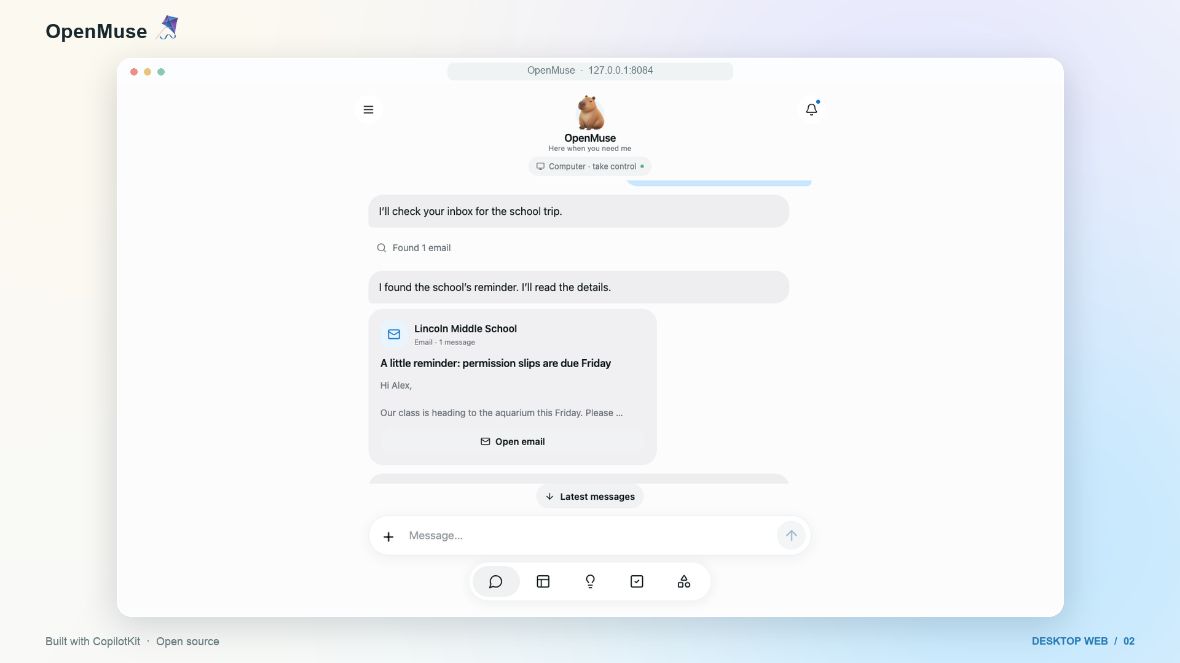
OpenMuse is CopilotKit’s open-source personal-agent application for people who want to inspect, adapt and supervise an agent workspace. It combines conversation with a browser, files and durable tasks, rather than hiding every action behind a final chat reply. The important buying decision is really a deployment decision: are you prepared to configure and operate an alpha project?
This guide is based on public project documentation checked on October 24, 2026. We have not installed OpenMuse, connected personal accounts or tested its reliability.
What OpenMuse is designed to do
The official repository describes an application with its own server, task worker and browser worker. Its interface supports following plans, reviewing proposed actions and returning to saved work. A persistent browser and optional Linux workspace provide places for the agent to work with pages and files.
The changelog dates the initial public alpha to September 15, 2026. That release introduced delegated tasks, reviews and receipts, goals and tracking, document workflows and Google adapters. The alpha label matters: an implemented adapter or recorded demonstration does not establish that every real-account workflow has passed acceptance testing.
Who should consider it?
OpenMuse is most relevant to developers and technically comfortable users who want a starting point for a personal-agent application. It may be useful for examining how task state, approvals and visible results fit together. Someone seeking a ready-to-use hosted assistant with a predictable subscription and minimal maintenance should evaluate those requirements separately.
Choose one narrow job before evaluating the broader feature list. A fictional form-and-reply exercise, for example, is easier to inspect than granting an agent access to a busy personal mailbox immediately.
A first evaluation: supervise a fictional document task
The following is a suggested evaluation plan, not a report of our own test.
1. Define the allowed result
Use fictional names and a disposable copy of a supported fillable AcroForm PDF. Scanned forms and OCR are outside the documented support for this workflow. Specify the fields to complete and ask for a draft reply only. Write down what would count as success: the right values in the right fields, a readable saved copy, and no communication sent without review.
2. Inspect the work, not just the summary
Look at the resulting document and task state. Compare every entered value with the supplied instructions. Check whether the file you can open matches what the agent says it produced. A confident completion message is insufficient if a field is blank or the wrong attachment was selected.
3. Test the boundary around external actions
Before enabling a live account, understand what a proposed action includes and which account it targets. The security policy says email sends and calendar changes require a recorded review. It also warns that cancellation cannot necessarily stop an already dispatched provider request.
Do not treat that review mechanism as universal protection for every computer action. The documented opt-in E2B desktop has internet access and distinct security limits; the policy explicitly notes that its network activity can bypass the app’s email and calendar approval gates. Read the relevant provider boundary before enabling it.
Setup requirements and operating costs
The current quick start lists Node 24 LTS, pnpm 11.19.0 and a CopilotKit Intelligence project key. Its sample workspace does not require a model, Google account or Docker, but more capable configurations require additional setup. Keep server-only credentials on the server and follow the repository’s current instructions rather than treating a copied command sequence as permanently valid.
OpenMuse’s MIT-licensed source is not a promise of a free hosted service. The Rich Threads documentation identifies CopilotKit Intelligence as a separate service. Configured model providers, hosting and optional infrastructure have their own terms and costs. No single all-inclusive operating price was verified for this guide.
Limits to check before using personal data
The project’s verification record distinguishes controlled tests and fictional-workspace recordings from live-model quality and real Google-account acceptance. It also documents supported PDF-form limits. Use that matrix to identify what you still need to verify for your intended workflow.
The security policy describes a single-owner deployment, not a multi-tenant authentication system. Protect stored files, browser profiles and backups. Self-hosting should not be read as an assurance that nothing leaves your machine: connected services and model providers remain separate data-processing decisions.
Our practical prompt-injection guide explains why material an agent reads should not become permission to act. For OpenMuse, a sensible first milestone is a small fictional task whose files, actions and stopping behavior you can verify, before adding live integrations or unattended work.