| Name | PhotoGrid AI Image Enhancer |
|---|---|
| Overview | PhotoGrid AI Image Enhancer is a powerful online tool that uses advanced artificial intelligence to enhance photo quality in just one tap. Whether you’re working with low-resolution images, blurry selfies, or faded old photographs, this tool aims to improve sharpness, brightness and apparent detail; reconstructed detail may not match the original scene. Ideal for social media, professional use, or personal memories, it offers fast and effective results with no editing skills required. |
| Key Features & Benefits |
|
| Use Cases and Applications |
|
| Who Uses? |
|
| Pricing | The named Image Enhancer page currently advertises free, no-sign-up, watermark-free enhancement up to 4K and batch uploads. Separately, PhotoGrid’s broader workspace lists a free tier with watermarked exports and paid VIP, Pro and Ultra tiers with 180, 500 and 2,000 monthly credits and batch limits of 10, 20 and 50 images respectively. These are different published scopes, not proof that every tool or export is unlimited and free. Confirm the exact tool and plan at export; selected numeric paid prices were not verified. |
| Tags | AI Photo Enhancer, HD Upscale, Photo Restoration, One-Tap Fix, Online Image Editor, Portrait Enhancer, AI Editing Tool |
| App Available? | Yes, available on iOS, Android, and Web platforms. |
In today’s fast-paced visual world, image quality can make or break how your content is received, whether it’s a selfie, a product photo, or a family memory. Enter the PhotoGrid AI Image Enhancer, an intuitive and smart tool designed to bring out the best in every photo, subject to the original quality and the selected processing tool. From restoring old memories to sharpening blurry mobile shots, this AI-powered enhancer can simplify enhancement, but results still need visual review.
What is PhotoGrid AI Image Enhancer?
PhotoGrid’s AI Image Enhancer is a web and mobile-based tool that transforms ordinary or low-quality photos into crisp, clear, and vibrant images in seconds. It’s designed for anyone who wants better photos without the hassle of manual editing.
Using advanced AI algorithms, the enhancer detects flaws, like poor lighting, blurriness, or lack of detail and automatically corrects them. Whether you’re fixing an old black-and-white photo or cleaning up a dim selfie, this tool makes your image clearer, sharper, and more appealing in one tap.
If you’re interested in exploring more creative AI tools for photography and colorization, check out Palette AI, which specializes in realistic photo colorization using deep learning, great for bringing old black-and-white images to life.
Why It Stands Out
Unlike traditional photo editors that require you to tweak multiple settings manually, PhotoGrid AI Image Enhancer handles everything for you. AI processing can simplify enhancement for casual users and professionals; consistency and recovered detail are not guaranteed.
The tool is also part of the broader PhotoGrid ecosystem, known for its collage-making and creative features. That means you can enhance your images and then use them in beautiful collages or social media layouts, all within the same platform.
Key Features That Users Love
- 1-Tap Auto Fix: No sliders, no guesswork. Just upload a photo and let the AI work its magic.
- HD Upscaling: Improve resolution for printing, presentations, or professional use.
- Portrait Enhancement: Smooths skin, sharpens eyes, and maintains natural tones, great for selfies.
- Photo Restoration: May improve the appearance of old or damaged photos; keep an unedited archival copy.
- Batch Editing: Process multiple supported images; batch limits vary between the named free enhancer and the broader paid workspace.
Real-World Use Cases
- Social Media Ready: Content creators use it to make sure every post looks sharp and professional.
- eCommerce & Marketing: Sellers improve product photos to increase buyer trust and engagement.
- Memory Preservation: Families enhance and archive old scanned photos with stunning clarity.
- Academic & Resume Use: Improve presentation images where editing is permitted; do not rely on reconstructed text or altered ID details as authentic evidence.
- Travel & Lifestyle Blogging: Bloggers use the enhancer to upgrade mobile snapshots into print-worthy content.
Conclusion
The PhotoGrid AI Image Enhancer is more than just a photo filter, it’s a full-blown AI assistant for your pictures. With one tap, it breathes new life into images and makes them ready for any platform, from Instagram to Etsy to family albums. Whether you’re polishing a selfie or preserving a moment in time, the tool offers another way to improve presentation, subject to input quality and careful review.
Output and usage limits: Enhanced faces, labels and other details may be reconstructed rather than recovered facts. Review important text against the source. The broader pricing page advertises commercial usage rights on paid plans, while its linked Terms contain personal-use restrictions for certain Service and AI-generated materials; confirm the terms applicable to your particular workflow rather than assuming unrestricted reuse.
Sources: Named enhancer · Platform plans and app links · Linked Terms
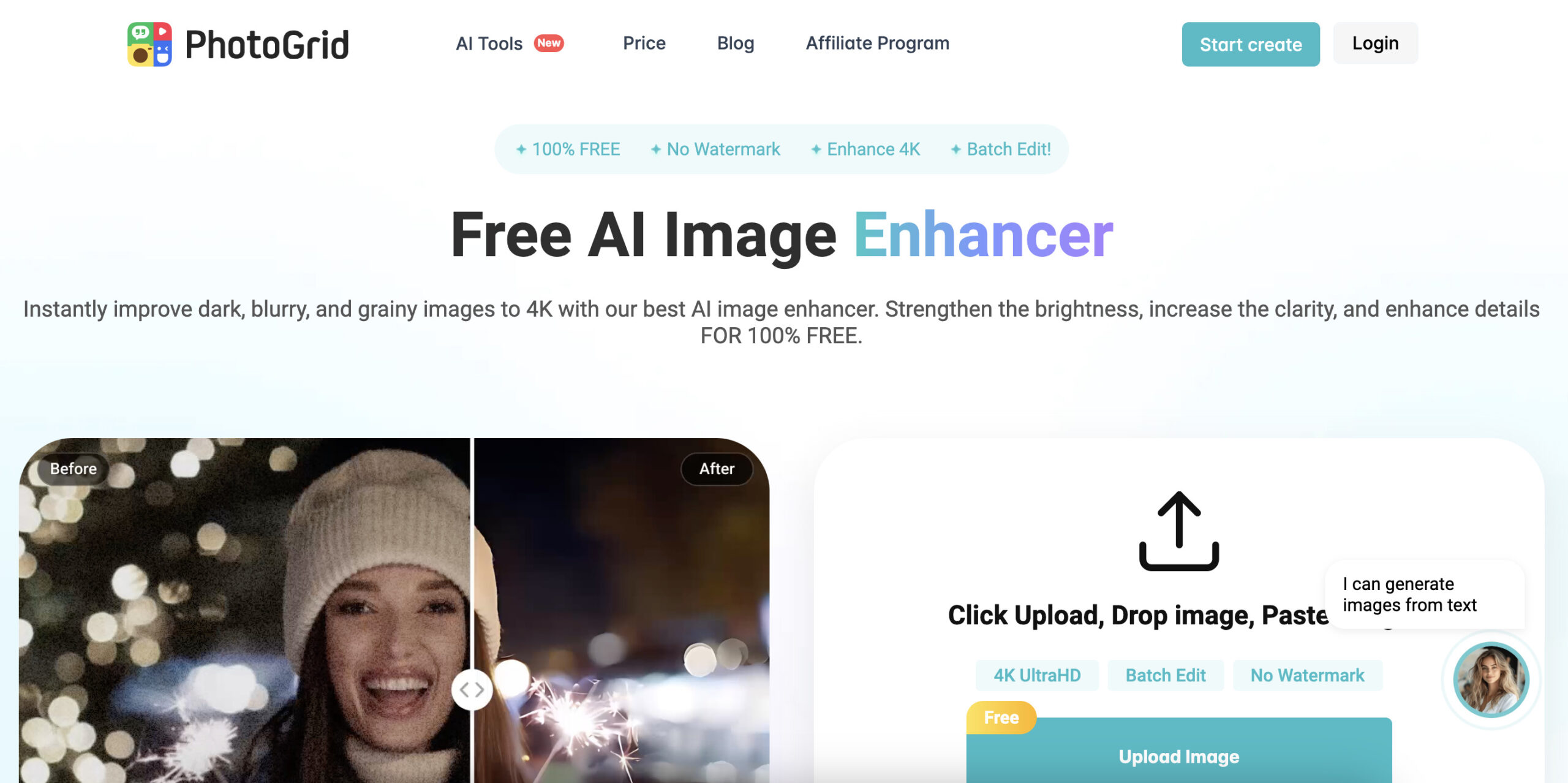
Provider screenshot: this existing PhotoGrid landing-page image shows its branded enhancer interface, an illustrative before-and-after portrait, and free, watermark-free, 4K and batch claims. The reviewed named enhancer page still advertises that scope; the image is not our enhancement test and does not establish the terms of every PhotoGrid product or plan. Its capture date is not verified.