Updated on October 20, 2026.
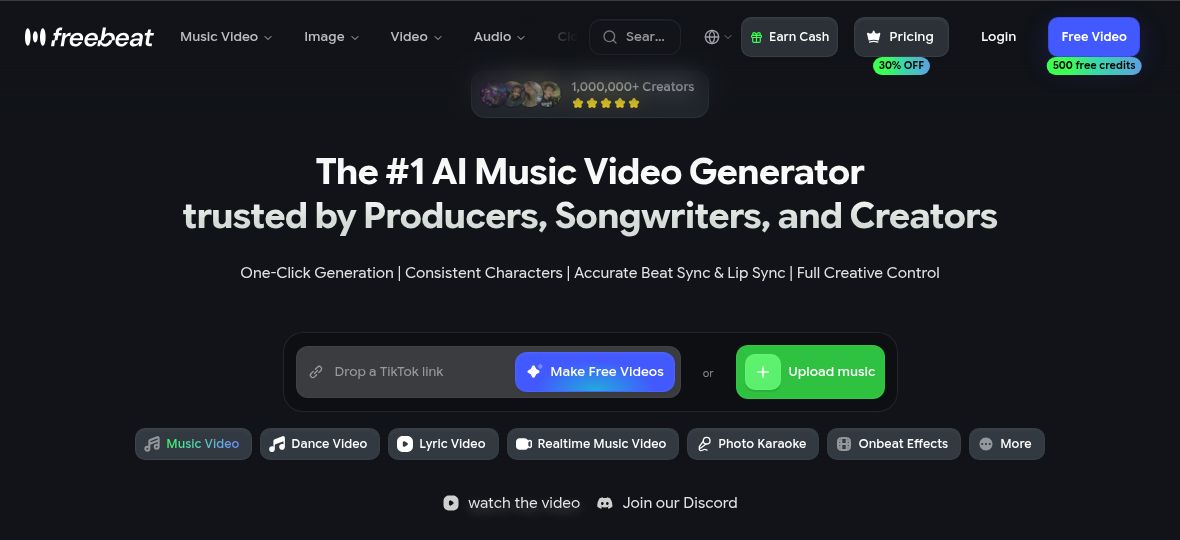
Featured image: screenshot of freebeat AI’s official homepage hero and workflow controls, captured October 20, 2026. Vendor presentation for editorial identification; no hands-on product test. The ranking, creator-count, performance and accuracy wording are provider claims, not independent test results.
freebeat AI is a music-first video creation platform. It combines music-video planning, dance animation, lyric videos and beat-reactive effects with image and video generation tools. Its current official website describes a workflow built around a song, a creative direction and optional character references.
What can freebeat create?
The music-video workflow analyzes a track, plans scenes and assembles generated clips. Users can revise the storyboard, change visual direction and add synchronized lyrics. Dance, photo-karaoke and on-beat effects offer narrower alternatives when a full narrative video is unnecessary. The site also provides text-to-video, image-to-video, lip-sync and editing tools; availability and credit cost depend on the chosen workflow and model.
Inputs include uploaded audio and supported music links. Horizontal, vertical and square outputs serve different publishing formats. Claims about exact beat matching, stable characters or professional quality are vendor descriptions, not results of a hands-on test here.
Musicians and social-content teams may use it for song promotion, short clips and visual storytelling. Adult educators can explore music-led instructional visuals, provided they have rights to the audio and images. These are possible uses, not guarantees of engagement or learning outcomes; the service terms require users to be at least 18.
Free access and paid plans
The public pricing page and homepage FAQ do not show an identical plan list. The dedicated pricing comparison is the reference for the amounts below, checked October 20, 2026. It displays a dollar sign without a currency code in the inspected cards; confirm currency and the actual checkout commitment.
| Plan | Displayed offer | Selected allowance |
|---|---|---|
| Basic | $4.99/week promotional amount; $6.99/week also displayed | 1,990 credits/week; up to 720p |
| Pro | $26.99/month promotional amount; $34.99/month also displayed | 10,000 credits/month; up to 720p |
| Ultimate | $39.99/month promotional amount; $49.99/month also displayed | Selected 19,000 credits/month configuration; up to 1080p |
| Creator | $199/month promotional amount; $249/month also displayed | Selected 95,000 credits/month configuration; up to 1080p |
Ultimate and Creator offer larger credit configurations at different prices. The Yearly selector shows Pro at $18.89, Ultimate at $27.99 for the selected 19,000-credits-per-month tier, and Creator at $139.30 for the selected 95,000-credits-per-month tier, per month equivalent and billed for 12 months. These are monthly credit allowances, not a single annual credit pool. Basic remains weekly. Confirm the full annual payment and promotion conditions at checkout. Model-specific “unlimited” promotions have eligibility, duration and fair-use restrictions; the inspected benefits are for manual web use and exclude API, automated and batch access. Check the current card and credit estimate before committing.
The paid cards also advertise watermark removal and faster processing. These are plan benefits described by the provider; no rendering-speed comparison was performed.
The service terms specify 500 non-expiring free credits for non-commercial use. Paid-plan credits expire at the end of their billing period, and weekly, monthly and annual subscriptions renew automatically until cancelled. Website subscriptions can be cancelled through the pricing or profile billing controls; app-store purchases must be managed through the relevant store.
The terms limit subscription refunds to completely unused, unexpired subscriptions, exclude partial refunds and make purchased credit packs non-refundable. Dissatisfaction with an AI result alone is not a refund basis. Review the applicable terms before spending credits.
Web, Android and iPhone access
The earlier article mentioned only browser access. Current official links lead to Google Play and the Apple App Store, with Random Motion identified as the developer. The Android listing advertises 500 signup credits; the Apple listing includes in-app purchases. Store prices and features can differ from the web offer. The website also links a Mac download, which was not installed or tested.
Rights, privacy and practical limitations
A music link is not permission to reuse the recording. Use tracks, images and likenesses you have appropriate rights to, and check the selected model’s conditions. Although the homepage broadly discusses commercial rights, the terms expressly restrict the free tier to non-commercial use. Their eligibility requirement is 18 or older, regardless of different app-store content ratings.
The terms also allow processing uploaded material to operate the service and describe anonymized model-improvement data with an opt-out. Do not assume uploaded client assets are excluded from every training or processing use without checking the applicable settings.
Start with a short section of your own track, inspect the scene plan and budget for revisions. Watch for altered faces, imperfect lip sync, inconsistent objects and incorrect lyrics before publishing. This review does not include an uploaded song, generated video, account purchase or measured rendering-speed test.
Official sources checked October 20, 2026. No hands-on product test was performed.