An action-item list can look tidy while assigning the wrong person, inventing a deadline or turning a suggestion into a commitment. Before copying AI-generated tasks into your team’s tracker, check what was actually agreed.
Microsoft describes Copilot in Teams as a tool that can suggest action items. Its Teams FAQ also advises checking facts before acting on generated responses and explains that post-meeting answers use the most recent available transcript. Those are reasons to review the source, not treat a generated list as an approved assignment.
The workflow below uses an invented meeting excerpt and an intentionally flawed action list. It is an editorial exercise, not a test of any product.
Start with the source and its limits
Keep the transcript or notes beside the proposed tasks. Record which meeting and version you are reviewing. If the recording stopped early or the notes omit part of the discussion, say so. Do not describe an incomplete source as the final record.
Check unclear names, missing words and speaker labels first. Our AI transcript review guide covers that earlier step. Here, the separate question is whether the words support a particular task, owner and deadline.
A worked example: a short exchange that changes the task list
Imagine a team discussing a draft welcome page. The following dialogue is fictional; the labels are excerpt references, not timestamps from a real recording.
A — Maya: “We could ask Leo to review the welcome text by Thursday.”
B — Leo: “I can’t commit to Thursday. I can review the first paragraph by Monday.”
C — Maya: “Monday works. Let’s keep the rest of the page unchanged for now.”
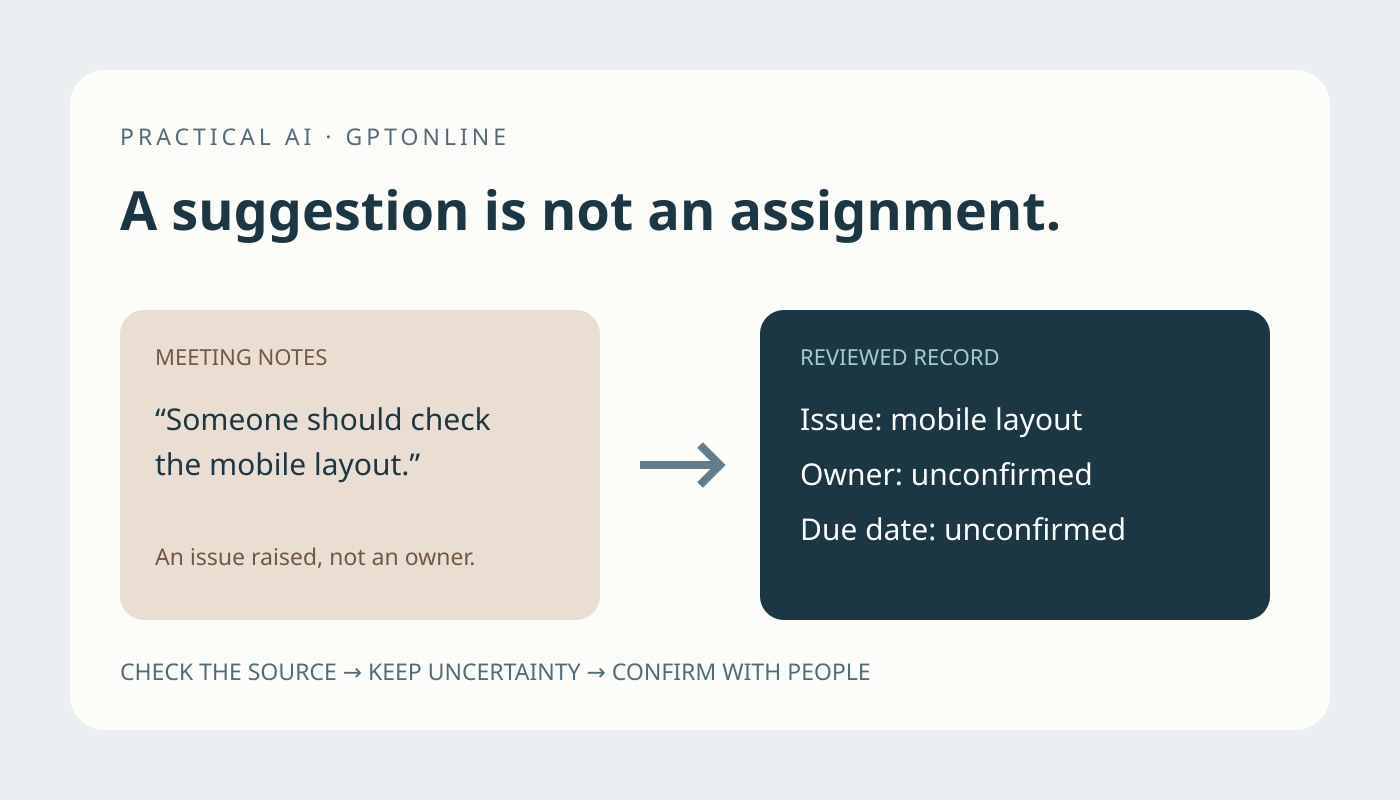
D — Sam: “Someone should check the mobile layout.”
E — Maya: “We haven’t assigned that yet. We’ll decide after Leo’s review.”
F — Leo: “I’ll post my comments in the shared draft.”
Now consider this deliberately incorrect candidate list:
- Leo: rewrite the whole welcome page by Thursday.
- Sam: fix the mobile layout by Monday.
Both entries sound specific. Neither accurately represents the discussion. Review each field rather than merely deciding whether the list sounds plausible.
1. Separate proposals from accepted commitments
Excerpt A proposes a person and deadline. It does not establish acceptance. Leo’s response in B changes both the scope and timing; C accepts that revision. The supported commitment is to review the first paragraph, not rewrite the whole page.
Look for the conversation around a proposed task. “Could we,” “perhaps” and “someone should” are cues to investigate, not automatic assignments. Equally, do not require one magic phrase such as “I agree”: check the full exchange and ask the participants if the decision remains ambiguous.
2. Do not turn a speaker into an owner
Sam raises the layout issue in D, but does not volunteer to fix it. E explicitly leaves it unassigned. Keep “check the mobile layout” under open questions, with owner and deadline marked unconfirmed. Do not add it to Sam’s task queue simply because his name appears beside the concern.
3. Preserve the deadline without guessing a calendar date
Thursday was replaced by Monday for Leo’s review. However, this excerpt has no meeting date. Record “Monday, exact date to confirm” rather than inventing a date. If the source says “tomorrow afternoon,” confirm the meeting date, relevant time zone and intended time before creating a timed reminder.
When a later statement changes an earlier one, retain the accepted decision and a brief explanation of the correction. Do not silently combine the earliest deadline with the latest scope.
Build a reviewable action record
For this example, the corrected draft record would read:
- Task: Review the first paragraph of the welcome page.
- Owner: Leo, based on his statement in B.
- Due: Monday; exact date requires confirmation.
- Deliverable: Comments in the shared draft, supported by F.
- Decision evidence: B and C replace the earlier Thursday proposal.
- Status: Ready for participant confirmation, not automatically assigned.
Keep a separate open question: who will check the mobile layout, and when? This preserves useful unfinished business without disguising it as a commitment.
Use AI to organize evidence, then review it yourself
A reusable prompt can ask for uncertainty explicitly:
From these authorized meeting notes, draft action items for review. For each, provide the task, proposed owner, deadline as stated, and supporting excerpt. Separate accepted commitments from proposals, unresolved questions and canceled tasks. Keep missing details marked unconfirmed. Check whether later discussion changes earlier statements. Do not create tasks, send messages or infer consent.
Check every supplied excerpt against the original. A quotation generated by an assistant is still something to verify. Use approved tools and only the material necessary for the review; our guide to removing sensitive details from AI writing prompts can help prepare a limited example.
Confirm before creating or changing tasks
Send the reviewed list through your team’s usual approval process. Ask targeted questions: “Leo, is this the right scope, and which Monday did we mean?” Resolve ownership and timing before assigning work or scheduling reminders. Where your role already authorizes assignment, still distinguish your new decision from something the meeting agreed.
Finally, check whether the task already exists. Update the same record when the meeting changes its scope or deadline, preserving the decision history. A good review leaves a short list people can recognize as their actual commitments, plus clearly labeled questions that still need an answer.