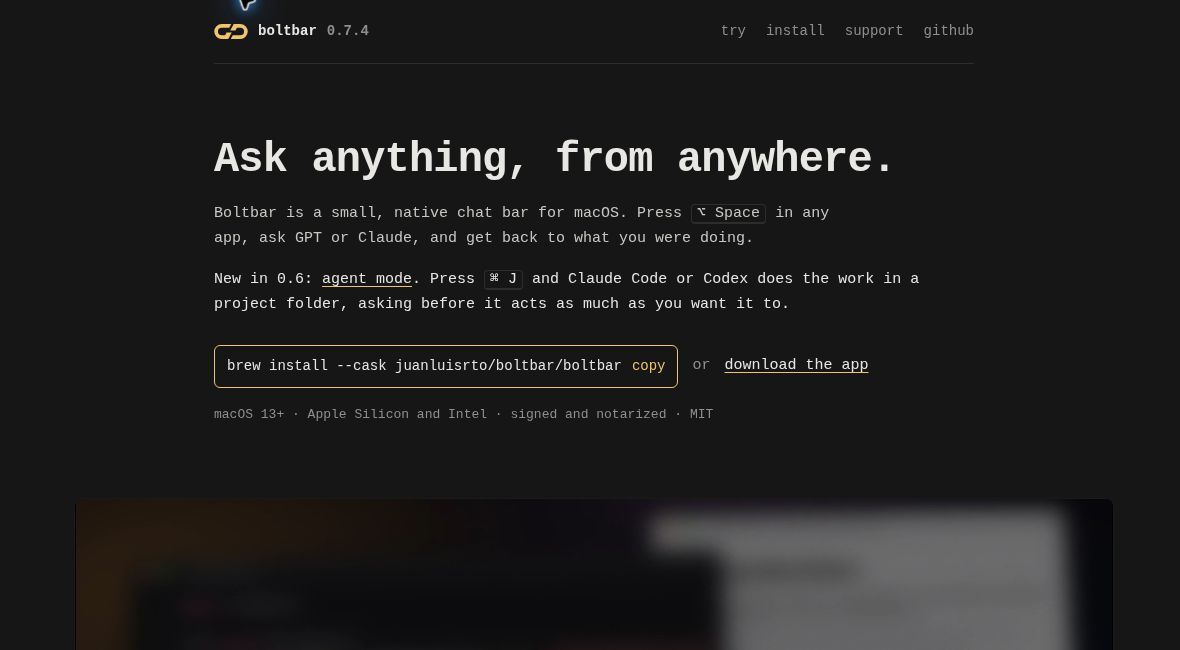
Boltbar puts a small AI conversation bar over the application you are already using. It is designed for quick questions on a Mac, with a separate agent mode for handing a chosen project to Claude Code or Codex.
This overview covers official features and limitations checked October 29, 2026. It is documentation-based, not a hands-on assessment of response quality or security.
What is Boltbar?
Boltbar is a native macOS application opened with Option-Space. It supports OpenAI and Anthropic connections, searchable local conversations, attachments and keyboard controls. You supply an API key or use a supported, already authenticated command-line client.
The app stores keys in the macOS Keychain and keeps chat history on your Mac. Requests still go to the chosen AI provider. Local storage therefore should not be mistaken for offline inference or a promise that project information never leaves your computer.
Recent release and availability
The official version 0.7.4 release, dated October 27, 2026, fixes the width of the agent button when its keyboard hint appears in a narrow bar. Agent mode was introduced earlier, in version 0.6; this latest release should not be described as its debut.
Boltbar’s October 28 Product Hunt launch provides a recent discovery signal. The observed audience was modest, so there is no basis here for claims about widespread adoption. The official distribution supports macOS 13 or later on Intel and Apple-silicon Macs, with signed and notarized downloads.
Pricing and connection limits
| Item | What to expect |
|---|---|
| Boltbar application | Free and fully functional, under the MIT license |
| Optional supporter license | One-off €19 or $19, as listed on the official site |
| AI requests | Subject to your provider’s access, charges and usage limits |
| PDF attachments | Require API mode |
| Agent mode | Requires a signed-in Claude Code or Codex CLI; web search is off |
The supporter license removes the occasional support reminder; it does not purchase unlimited AI use. The website says Stripe handles payment and VAT. Review checkout for the amount applicable to your purchase rather than assuming the displayed currencies are interchangeable.
Understand the agent permissions
The official repository describes four permission levels. Look restricts work to reading and read-only commands. Ask requests approval before commands or changes. Edit permits project-file changes, including deletion, while asking before other actions. Full stops asking and can run commands anywhere on the Mac.
Full requires a second press and normally returns to Ask after 24 hours, unless that behavior is disabled in settings. These controls deserve attention before you begin: the convenient floating interface does not make an agent’s file and command access inconsequential. A project’s saved permission should be checked each time its contents or purpose changes.
A hypothetical first workflow
Suppose you maintain a small documentation site and want to locate an outdated example before editing it. This is an illustrative evaluation, not a task we ran in Boltbar.
- Choose a non-sensitive project. Work with a backup and remove secrets or private material that the task does not need. Confirm which provider and connection mode are selected.
- Start with a reading task. Use Look to ask where the example appears and which files refer to it. Ask for file locations and an explanation before requesting any modification.
- Check the evidence yourself. Open the identified files. Confirm that the quoted example really is outdated and that the proposed replacement matches your current documentation.
- Move to Ask for a narrow edit. Specify the exact correction and require unrelated content to stay unchanged. Read each proposed command or change before approving it.
- Review outside the chat. Inspect the resulting diff, build the documentation and check the rendered page. Keep or reject the change according to those results, not the confidence of the assistant’s reply.
This tests whether the bar reduces switching between small tasks while keeping review understandable. It does not establish that a broader autonomous workflow would be safe.
Who is it for?
Boltbar is a plausible fit for Mac users who already have supported AI access and want quick conversations plus an optional bridge to coding agents. It is less suitable for someone seeking an all-inclusive AI subscription, a Windows application or a fully offline assistant.
The website includes an interactive browser demonstration with scripted replies and a pretend project. That demo can show the interface, but it cannot establish live model performance. Before using real work material, consider both the app’s local storage and the provider’s handling of the content you send.
If your main concern is organizing several coding-agent applications on a Mac, our AI Bridge overview addresses that related workflow. Boltbar’s focus here is quick chat and explicit permissions for the agent session you choose.
Featured image: screenshot of the official Boltbar website, captured October 29, 2026 for product identification. It is not a screenshot of a test performed by GPTOnline.