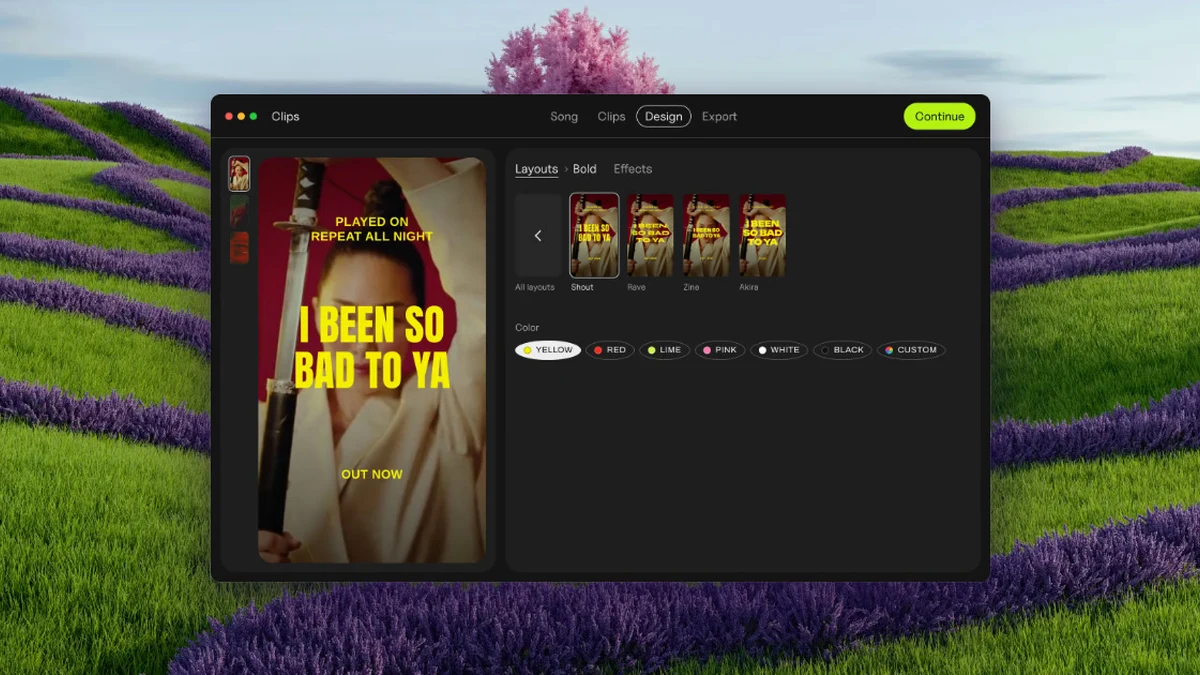
Clips by Plastic is a lyric and lip-sync video maker for Mac. It launched on Product Hunt on October 25, 2026. It answers a simple question for musicians: which part of your song sells it? Drop in a finished song and Clips finds the tempo and every part, verse, pre-chorus, chorus and bridge, then makes a vertical lyric video for each one, cut on the beat, with the words synced. Run them all for a week, then put your budget behind the part that wins.
What Clips does
- Song in, ads out: drop in a finished song and Clips finds the tempo and every part, then cuts each part into its own clip, on the beat.
- Lyrics synced word by word: add a hook line on top, with the lyrics synced word by word or line by line, on the beat.
- Every part, every backdrop, at once: export 15 videos in one batch, every part of the song on every backdrop, in 54 effects, named and ready for Ads Manager.
- Vertical and square: exports vertical video at 1080 by 1920 or square at 1080 by 1080.
- Works offline: your unreleased song never leaves your Mac.
- No timeline: from a finished song to a full batch of ads in four steps, with no editing timeline to learn.
Who it is for
Clips targets musicians promoting a release. It was built by Kai Williams, a music artist with 30,000 monthly listeners on Spotify, while he was promoting his own album: cutting the same song fifteen ways by hand was eating the time he wanted for music. It fits artists who want to test every part of a song as an ad and let the results pick the hook, rather than guessing which chorus will convert.
Pricing
Prices are listed on the official website, in US dollars, as one-time payments with no subscription. Free: $0, with every feature and unlimited exports, a small Clips tag on exports, and no time limit. Artist: $99 once, with no Clips tag on exports, use on up to 3 of your own Macs, and free updates. Label / Studio: $299 once, for work for a roster or clients, with up to 10 Macs, client and commercial work, and priority email support. A bundle of Clips and the maker’s other app, DOT, costs $125 once. A 30-day refund applies, no questions asked. Clips needs macOS 13 or later, on Apple silicon or Intel; lyric sync works best on macOS 26. Pricing may change, so check plastic.audio/clips for current terms.
Sources
- Clips by Plastic on Product Hunt (launched October 25, 2026)
- Official website: plastic.audio/clips (features and pricing verified October 26, 2026)