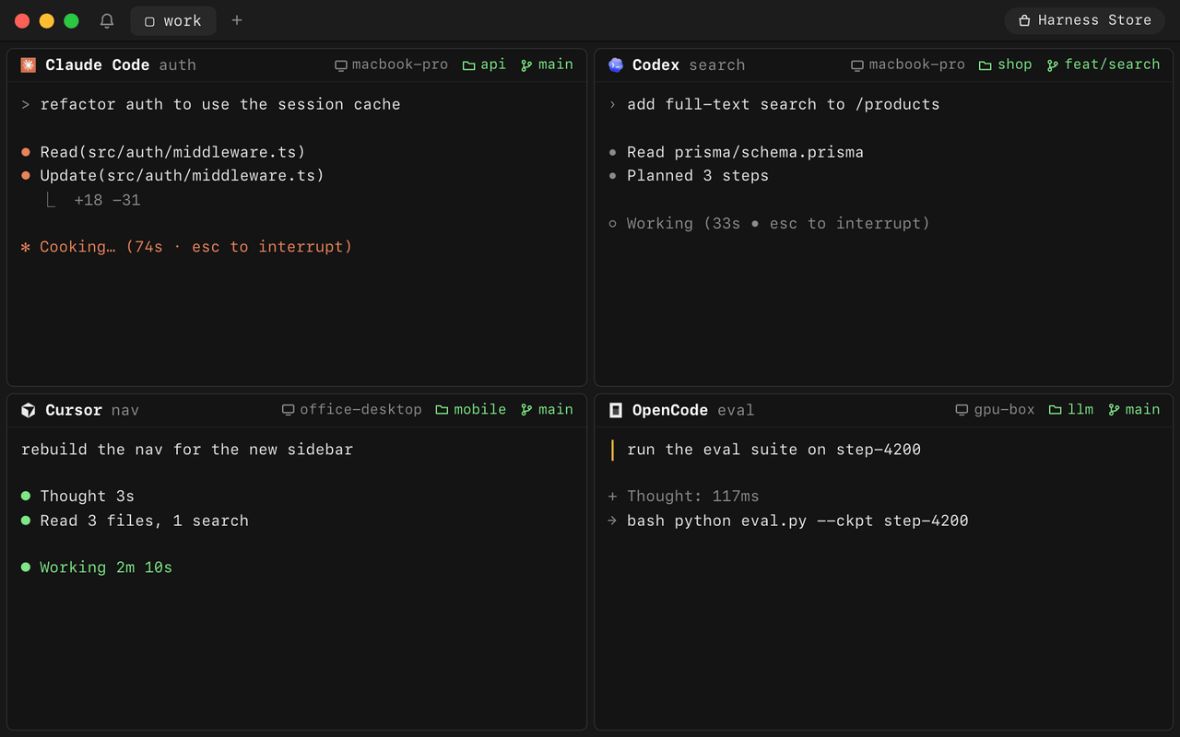
Harness by Autonomous brings multiple coding-agent sessions into one workspace. The open-source project is called OpenHarness. Its practical use is keeping separate tasks, terminals and machines visible while a developer decides what may change and what is ready to merge.
This overview uses the project’s public documentation, checked on October 24, 2026. We have not installed Harness, tested its remote connections or measured coding performance.
What Harness organizes
The official repository describes sessions for agents including Claude Code, Codex, Cursor and OpenCode. It keeps agent CLIs in terminal sessions and supports a separate Git worktree and branch for each harness. Tabs group related work, and the interface can show sessions on different machines.
This is a coordination layer around coding tools, rather than a single replacement AI model. Its usefulness depends on the agents, repositories and review practices you bring to it.
What changed recently
Harness Desktop 1.3.12, released October 23, 2026, improves the Swarm sidebar, project and device navigation, team status display and related interface behavior. The release also lists a fix for a macOS accessibility crash. These are release-note claims, not results from our testing.
The release page provides downloads for macOS, Windows and Linux, including architecture-specific options. Check the current package for your operating system and processor, as desktop and CLI versions have separate release numbers.
A useful first workflow: fix, test and review
Start with a small repository change that you can independently verify. For example, imagine a documentation site whose search box fails to clear after a reset. The following is an evaluation plan, not a completed Harness experiment.
1. Define the boundaries
Write down the expected behavior, the files likely to be involved and the checks required. State that the task must not deploy, change credentials or introduce unrelated dependencies. Use a nonproduction copy of the project and keep production secrets out of the working environment.
A short brief might read: “Fix the search reset behavior. Keep the public interface unchanged. Explain the cause, show the diff, and report which checks you ran. Stop before pushing or deploying.” Those boundaries are instructions to review, not proof that a tool is technically prevented from exceeding them.
2. Give each session one responsibility
Assign one agent the implementation. Give another a test-design or review task, with an explicit instruction not to modify the implementation files. Separate branches help distinguish proposals, but two agents can still make incompatible assumptions. Tell the reviewer exactly which revision or diff to inspect.
Avoid sending “fix everything” to several agents at once. Parallel work is easier to assess when each task produces a small, named artifact: a patch, a test case or a list of findings.
3. Review evidence before combining changes
Read the patch yourself. Reproduce the original bug, run the relevant checks and try a nearby case that the agent may have missed. For the search example, check both an empty query and a second query after resetting. A passing check reported in chat is weaker evidence than a result you can inspect and repeat.
Merge only the changes that solve the agreed problem. Keep deployment as a separate approval step. For risks from instructions embedded in untrusted project material, see our practical guide to prompt injection in AI assistants.
Permissions and remote-device trust
Read the project’s security documentation before connecting machines. It explains that signing in establishes device trust: someone able to sign in as you, or the backend operator, can add a device. The new-device notices and review process make additions visible; they do not prevent that initial trust. Review only devices you recognize, and do not treat encryption as a substitute for account security.
The documentation also warns that its demonstration provider runs without normal permission prompts and is not intended for deployment. Do not use that sample as a production configuration. Preserve the permission and sandbox controls appropriate to your agent, and approve only the access the current task needs.
Cost and suitability
The repository uses the MIT license, and Autonomous advertises a free app download. Neither establishes that every connected AI service is free. Check your chosen agent’s subscription or API charges, usage limits and any remote computing costs separately.
Harness is most relevant when you already use coding agents and need clearer oversight across sessions. If you have one small task and one agent, additional orchestration may add complexity. Evaluate it on whether you can follow the work, control access and verify changes, not on how many agents you can start.