Updated on October 20, 2026.
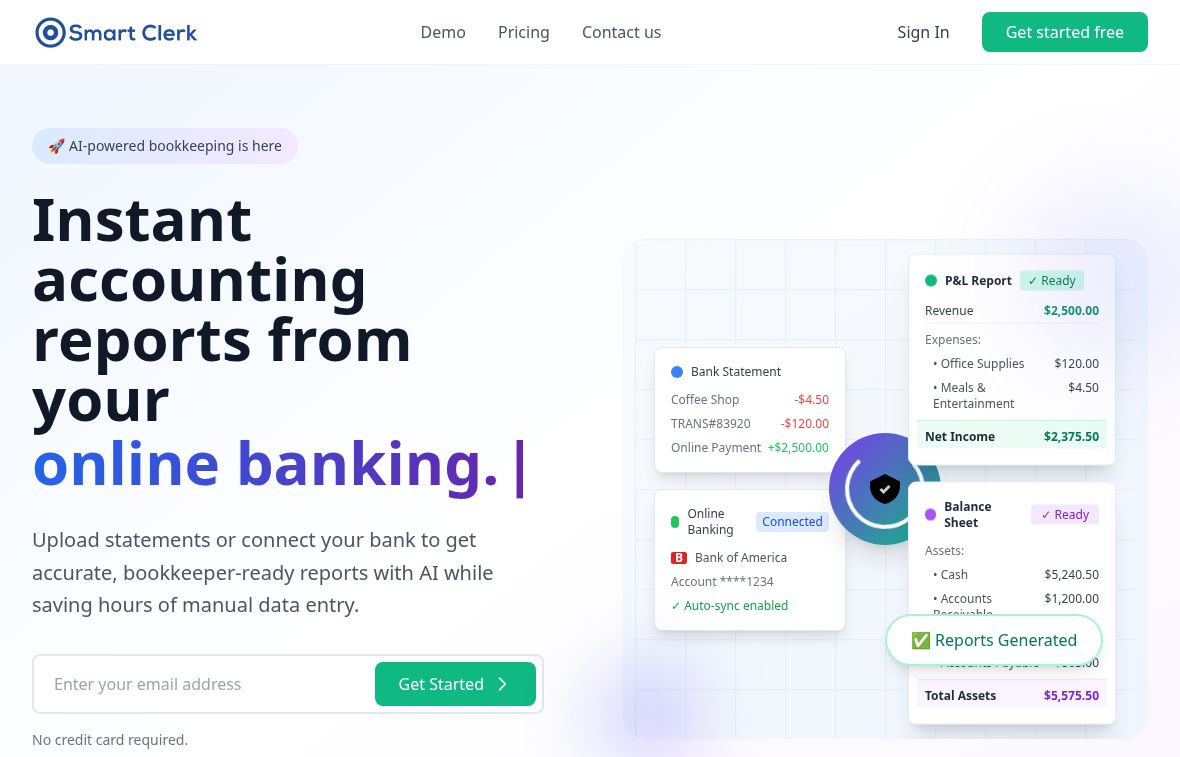
Featured image: screenshot of Smart Clerk AI’s official website, captured October 20, 2026. Vendor presentation for editorial identification; no hands-on product test. Speed and accuracy are provider claims; the bank and report cards are public illustrations, not a connected account or an independent financial test.
Smart Clerk AI automates bookkeeping from bank statements, connected accounts, and invoices. It extracts transactions, organizes vendors and categories, and prepares financial reports for small businesses, freelancers, bookkeepers, and accounting firms. Its current offering includes bank connections as well as document uploads.
Document processing and bookkeeping features
The official website describes a workflow that combines historical statement uploads with ongoing bank activity. Users can review categorized transactions, vendor totals, spending patterns, and reports from the same account.
- Statement extraction: upload bank or credit-card PDFs and organize the extracted activity for review.
- Invoice intake: process uploaded invoices; the provider’s invoice guide also describes email forwarding, line-item extraction, and Excel export.
- Vendor cleanup: consolidate inconsistent merchant names and categorize transactions, with corrections informing later work.
- Reporting: produce profit-and-loss statements, balance sheets, trial balances, and spending analysis. Export transactions and reports to Excel or PDF.
- Multiple companies: Professional supports several companies under one login, useful for bookkeepers managing client records.
The site advertises connections to banks in the United States and Canada and statement processing across countries, languages, and currencies. Confirm support for your particular institution and inspect currency conversion before relying on a report. These broad vendor claims do not establish error-free handling of every document layout.
Current plans and historical-data charges
The public comparison lists these monthly plans. It uses a dollar sign without identifying the currency code in the reviewed pricing section; confirm the currency, taxes, and renewal amount before subscribing.
| Plan | Displayed monthly price | Included capacity |
|---|---|---|
| Free | $0 | 1 bank account and 20 invoices per month |
| Growth | $29 | 2 bank accounts and 100 invoices per month |
| Professional | $49 | 6 bank accounts and 250 invoices per month; multiple companies and priority support |
The paid plans are presented as billed monthly and cancelable at any time. Processing for the 2025 and 2026 tax years is included; records before 2025 have a separate one-time charge of $15 per account per year. That charge is for each historical account/year, not an unlimited history upgrade. Accounting firms can request a custom quote.
Important workflow limits
Smart Clerk’s August 2026 product comparison says connected accounts sync monthly by default, with more frequent syncing available. Do not interpret general “real-time” marketing as a guarantee of instant bank-feed updates.
The same comparison distinguishes bookkeeping from a full operational accounting suite: Smart Clerk does not provide invoice creation or payroll. Processing an invoice document is different from issuing an invoice to a customer.
An older indexed copy of the income-statement page mentions Xero and Zapier; the current route redirects to the homepage. The current homepage FAQ instead explains Excel export for use with accounting tools. Direct connector and general API availability were not confirmed, so verify those requirements before choosing a plan.
Check financial data before use
Compare extracted rows with the original statements, check opening and closing balances, and review duplicate transactions, categories, vendors, and currencies. Have the responsible accountant confirm tax treatment and reporting. Advertised accuracy percentages are not a promise that a particular upload is correct.
The homepage says account documents can be stored in the dashboard. A demo’s separate deletion claim should not be generalized to all account data. The footer-linked privacy policy says uploaded documents are kept for no more than one year and may be processed in the United States or European Union, with access by service providers for specified functions. Confirm how these arrangements apply before uploading sensitive financial records.
No bank was connected, private document uploaded, or extraction accuracy tested for this overview. The reviewed service is web-based; a dedicated native app was not verified. Sources checked: October 20, 2026. Browse related accounting assistants.