Updated on October 20, 2026.
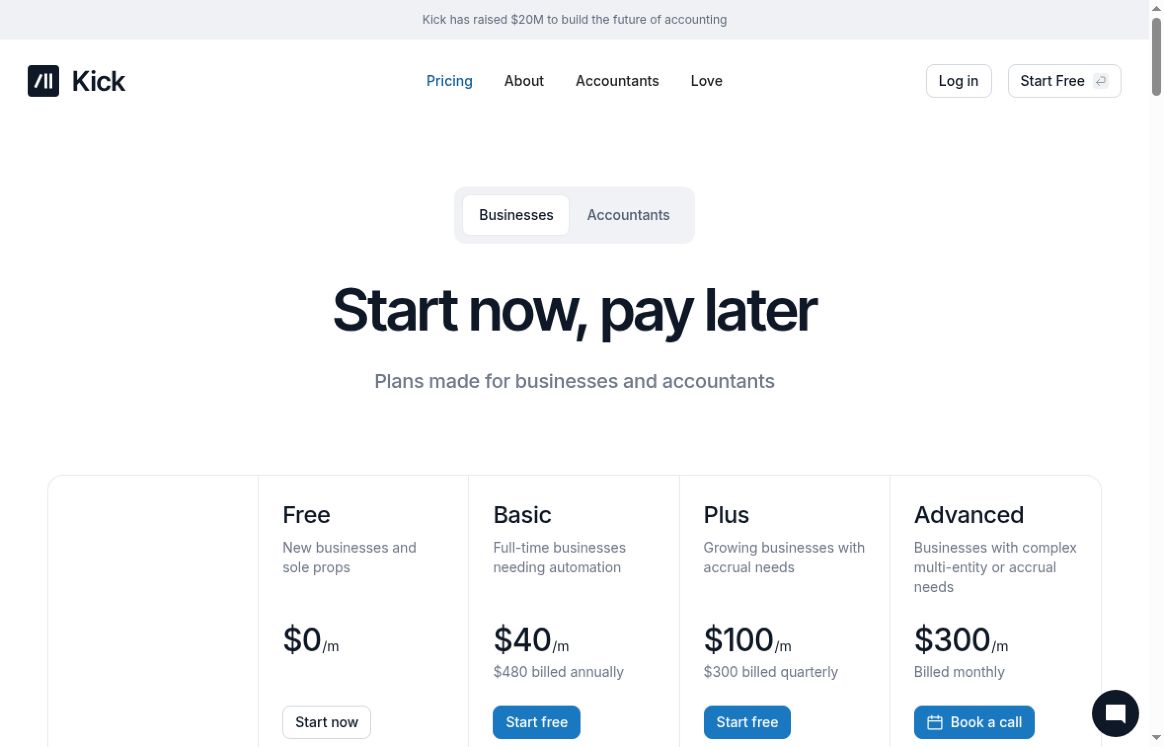
Featured image: screenshot of Kick’s official business-pricing page, captured October 20, 2026. Provider presentation for editorial identification, not a hands-on product test. Visible prices use different billing commitments; the image is a dated excerpt, not the full offer terms. See the plan limits and additional charges below, and verify current terms before subscribing.
Kick is an AI-assisted accounting platform for business owners and accounting firms. It categorizes transactions, matches receipts, organizes financial records, and produces reports for review. Its current offering includes both cash-basis and higher-tier accrual accounting, so the older description of a cash-basis-only tool is incomplete.
What Kick does
The official website presents transaction categorization, customizable rules, spending analysis, revenue breakdowns, and financial reports. Accountants can work with journal entries, profit-and-loss statements, balance sheets, and transfers between entities. Automation can reduce repetitive work, but generated categories and reports still need checking against the underlying transactions.
- Connected records: the current plan comparison lists banking and payment integrations including Plaid, Stripe, PayPal, Mercury, and Ramp. Gusto payroll reconciliation is included from Basic.
- Review and reporting: track vendors, split transactions, define rules, and prepare financial statements or a year-end package for an accountant.
- Accrual workflows: Plus adds an accrual ledger, classes, and accounts-receivable/payable automation. Advanced adds consolidation and revenue recognition.
- Agent access: Basic and higher advertise MCP and CLI tools. These can read and change books, so evaluate permissions and approval controls before connecting an agent.
Kick’s October 2026 invoicing release adds invoice creation and payment matching. The plan comparison includes invoice creation across tiers, while online payments require Basic or higher. An invoicing feature is not the same as a complete payroll or inventory-management system.
Current business plans
The live pricing page displays the following amounts with a dollar sign, without an explicit currency code in the captured comparison. Confirm currency, tax, renewal terms, and checkout total before purchase.
| Plan | Displayed price and billing | Entity and categorization limits |
|---|---|---|
| Free | $0 | 1 entity; 250 categorized transactions per year |
| Basic | $40/month equivalent; $480 billed annually | 1 entity; unlimited categorization |
| Plus | $100/month equivalent; $300 billed quarterly | Unlimited entity count; unlimited categorization; additional-entity fees apply |
| Advanced | $300/month, billed monthly | Unlimited entity count; unlimited categorization; additional-entity fees apply |
Unlimited entity count does not mean every entity is included at the base price. The comparison says new entities on Plus and Advanced start free for their first 250 transactions per year, then cost $50 per month. The official FAQ says a Plus entity remains billed once it passes that threshold. Confirm the number of billable entities in your quote.
Free includes receipt matching, profit-and-loss reporting, and a balance sheet. Basic adds bank reconciliation, statement sync, and a universal importer. Plus supports the accrual and multi-entity workflows above; Advanced adds more complex consolidation and schedules. The page marks prepaid/accrued and multi-book features as beta. Unlimited entities are not included in every paid plan, and the free cap is now transactions rather than annual expense dollars.
Accounting firms have separate client-license arrangements: Starter covers 1–19 licenses, Partner starts at 20, and Enterprise and Platform are custom offerings for larger portfolios. These are not extra business-plan tiers. Obtain the applicable firm quote rather than treating a public discount as an unconditional per-client price.
How to assess it for your business
- Identify whether you need cash or accrual reporting, one entity or several, and historical-data migration.
- Check that the required bank, payment provider, and payroll connection is supported for your account.
- Review imported balances, transaction categories, duplicates, transfers, and reconciliation exceptions.
- Have your accountant confirm the reports and tax treatment before filing or relying on them.
The revenue-recognition release is a concrete expansion beyond the original bookkeeping description. It does not establish that every accounting requirement is supported. The older 95% automation rate, guaranteed deduction savings, and reduced-audit-risk claims are not independently verified here.
Kick is accessible through a web account; a dedicated native mobile app was not verified. The pricing FAQ directs cancellation to Settings → Billing and says data remains accessible during the subscription period. No financial account was connected, transaction uploaded, or accounting output tested. Sources checked: October 20, 2026. Browse related accounting assistants.