Updated October 29, 2026
| Name | Client Hub |
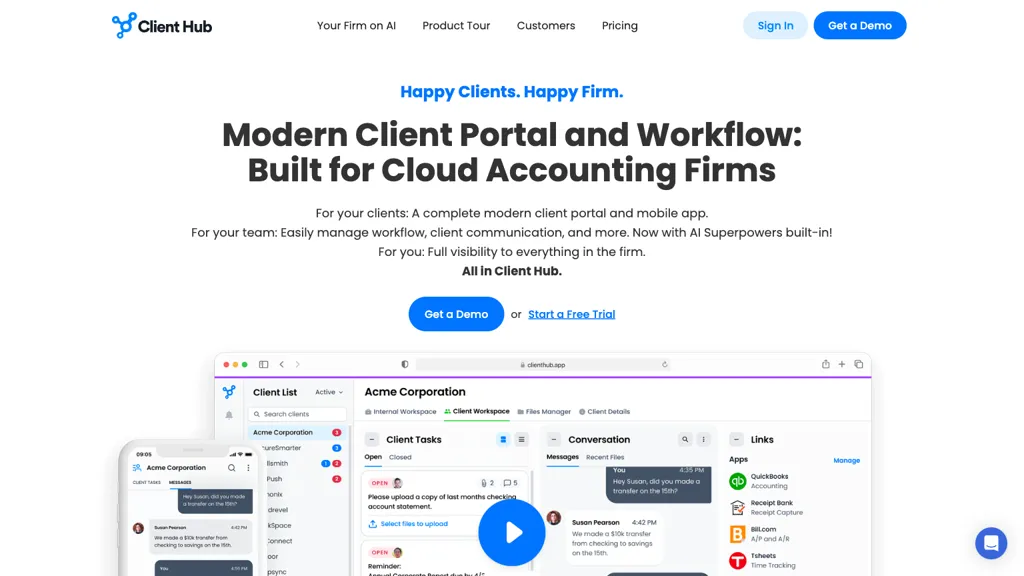
| Overview | Client Hub is a cloud-based practice-management and client-communication platform for accounting and bookkeeping firms. It combines a client portal, task workflows, messaging, document sharing and dashboards. Its AI features assist with drafting messages and generating workflows; they do not replace professional review. QuickBooks Online and Xero integrations support collecting information about uncategorized transactions, subject to the selected plan. |
| Key features & benefits |
|
| Use cases and applications |
|
| Who uses? | Accounting and bookkeeping firms. |
| Pricing | The official page lists Solopreneur at $49 per month for a single-user firm, Practice Manager at $59 per firm user/month, and the integration-inclusive Practice Manager tier at $79 per firm user/month, all billed annually. The dollar symbol is displayed without a verified ISO currency code. Solopreneur is annual-only. Monthly-billing options are shown, but the comparison table contains inconsistent billing labels; confirm the applicable total and integration entitlement before subscribing. A guided free trial is advertised, typically lasting 14 days. Although the pricing FAQ says payment starts after choosing a plan, the terms allow billing details and automatic conversion after a trial unless canceled. Confirm the trial agreement and renewal terms rather than assuming no card or no automatic charge. |
| Tags | Cloud-based communication, Workflow management, Accounting solutions, AI Accounting assistant |
| App available? | Yes. Official documentation describes a mobile app for iOS and Android and links to the provider’s device-specific download page. Store availability, device compatibility and installation were not independently tested. |
A practical accounting-workflow example
For a hypothetical month-end review, an accountant could draft a request for the purpose of a fictional business purchase, assign a follow-up task and check the client’s response against the supporting document. Review any suggested classification and synchronized records before finalizing the books. This is a planning example, not a product test or tax advice; automation does not guarantee correct accounting or timely client replies.
Privacy and review considerations
Client Hub describes encryption and role-based controls on its security page; these are provider statements, not an independent security audit. Its privacy policy distinguishes processing client records on a firm’s behalf from using account and website data for its own operational and marketing purposes. It also describes service-provider sharing and processing in the United States and Canada. Confirm your firm’s permissions and data-handling requirements before connecting accounts or uploading records.
The terms caution that AI suggestions can be inaccurate and describe efforts to choose AI providers that do not train on customer data, rather than an unconditional no-training guarantee. Keep human review in the workflow.
Sources checked October 29, 2026 (UTC): the official website, pricing page, mobile-app instructions, security page, privacy policy and terms. No account, trial, integration, client-data upload or app installation was performed for this review.