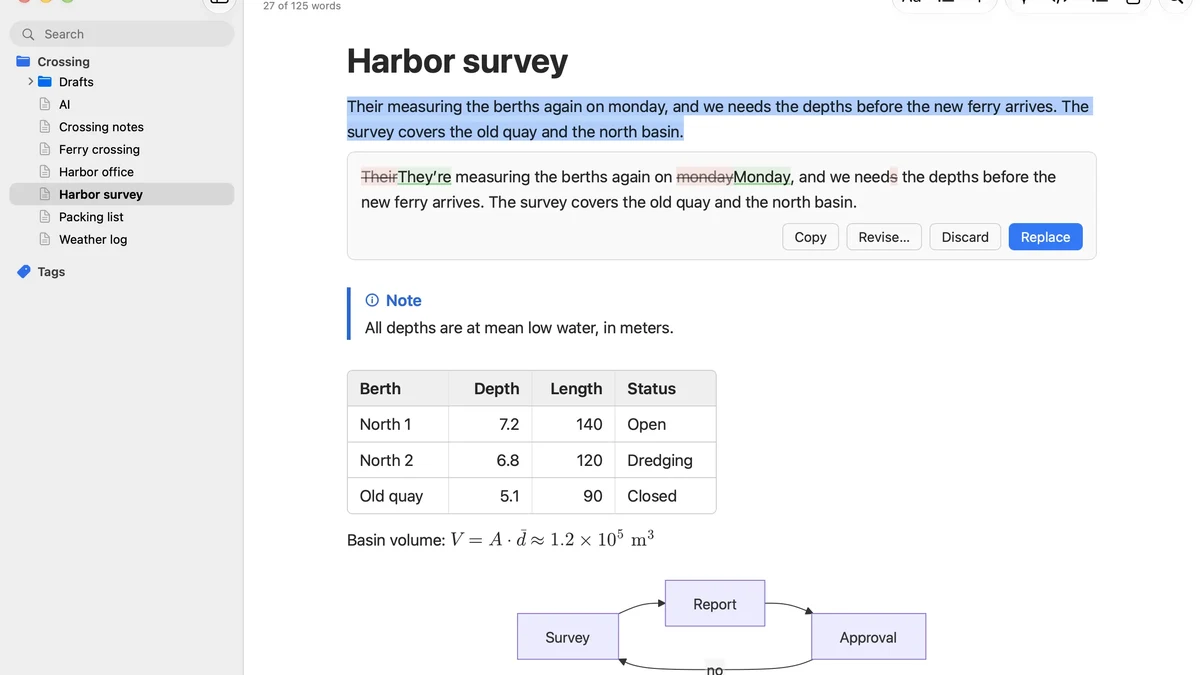
Glifa AI Markdown editor launched on Product Hunt on 15 November 2026, as a Mac Markdown editor with the AI built right into the document. Select some text, press Shift Command R, and ask for a table, a diagram, a summary, or a better sentence. Nothing changes until you click Replace, so the AI suggests and you decide.
What Glifa Does
Glifa is a native Mac app for writing plain Markdown that looks finished while you type. The AI works on the text you selected, not on a separate chat window: it can turn notes into a table, a table into a chart, a list of steps into a diagram, or an empty line into a first draft. The answer appears in the document with every change marked, and you keep or revert each one, from the keyboard if you like.
The same idea extends to whole documents. Review Whole Document proofreads or rewrites the full file and marks every change, Translate Document writes a translated copy next to the original with the Markdown kept, and Describe Image writes alt text so VoiceOver can read it. Glifa also checks that tables, code, links, and footnotes survive the AI’s answer, and warns you before you click Replace if something went missing. Because the files stay plain Markdown, they open anywhere and never lock you into Glifa.
Key Features
Glifa ships with 18 built-in actions, from Proofread and Translate to Make Chart, and you can add your own: an action is a Markdown file with an instruction in it, and dropping one in the AI Actions folder puts it in the menu right away. For the AI itself, you use what you already have: the Claude Code or Codex you are signed in to, Apple Intelligence, a local model in LM Studio or Ollama, or your own API key. There is no Glifa server in between, and no AI fee on top.
- In-document AI: select text, ask, and review every change before Replace
- Notes to tables, tables to charts, steps to diagrams, first drafts from a prompt
- 18 built-in actions, plus custom actions made from plain Markdown files
- Whole-document proofreading, rewriting, translation, and image descriptions
- Works with Claude Code, Codex, Apple Intelligence, local models, or your own key
- Plain .md files, with no account and no data passing through a vendor server
Who Glifa Is For
Glifa fits Mac writers who live in Markdown and want AI help without leaving the document. A note taker can turn rough meeting notes into a clean table in seconds. A technical writer can draft a diagram from a list of steps and check every change before it lands. Anyone who writes release notes, documentation, or long-form notes will recognise the workflow at once.
It also fits writers who care about where their words go. Because there is no vendor server in between, your text goes only to the AI provider you chose, or stays on your Mac entirely with Apple Intelligence or a local model. That makes Glifa a sensible choice for drafts that are private, unpublished, or simply not meant to be uploaded anywhere.
Glifa Pricing
Glifa pricing, checked on 17 Nov 2026, is a one-time payment, not a subscription. It costs $14.99 at launch, and $19.99 after that. The 15-day free trial asks for no account and no card, so you can try the full app before paying anything.
Glifa needs Apple silicon and macOS 15 or later. Prices may change, so the official site is the place to confirm the current figures before buying.
Getting Started With Glifa
Starting is simple: download Glifa for Mac from the official site, open a Markdown file, and try the 15-day free trial. The trial is the full app, not a cut-down demo. Select a rough paragraph, ask for a better version, and check the marked changes before you click Replace. Glifa is worth a look for any Mac writer who wants AI inside the document, not in another window.
Image: official Glifa app screenshot, via glifa.app.