Updated October 29, 2026
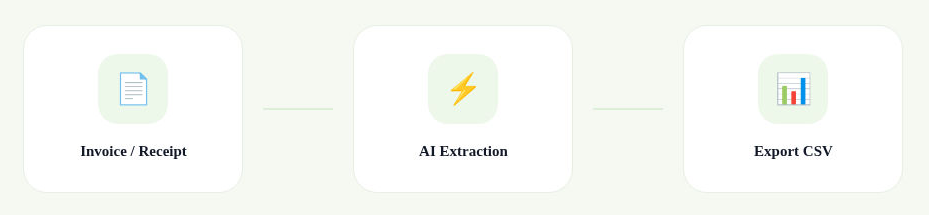
Image source: cropped workflow diagram from the official ASSIST Smart Documents page, captured October 29, 2026 (UTC). It illustrates the provider-described invoice/receipt-to-CSV workflow, not a processing test or a guarantee of extraction accuracy.
Features, uses and access
| Name | Assist biz |
| Overview | ASSIST is a web-based financial document management and workflow platform for business owners and bookkeepers. It offers extraction of data from invoices and receipts, document organization, CSV export, and connections to Xero and QuickBooks. The provider describes SmartLearn as learning from user corrections and advertises multilingual processing. Its current offering also includes approval workflows, expense claims and e-invoicing support for Singapore and Malaysia. Review extracted information before relying on it; automation does not guarantee accurate records or regulatory compliance. |
| Key features & benefits |
|
| Use cases and applications |
|
| Who uses? | Business owners, Bookkeepers |
| Pricing | The official pricing page describes a 14-day Premium trial with 30 AI OCR pages. Unused trial pages remain usable afterward with limited features; Approval Matrix and Zapier Integration are no longer included. This is not a renewing monthly free allowance.
Confirm the current price, billing currency, taxes, page allowance and included features before subscribing. The retrieved price cards did not explicitly identify the billing currency, so payable amounts are not reproduced here. |
| Tags | Document Management, Financial Automation, Data Extraction, AI Tools |
| App available? | Web access is offered through the official website. The provider describes document submission without a separate app download. Native mobile app availability was not independently confirmed. |
Check the records before exporting
For example, a bookkeeper could compare an extracted invoice with its original, checking the supplier, invoice number, date, tax and total before sending the record to accounting software. Check for duplicates too. This is an illustrative workflow, not a test result.
Only upload records you are authorized to process. Review the provider’s Privacy Policy and clarify retention, deletion, access permissions and integration scope before submitting sensitive financial or personal information.
Official information checked October 29, 2026 (UTC): Smart Documents, pricing and trial conditions, and QuickBooks workflow. Features are provider-described; document processing, integrations and checkout were not independently tested.