Updated October 24, 2026.
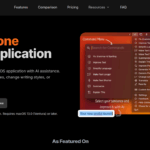
Retained screenshot of the RewriteBar website; its original capture date is unrecorded. The tone and all-application slogans are vendor marketing, not a guarantee of writing quality or universal app compatibility.
| Name |
RewriteBar AI |
| Overview |
RewriteBar AI is a macOS menu bar application that provides AI-driven writing enhancements in most applications that support text input. It offers features like grammar correction, tone adjustment, translation, and more, directly within your current workflow. |
| Key Features & Benefits |
- Grammar Correction: Suggest corrections to grammatical errors in your text.
- Tone Adjustment: Modify the tone of your writing to suit different contexts.
- Translation: Translate text into multiple languages seamlessly.
- Text Summarization & Expansion: Condense or elaborate on your content as needed.
- Custom Commands: Create personalized rewrite actions for repetitive tasks.
- Integration with Multiple AI Providers: Choose supported cloud providers or local models; model availability depends on the provider and setup.
- Lightweight & Efficient: A native macOS menu bar app; download size varies by version, and local-model performance depends on your hardware.
|
| Use Cases & Applications |
- Enhancing professional emails and reports.
- Crafting compelling social media posts.
- Assisting non-native speakers in writing.
- Streamlining content creation for blogs and articles.
- Improving code documentation and technical writing.
|
| Who Uses It? |
- Professionals seeking polished communication.
- Content creators and marketers.
- Non-native English speakers.
- Students and academics.
- Developers and technical writers.
|
| Pricing |
- Standard: USD 29 one-time for one active device, with BYOK and local-provider support.
- Pro: USD 59 one-time for three active devices and one year of Gateway access with 3 million credits per month.
- Gateway add-on: USD 40 billed annually; 3 million monthly credits. An extra-device license is USD 19 one-time.
- Trial: The pricing cards display 35,000 one-time credits, while the comparison and FAQ still describe 100 corrections/credits. Confirm the allowance in the app before relying on either figure.
Allowances are stated in credits, not a guaranteed word quota. Cloud usage through your own API key is billed by the provider; a ChatGPT subscription does not include that API usage. Check the current pricing page before purchase.
|
| Tags |
#AIWriting #Productivity #MacApp #GrammarCorrection #Translation #ContentCreation |
| App Available? |
Yes, available for macOS 13.0 (Ventura) or later, compatible with both Intel and Apple Silicon Macs. |
Before replacing important text
Select a short passage, choose an action and review the differences for meaning, names and numbers. RewriteBar uses the clipboard to replace selected text. Check which provider will receive sensitive text; cloud processing and local-model operation are different setups. The official feature guide describes custom actions and comparison tools.