Updated October 30, 2026
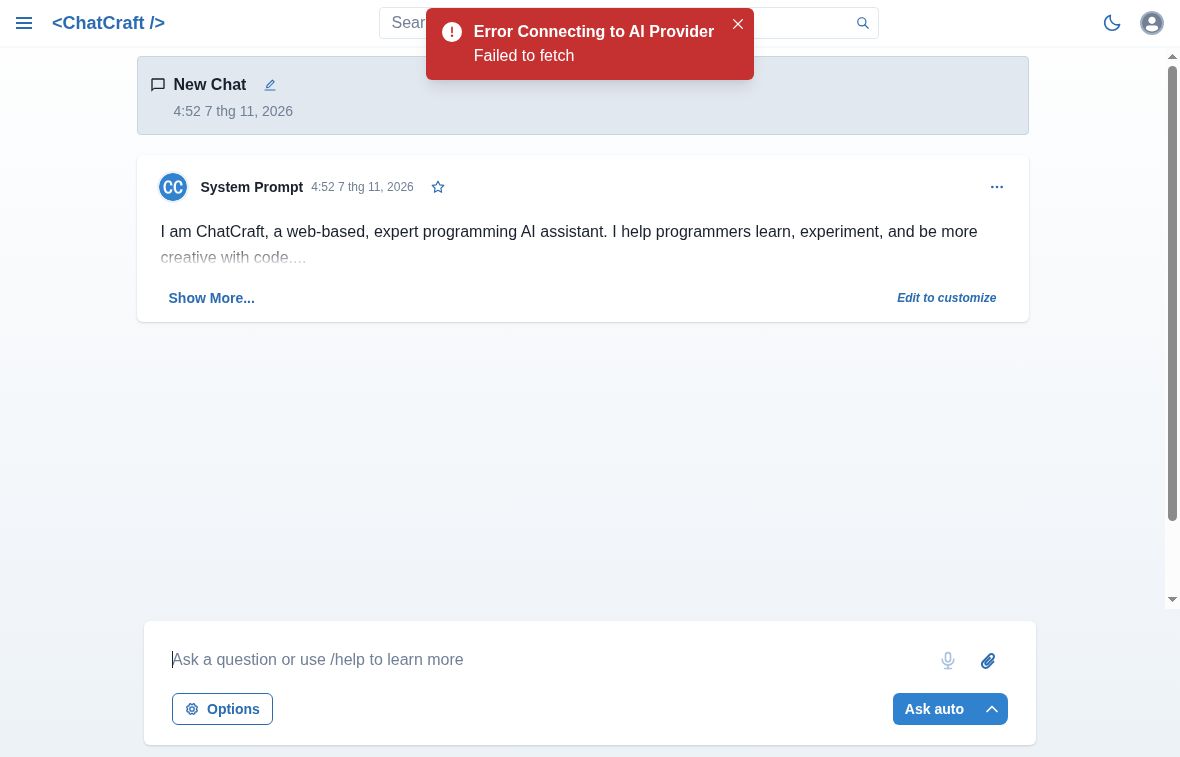
Image: Official ChatCraft website screenshot of its empty interface, captured November 7, 2026 (Vietnam time). It shows the default system prompt, a blank message box and a provider-connection error. We submitted no prompt and did not test a model response or execute code.
| Name | Chatcraft |
| Overview | ChatCraft is an open-source, browser-based coding companion for working with large language models. Its project documentation describes OpenAI and OpenRouter support, editable responses and configurable prompts. It is an independent interface, not an official OpenAI app or a guarantee that generated code is correct. |
| Key features & benefits |
|
| Use cases and applications |
|
| Who uses? | Data scientists, AI researchers, developers, and AI enthusiasts. |
| Pricing | The project documentation describes a free app with no additional app subscription; model-provider API calls may cost money. This is not a promise of free or unlimited model usage. Check the selected provider’s current rates and limits. |
| Tags | Coding companion, AI tools, AI coding, code assistance. |
| App available? | A browser-based web app. A separate native mobile or desktop app was not verified. |
Using your own model-provider account
The project’s provider settings separate entering a key from choosing the active provider. For an OpenAI or OpenRouter account you control, the repository documents this workflow:
- Review your provider account’s API access, rates, limits and data-use policies before entering a key. Then open User Settings, select Models, and enter the key in that provider’s API Key field, not in a chat message. Entering a key starts a validation request to that provider.
- Select that provider and use Set as Current Provider. Check the selected provider and model before sending a small, non-sensitive prompt. Saving a key for another provider does not by itself select that provider.
- Review the response against your own tests before using generated code. Keep API keys out of prompts, exported conversations and public shares.
The project stores provider settings, including configured keys, in browser storage. This describes the implementation, not an independent security assessment. These steps cover a personal provider connection; they do not establish the availability of the separate Free AI Models mode.
Workflow sources: provider selection and API-key settings and browser-storage implementation, reviewed November 11, 2026. The deployed app’s build and a working provider connection were not verified in this review.
Practical use and limits
For example, a developer could ask for an explanation of a small, non-sensitive JavaScript sorting function, then compare a suggested change against tests for empty input and duplicate values. This is an illustrative workflow, not a tested ChatCraft result. Review generated code before running it, especially custom functions or code that accesses files, credentials or networks.
Browser-local chat storage does not mean that model inference happens offline: requests to a remote provider transmit content to that provider. Public sharing can expose a conversation. Avoid confidential code or secrets unless the applicable provider terms and your organization’s rules permit it; keep backups rather than treating browser storage as permanent.
Sources and verification: Official ChatCraft repository and project release notes, checked October 30, 2026. On November 7, 2026 (Vietnam time), the public interface loaded in this browser and displayed “Error Connecting to AI Provider” and “Failed to fetch” before any message was submitted. This observation does not establish availability for other users. No API key was entered, we submitted no prompt and no code was run. Documentation and releases establish the described design, not a live compatibility, model-availability or security test.