Updated October 18, 2026. This overview is based on Molku’s public website and terms, not hands-on testing.
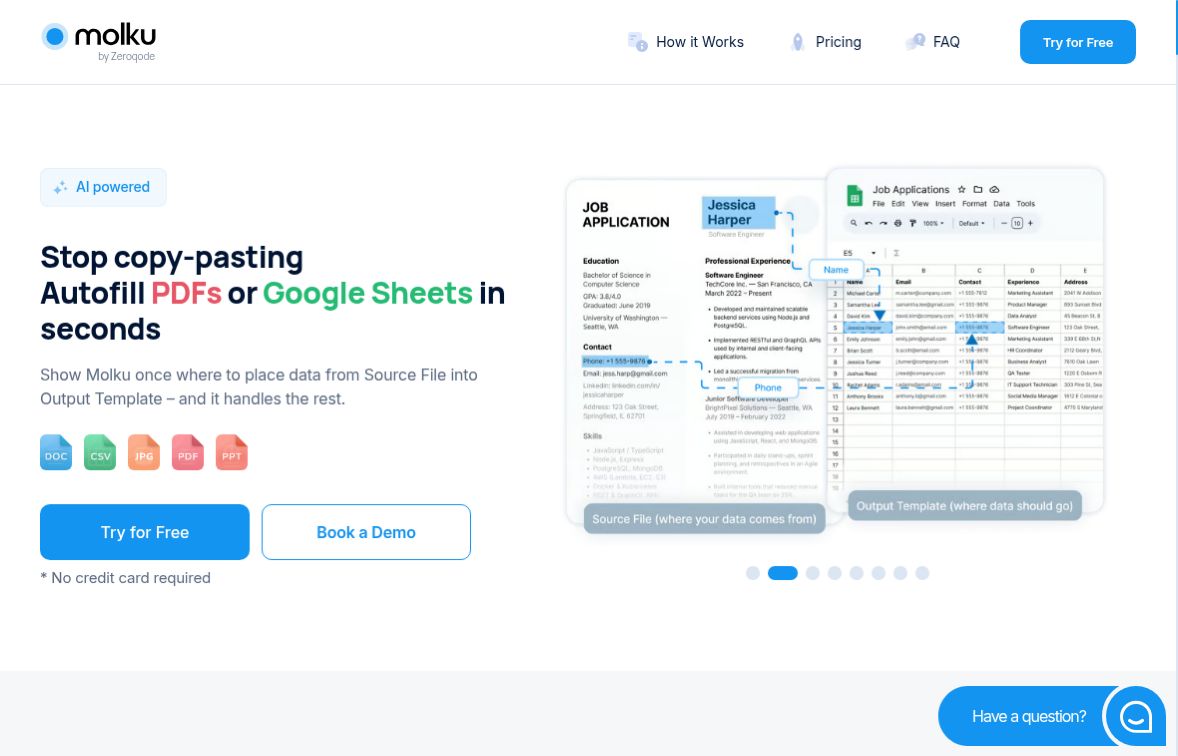
Featured image: screenshot of the official Molku website, captured October 18, 2026. The sample document, sheet and promotional claims are the provider’s examples, not a GPTOnline hands-on test.
Molku AI is a browser-based document automation service from Zeroqode, Inc. It is designed to extract selected information from a source document and place it into a PDF template or Google Sheet. The useful idea is a reusable mapping: choose the fields once, then run similarly structured documents through that workflow. Visit the official Molku website.
What Molku can help you automate
- Field extraction: select values such as names, dates and totals rather than copying an entire document.
- Template filling: map extracted values to positions in a PDF or to a Google spreadsheet.
- Data adjustments: the homepage describes prompts for text replacement, calculations, format standardization and merging fields.
- Repeatable processing: reuse the workflow for new source files with the same structure as the sample.
- Connected workflows: Molku advertises Zapier, Make and API access. Confirm the integration and plan requirements for your intended setup before purchasing.
The homepage also advertises handwriting recognition, support for more than 100 languages and translation during transfer. These are vendor-described capabilities; they are not a guarantee that every scan, language or handwritten field will be read correctly.
A practical first workflow
An operations team could use Molku to move the supplier name, invoice number, date and total from routine invoices into a tracking sheet. This is an illustrative workflow, not a measured test result.
- Start with a non-sensitive sample PDF and a small output template containing only the fields you need.
- Upload the sample source and specify a PDF or Google Sheet as the destination, following Molku’s setup flow.
- Select the fields to extract. Add a narrowly scoped formatting instruction if needed, such as converting dates to YYYY-MM-DD.
- Map each value to its destination and run another document with the same structure.
- Compare every output against its source, especially totals, decimal separators, dates and missing fields. Review changed layouts before processing more files.
The same approach can support supplier-document processing or standardized business reports. It still needs review before results are passed into accounting systems or sent to clients.
Pricing and credit limits
The public pricing cards and subscription terms list the following prices, using the dollar symbol shown by Molku. The reviewed pages do not identify the currency code or explain tax treatment; confirm both at checkout.
- Free: 50 credits provided once, not a monthly allowance.
- Starter: $19 per month for 100 credits.
- Pro: $49 per month for 300 credits.
- Ultra: $99 per month for 700 credits, with additional usage listed at $0.14 per credit.
Molku’s FAQ defines one credit as processing one page of an input document. Creating workflows does not consume credits, and the FAQ says the number of workflows is unlimited. Document processing is therefore still limited by credits: a five-page input would use five credits under that definition. The pricing page directs users who need more than 300 credits to Ultra; do not assume its overage rate also applies to Starter or Pro.
The terms say subscription fees are generally non-refundable except where required by law. They describe crediting an unused subscription portion on upgrade, but no refund for an unused portion on downgrade. The homepage says no credit card is required to try the service.
Important limitations to check
File-support information conflicts. The current FAQ lists PDF, Word, text, CSV, Excel, PowerPoint and image formats. However, the terms dated February 13, 2025 still say PDF-only and prohibit uploading other formats. They also give a 50 MB limit in one section and 20 MB in another. Ask Molku to clarify the applicable format and size limits before relying on non-PDF or large-file workflows; this review cannot resolve that inconsistency.
Accuracy and speed are not guaranteed. Despite the homepage’s speed messaging, the terms say processing time and output quality depend on factors including load, complexity and document quality. Check important extracted information against the original.
Regulated data needs particular caution. Molku’s terms state that the service is not designed for HIPAA, FISMA or GLBA compliance and prohibit use when activities or data are subject to those regulations. It should not be recommended for regulated patient-record processing on the strength of marketing examples.
Sharing links carry access risk. The terms say anyone with a valid document link can access that document. Review access arrangements and the provider’s data policies before uploading confidential material or sharing an output.
If your main task is reading and asking questions about PDFs rather than populating templates, our Collate AI overview covers a different document workflow, including local and cloud considerations.