
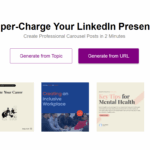
Historical MakeMyBrand homepage with purple branding, carousel headline, topic and URL buttons, and template examples; capture date unknown
Branding

Make My Brand AI

Review Make My Brand AI’s documented carousel and infographic features, listed monthly plans, Chrome extension and current access limitations.

Historical MakeMyBrand homepage with purple branding, carousel headline, topic and URL buttons, and template examples; capture date unknown

Updated on October 20, 2026.

Featured image: historical screenshot of MakeMyBrand’s official homepage; original capture date unknown. The two-minute claim, topic/URL controls, Add to Chrome button and template examples show the former provider presentation, not verified current availability or tested performance. Current access could not be confirmed during the October 20, 2026 review; see the access note below.

Access note, October 20, 2026: The official homepage returned a connection error during this review, and the Chrome listing could not be rechecked in the browser. The descriptions and listed prices below draw on indexed official homepage text and a separately reviewed Chrome Web Store listing. Current service operation, extension installability and checkout were not verified. These access limits do not establish closure or delisting.

Name Make My Brand AI
Overview Make My Brand AI is described in the reviewed official pages as turning topics, blog posts and article URLs into branded visual content. Alongside the original infographic focus, its documented carousel workflow includes: downloadable PDFs for LinkedIn and image ZIP files for Instagram or Threads. Templates and an editor help adapt the content and appearance, but generated facts, text and layout still need review.
Key Features & Benefits
  • Infographic and carousel generation: Start from a topic or URL, then review and edit the generated infographic or carousel.
  • Brand customization: Add logos, colors, and fonts to match your identity.
  • Template variety: Choose from numerous professional designs.
  • Unlimited edits & downloads: The documented paid plans list unlimited edits and downloads; monthly generation allowances are separate.
  • Time and cost savings: Templates can reduce repetitive design work; complex brand requirements may still need a designer.
Use Cases & Applications
  • Convert blog posts into social-ready visuals
  • Enhance presentation slides with branded graphics
  • Create engaging carousel posts for social media
  • Design marketing assets for promos and pitches
Who Uses It?
  • Bloggers and content creators
  • Freelancers and solopreneurs
  • Social media managers and marketers
  • Small business owners needing branded visuals
Pricing
  • Basic: Listed at $14.99/month – includes 100 infographics and carousels per month, basic templates, unlimited edits/downloads, custom branding, and email support.
  • Premium: Listed at $24.99/month – everything in Basic plus premium templates. The reviewed official text does not confirm annual billing.
Tags #AItool #infographics #contentmarketing #branddesign #visualcontent #Carousels
App Available? The reviewed official pages describe a web app and a Chrome extension for creating carousels from LinkedIn; current access was not verified. A WordPress plugin was not verified.

Choosing the right export

The documented PDF workflow is intended for a LinkedIn document post and the image ZIP workflow for Instagram or Threads. Check slide order, readable text and image permissions before posting. A generated carousel does not guarantee engagement, audience growth or leads.

The reviewed homepage text advertises a free trial but does not state its length or payment requirements in the reviewed text. Prices above are documented dollar amounts; confirm currency, taxes and renewal details before starting a paid plan.

Official sources reviewed October 20, 2026: Make My Brand’s product and pricing information through indexed homepage text, and its LinkedIn carousel Chrome extension listing. The access limits above apply; this review did not install it, create content or test a subscription.

KEEP EXPLORING

More tools to discover.

Earlier Ceeya homepage with a personal-branding headline and a Try for free button; current offer unverified

Ceeya AI’s linked website now presents Klaim. Review the earlier branding-tool context and what remains unverified about Ceeya’s features, access and prices.

BrandingExplore
branalyzer

Discover Branalyzer, the ultimate tool for brand analysis and online optimization, offering SEO tracking, competitor analysis, and social media insights.

BrandingExplore
qr code ai

Explore QR Code AI’s custom designs, smart links and analytics. Check current pricing, scan limits, privacy and content rights before printing.

BrandingExplore
produkto

Explore Produkto’s logo and website tools, paid download options and design-licence limits. Check package terms and generated content before publishing.

BrandingExplore
brand ai model

Read a historical overview of Contlo’s Brand AI Model, its earlier marketing uses, and the availability, pricing and data-policy details still unverified.

BrandingExplore
makelogoai

Explore MakeLogoAI’s earlier logo-design workflow and intended uses, with clear limits on current pricing, delivery, availability and usage-rights verification.

BrandingExplore
Find your next starting point