Updated November 7, 2026
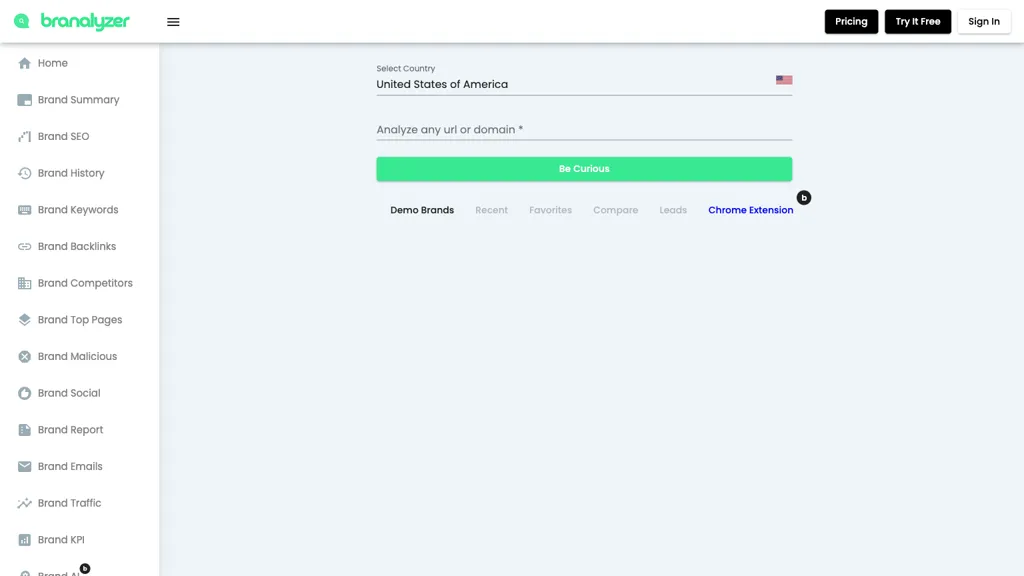
Branalyzer is a web-based brand and competitor research tool for examining website domains. Its public interface includes sections for SEO information, keywords, backlinks, competitors and traffic. A separate Chrome extension provides access to brand information while browsing.
This overview is based on the provider’s public interface, pricing page, documentation and extension listing. We did not submit a domain analysis, install the extension or test a paid account, so the availability of a menu item is not evidence that every report works or that its data is accurate.
What can you research with Branalyzer?
- Brand and domain summaries: Review the business and website information presented for a domain before deciding what needs closer investigation.
- SEO, keywords and backlinks: Explore the product’s dedicated sections for search visibility, keyword information and links. Treat third-party metrics as research inputs rather than a substitute for your own analytics.
- Competitors and traffic: Use the available comparison and competitor-research features to develop questions about similar websites. Traffic figures should not be assumed to match a site’s private analytics.
- History and reporting: The interface includes Brand History, Brand Top Pages and Brand Report sections. Access and export options vary by plan; check the current plan details before relying on a particular report.
- Chrome extension: The publisher’s Chrome Web Store listing describes brand and competitor information available through an extension. The extension and the main web app are distinct ways to use Branalyzer.
What is verified about its AI features?
The public navigation includes Search Analysis AI. A homepage announcement describes Brand Summary AI and Brand Report AI as upcoming features. Do not assume that those announced features are already included in a subscription. We found no supporting evidence for the earlier claims on this page about “psychology-driven AI” or a “Social Summarizer,” so those claims have been removed.
A practical way to evaluate the tool
- Choose a research question, such as which competitors cover a topic or which domains link to a comparable website.
- Open the web app, select the relevant country and enter a public website domain. Avoid confidential URLs or personal information.
- Review the available reports and note their dates, coverage and any missing data. Check important findings against the underlying websites and your own analytics where available.
- Compare a small set of relevant competitors using the same market and time period. A metric difference alone does not explain why a business performs differently.
- Check your plan’s search allowance and export access before using the tool for a recurring client workflow.
Plans, trial and access
When checked on November 7, 2026, the official pricing page listed Individual, Business and Enterprise plans with up to 100, 250 and 500 searches per month respectively. It also advertised a seven-day free trial.
The page displayed promotional headline prices alongside different “after sales” monthly figures, without clearly establishing the currency code, promotion duration or renewal conditions in the inspected view. Confirm the current total, billing cycle, trial requirements, included features and cancellation terms before subscribing. Published credit documentation is not a guarantee that the same free allowance is available in every current session.
Who may find it useful?
SEO specialists, marketing teams, brand managers and agencies can use this kind of domain research to prepare a competitor review or identify leads for further investigation. It does not establish that a campaign will improve rankings, engagement or revenue. Review data quality, coverage and account limits against your actual project before making a commitment.