SenseTime has open-sourced SenseNova U1.6, an 8-billion-parameter image model that can check its own work, the company said on November 24. The unified model generates and edits images, then reviews the result against the prompt and redraws it when it spots errors, a feature aimed squarely at the garbled text that has long plagued AI-generated posters and infographics.
The weights are available under the Apache 2.0 license on Hugging Face, with code and showcases in the SenseNova-U1 GitHub repository. The model also ships with native support in ComfyUI.
What Is Self-Correction?
Most image generators work in one direction: they render an image and stop, even if the text inside it comes out scrambled. SenseNova U1.6 is built differently. Because the same weights both draw the image and read it, the model can inspect its own output, compare the text with the prompt, and fix problems such as misspelled words, scrambled letters or wrong numbering while keeping the typography and layout intact.
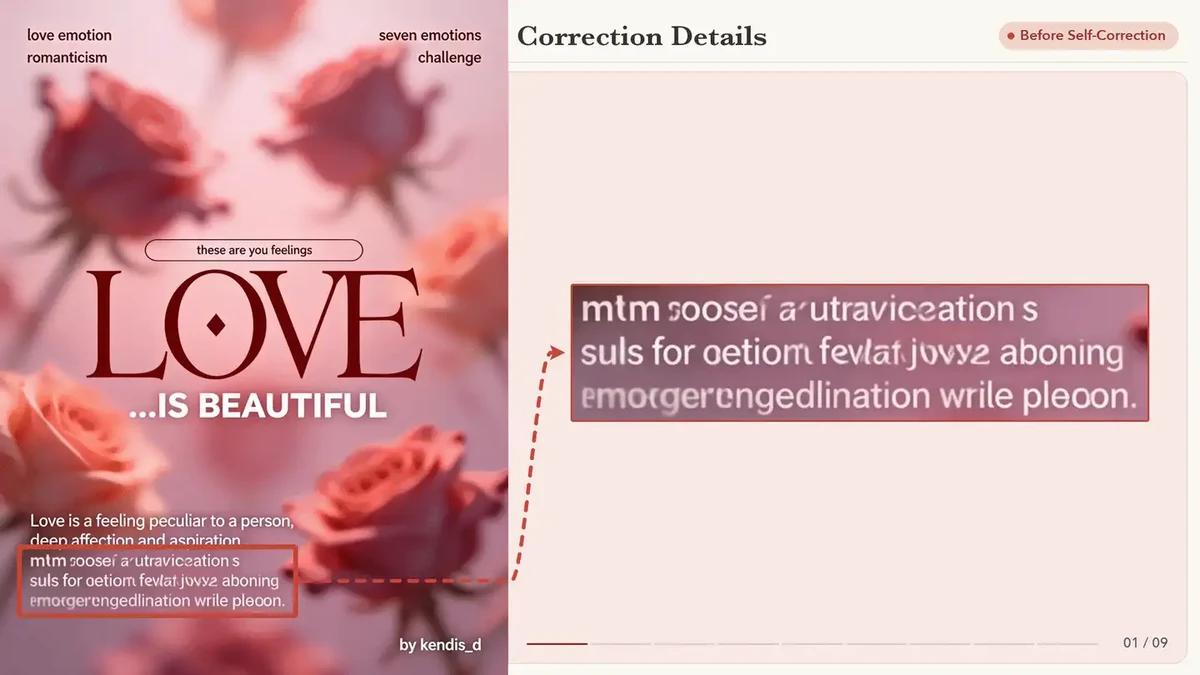
The garbled text SenseNova U1.6 flags before redrawing the image. Image: SenseTime
The feature matters most for text-heavy images: posters, infographics, menus and presentation slides, where a single wrong character can ruin an otherwise good design. SenseTime says the model supports English and Chinese, with a default output size of 2368 by 1760 pixels.
Benchmarks: Better Looks, Cleaner Text
SenseTime reports a 10 percent improvement in aesthetic score over the previous U1.5 model in user testing. On its internal aesthetic benchmark, U1.6-8B-MoT scored 70.80, up from 64.10 for U1.5-8B-MoT.
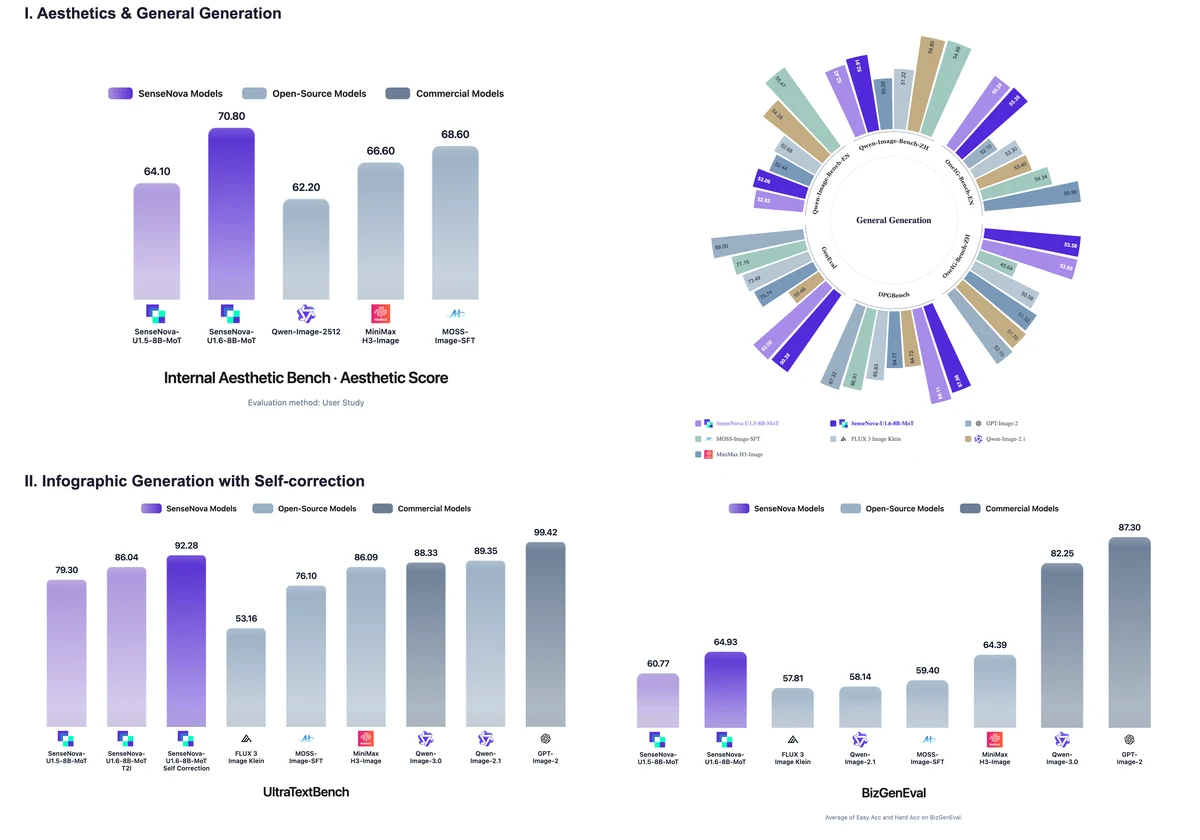
SenseNova U1.6 benchmark results reported by SenseTime. Image: SenseTime
On UltraTextBench, the company’s text-accuracy benchmark, self-correction lifted the score to 92.28 from 86.04 for a single generation run, a gain of about 7 percent. The scores are SenseTime’s own results and have not yet been independently verified.
Availability
SenseNova U1.6 is available as open weights on Hugging Face, in SenseNova Studio and through the SenseNova platform API, with a lighter U1.6 Lite version offered through the SenseNova Token Plan and apps. ComfyUI supports the model natively, with official templates for both text-to-image generation and image editing.
The model offers two modes: Turbo, which renders in eight steps, and Quality, which uses fifty steps for a more refined result. Separate aesthetic training covers portraits, photos, art styles and infographics, according to the release notes.
Why It Matters
Broken text has been the most visible failure of AI image generation since the first text-to-image models appeared. Rivals have improved spelling steadily, but most still cannot reliably catch their own mistakes. By building the check into the model itself, SenseTime is betting that closed-loop generation, where the model inspects and repairs its output, is the next step for commercial image work, where a poster with a typo is unusable no matter how good it looks.
The open release also gives the wider ecosystem a test bed. With Apache 2.0 weights, native ComfyUI support and a self-correction protocol other developers can study, U1.6 is likely to show up quickly in design tools and local workflows, not only in SenseTime’s own apps.