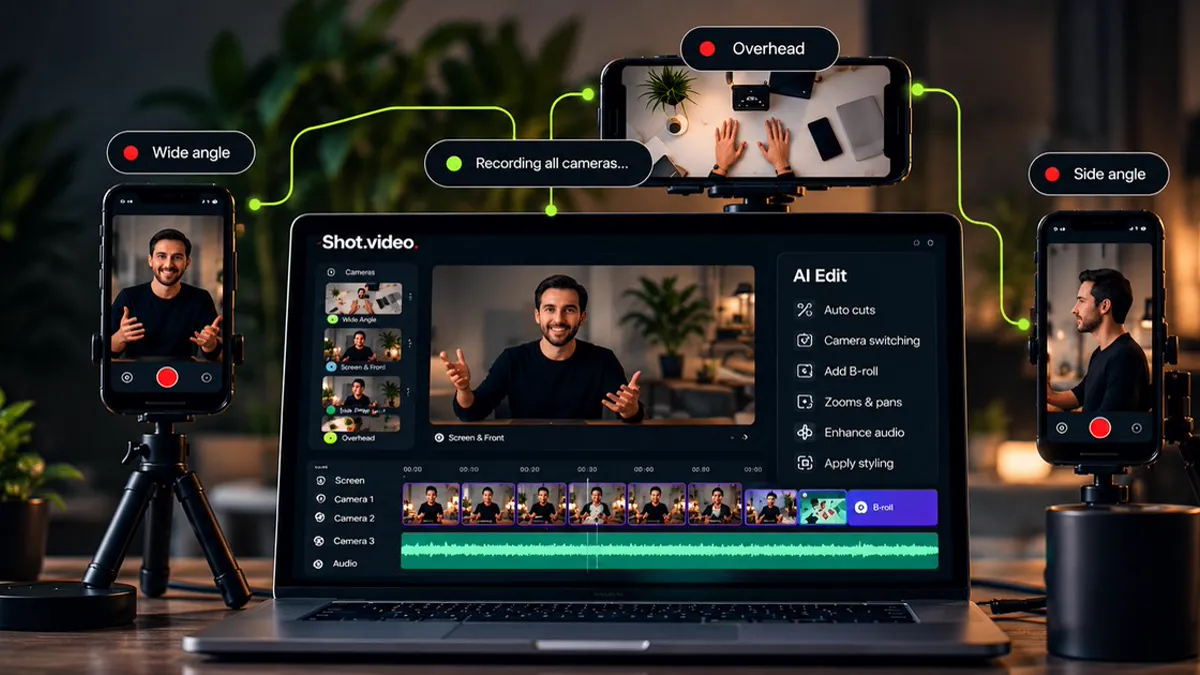
Shot.video turns the devices you already own into a multi-camera studio. Your laptop and phones record every angle in sync, then AI builds your first edit, with no extra cameras, no crew, and no editing skills needed. The product launched on Product Hunt on 11 November 2026, where it placed eighth for the day. You can see the official site at https://shot.video/.
What is Shot.video?
Most people record with one camera: a laptop webcam, or a phone on a tripod. The result is a single flat angle, and the edit that could fix it takes hours. Shot.video changes the setup, not the skill. Scan a QR code and any phone becomes another camera angle, with no app to install, and your screen and laptop camera can join the same recording. Press record once, and Shot.video captures every camera, screen, and audio track together, in sync.
Then the AI does the complicated production work: it cuts between angles, zooms into the busy part of your screen, and suggests B-roll for you to approve. Every choice stays editable, so the AI edit is a starting point, not a final cut. The idea comes from founder Ian Naylor, who spent more than 20 years making videos with one camera and a screen recording, knowing what would make them better but finding the setup too complicated to do.
Key features
- Multi-camera recording from your laptop and phones, connected by QR code with no app to install.
- One-tap recording that captures every camera, screen, and audio track in sync.
- AI editing that picks the best camera for each moment and cuts between angles with purpose.
- Screen zooms and pans that glide in on the area that is changing and hold there.
- Manual changes and downloads stay free, and your own B-roll uploads cost nothing.
Who is it for?
Shot.video fits creators, teachers, founders, and course makers who record demos, tutorials, courses, and updates alone. If you talk to a camera and share your screen, a second angle and a well placed cutaway can win back a viewer’s attention. It is built for people who want better videos, not for people who want to become professional video producers.
Pricing
Shot.video runs on credits: Video Credits pay for AI edits, and B-roll Credits pay for generated images and clips. The Free plan costs $0 and includes 2 Video Credits and 5 B-roll Credits, given once, with no card needed. Manual changes, downloads, and your own B-roll uploads stay free.
The paid plans are Creator at $19 a month with 20 Video Credits and 25 B-roll Credits, Pro at $39 a month with 60 Video Credits and 100 B-roll Credits, and Studio at $79 a month with 150 Video Credits and 250 B-roll Credits, all billed monthly with rollover up to three times the monthly credits. One-off packs are also available: Video Credit packs from $9 for 5 credits to $99 for 100, and B-roll packs from $9. One Video Credit covers each started five minutes of synchronized footage, and recordings stop at 10 minutes. You can see current pricing on the official Shot.video pricing page.
Pricing may change; see the official website for current pricing. Details above reflect the official site as checked on 13 November 2026.
Getting started
Create a free account, connect your phones by QR code, and record once. No card is needed to start, and your free credits cover your first AI edits and B-roll. Try a short demo first: record with your laptop camera, your screen, and one phone as a side angle, then let the AI build the first edit and adjust the cuts it chose. When your free credits run out, your videos stay in your library, and you can choose a monthly plan or a credit pack for new AI edits.