Updated October 18, 2026. Redesign With AI is a browser-based image-generation service for turning written ideas into design concepts. It is worth considering for early visual exploration, provided you check the billing mode and avoid assuming that a generated image is a finished, rights-cleared asset.
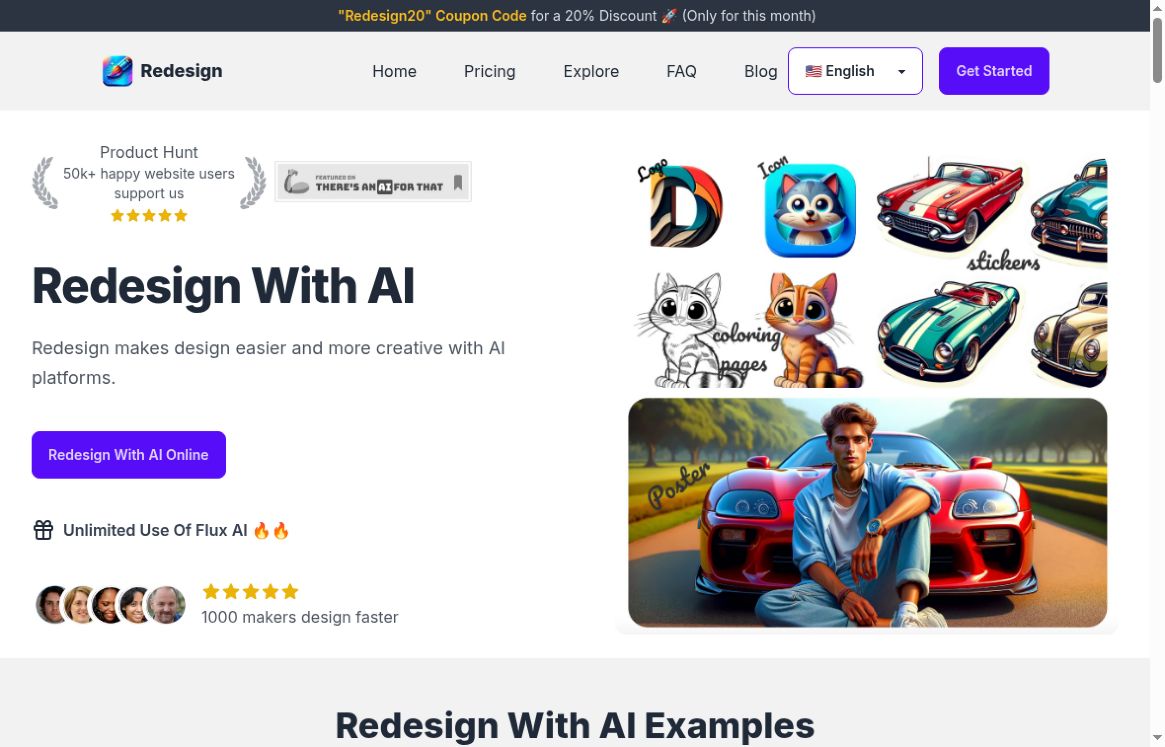
Featured image: Screenshot of the official Redesign With AI website, captured October 18, 2026. The examples and promotional claims shown belong to the provider; this is not a GPTOnline-generated result or hands-on test.
What can Redesign With AI create?
The official homepage presents icons, logos, stickers, posters, coloring pages, mockups, birthday cards, tattoos and illustrations. Its plan cards list image history, Flux AI and Face To Many; the free card also lists a design editor. These are advertised features, not independently measured capabilities.
Practical uses and a sample brief
The strongest starting point is a small, clearly defined concept rather than an entire brand identity. Designers can explore directions before refining them; marketers and small businesses can prepare visual briefs; hobbyists can experiment with personal projects.
- Logo and icon concepts: compare shapes and color palettes, then inspect small-size legibility and redraw the chosen direction if editable production files are needed.
- Event posters and stickers: develop an illustration first, then add checked dates, names and readable typography in a layout tool.
- Mockups and illustrations: use rough visuals to discuss an idea with a client or collaborator. Confirm actual dimensions and product details separately.
- Coloring pages and tattoo ideas: review line clarity and complexity. A tattoo artist should adapt any concept to its intended placement.
Example prompt to adapt: “A friendly orange cat sticker concept, bold clean outline, simple shapes, plain white background, no lettering.” This is an editorial example, not a tested prompt or a promise of a particular output.
How to get started
The provider’s March 8, 2024 guide describes signing in, choosing an image type and model, entering a prompt and generating an image. It also describes a control for preventing publication to the Explore gallery. Because the guide is older than this review, check the current dashboard’s model choices and sharing setting before generating anything confidential.
- Start with a non-sensitive concept and identify its intended size and use.
- Inspect the available model, credit cost and public-sharing setting before generation.
- Compare the result against the brief, including lettering, edges and unintended details.
- Confirm download format, resolution and usage terms before treating it as a deliverable.
Pricing: distinguish monthly and annual billing
The pricing selector showed these amounts on October 18, 2026:
- Free: $0 and 3 credits; Flux is listed at 1 credit per image.
- Starter: $14.99/month in Monthly mode, or $9.99/month displayed in Annually mode; 800 credits per month. Flux and Face To Many are listed at 1 credit per image.
- Premium: $26.99/month in Monthly mode, or $17.99/month displayed in Annually mode; 1,600 credits per month, advertised unlimited Flux use, and Face To Many at 1 credit per image.
The page uses a dollar symbol without specifying an ISO currency code. Annual-mode figures should not be read as month-to-month prices. We did not verify the checkout total, taxes, credit rollover, free-credit renewal or detailed fair-use conditions for “unlimited” access. Check these before committing.
Privacy, rights and refund cautions
The privacy policy, dated November 25, 2023, describes collecting names, email addresses, payment-related information and cookie/device data. It says payment details are processed by third parties rather than stored on its servers. It does not clearly explain prompt/image retention, model-training use or deletion timelines. Ask the provider before uploading sensitive work or identifiable photographs.
The public terms do not provide a detailed commercial-output license. For a client project, logo or merchandise, obtain clarity on usage rights and check the result for third-party branding. Do not assume exclusivity or trademark suitability.
Refund information is inconsistent: the homepage FAQ says refunds are unavailable, while the refund policy describes requests within three days and excludes accounts that have used more than 20 credits. Approval is subject to review. Resolve this with the provider before paying rather than relying on a guaranteed refund.
Bottom line
Redesign With AI offers a starting point for visual concepts across several formats. Try a modest brief, check the result carefully and confirm billing, privacy and output rights before using it for paid client work. This overview reviews public documentation and pricing controls; we did not sign in, buy a plan or benchmark generated images. For more options, browse our AI tools directory.