Updated: October 17, 2026
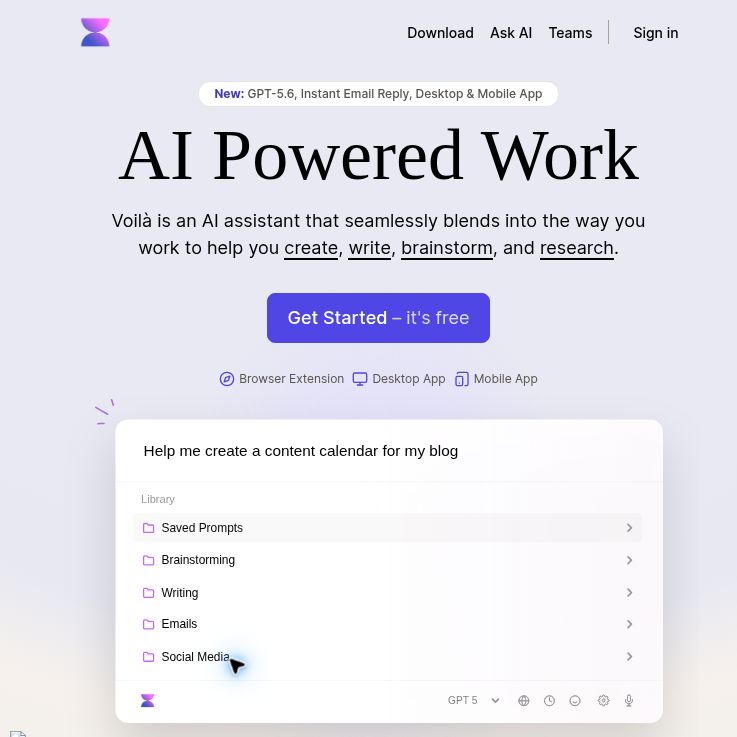
Screenshot: Voilà official homepage, captured October 18, 2026. Public marketing preview; no account, software or API workflow was tested.
Voila AI, branded Voilà, is an AI assistant for working with webpages, writing and source material. It combines browser-based assistance with chat and desktop access, so its main appeal is bringing drafting and summarization closer to the material you are already reading.
This overview uses public official pages checked on October 17, 2026. We have not installed the software, connected an account or tested its outputs. Features and limits below are the provider’s published descriptions, rather than measured performance.
What can Voila help you do?
The official website advertises rewriting, translation, email drafting, saved prompts, image generation and conversations about source material. These functions can support writers, researchers and marketers, but a fluent answer still needs factual and editorial review.
- Work with a webpage: the page-context guide explains how to select the current page as context and give instructions for summarization or extraction. Check that the relevant passage was actually included.
- Summarize a video: the YouTube guide describes summaries and follow-up questions using a video as context. Compare important claims with the original video; do not assume every visual detail is captured.
- Discuss files: the document guide, last updated January 24, 2025, lists up to three files at once, each no larger than 2.5 MB. Supported examples include PDF, DOCX, spreadsheets, CSV and text. Confirm current upload limits before planning a larger project.
- Look up information: its web-access documentation describes online retrieval with sources. Open those sources yourself to check dates, context and whether they support the answer.
Browser, desktop and mobile access
The help pages list extensions for Chrome, Edge, Firefox, Brave and other Chromium-based browsers. The Windows and macOS download page labels the desktop application a preview release. Check compatibility and permissions for your own device.
The mobile page directs users to add Voilà to their home screen and links to the web chat experience. That supports mobile access, but does not by itself establish separate native iOS and Android store apps. Likewise, the website’s Safari link leads to its desktop page; a standalone Safari extension was not verified here.
Plans, model access and fair usage
The pricing page lists Free, Premium and Ultimate. Free advertises 250 requests without a credit card; it does not state a renewal period, so do not assume 250 new requests every month. Premium lists 3,000 requests per month. Ultimate advertises unlimited requests, with document and image chat included.
The same page currently names GPT-5.6 and GPT-5 mini, with automatic model selection on Premium. Its fair-use note says roughly 500,000 words per month can use GPT-5.6 before further requests switch to GPT-5 mini. These are vendor labels and limits, not independently verified model routing or unrestricted access to the larger model.
Monthly and annual billing choices are shown. Confirm the selected billing interval, currency, total charge, taxes and renewal conditions before paying; a displayed monthly equivalent can require an annual commitment. We are not quoting a checkout-verified subscription price.
What does Bring Your Own Key mean?
The BYOK offer advertises Ultimate features using your own OpenAI API key, with a displayed Voilà fee of $5 per month and an 18,000-word chat limit. The dollar currency code and final checkout conditions were not established here. This is an API-key option, rather than evidence of arbitrary custom integrations.
Budget for the API provider’s usage charges as well as the Voilà fee, and verify the billing arrangement before connecting a key. OpenAI explains that API billing is separate from ChatGPT subscriptions. Never paste a secret key into a normal conversation or share it with collaborators. Review the setup’s handling of credentials and your provider’s spending controls before using this option.
A practical workflow to evaluate
Hypothetical example: you maintain a small software product’s help centre and want to turn an approved public release announcement into a customer FAQ. This is an editorial example, not a tested Voilà session.
- Choose a safe source. Use the public announcement rather than internal customer tickets or confidential roadmaps.
- Set a bounded task. Ask for five questions customers might have, with answers based only on the announcement and a separate list of missing information.
- Keep uncertainty visible. Instruct the assistant not to invent supported devices, prices, release dates or migration steps.
- Compare every answer. Check each statement against the announcement and the relevant official documentation. Remove plausible details that lack support.
- Edit for your audience. Replace generic language, explain unfamiliar terms and add links to verified instructions.
- Review before publishing. Have the appropriate person approve the FAQ. Record how much checking and rewriting it required before deciding whether the workflow helped.
For an initial trial, one short source is more informative than uploading a large collection. It makes omissions and unsupported additions easier to spot.
Privacy and subscription cautions
Voilà’s homepage says it does not store conversation content on its own servers or use it for AI training. Its privacy policy adds important context: account and usage information is collected, and OpenAI and Microsoft Azure are named as processors that process and store content. Payment and analytics providers are also listed. The marketing statement should not be read as a promise that no data is stored anywhere.
Before using confidential documents, ask about retention, processor settings and organizational requirements. The policy describes retention until data is no longer needed or the account is deleted; it does not give one fixed retention duration for every processor.
The terms, dated February 28, 2023, describe purchases as generally final, with limited discretionary refund exceptions and a 24-hour written-request window. They require adult eligibility or parental permission and supervision for users under 18. Review the current terms before subscribing, especially when evaluating the tool for students or a team.
Voila may suit readers who want reusable writing and source-review workflows across their everyday tools. It should not replace checking evidence, protecting sensitive material or making your own publishing decisions. Browse the AI tools directory to compare other approaches.