Updated October 18, 2026. Cabina AI brings several AI model families into a browser-based workspace for writing, document questions, images, video and audio. Its practical appeal is comparing approaches to the same task and keeping related work together. It also offers cloud agents, reusable prompts, a knowledge base and connections to external AI clients.
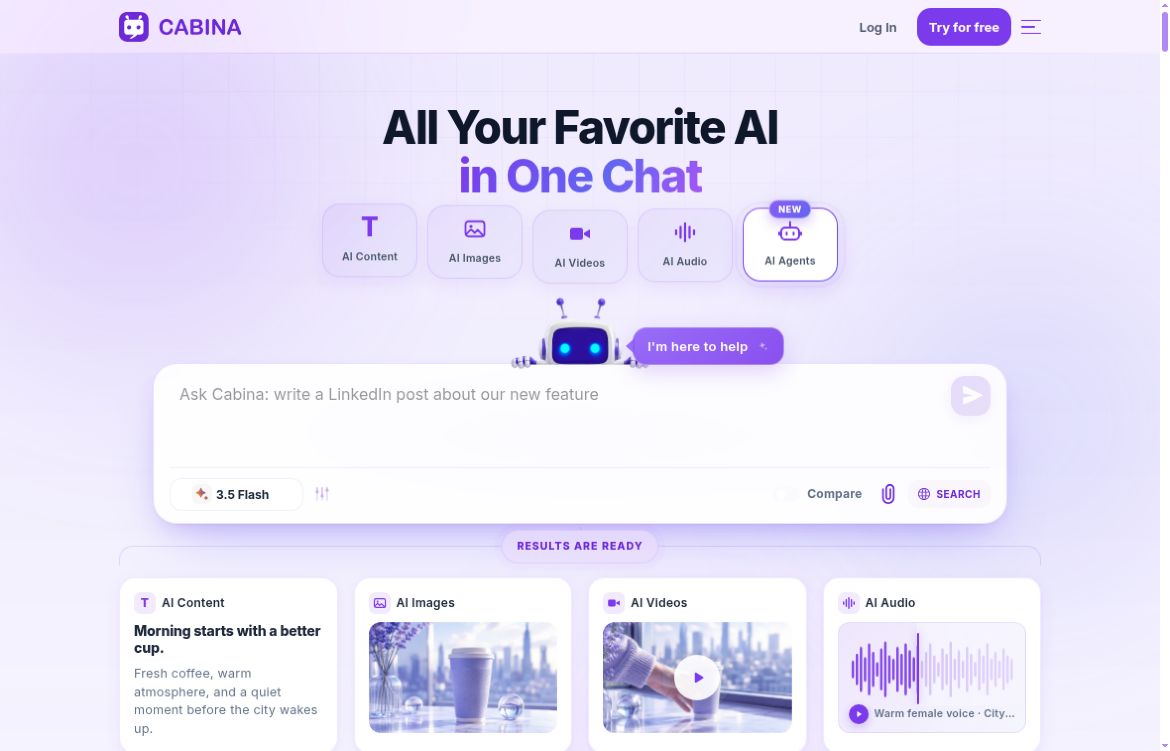
Image: screenshot of the official Cabina AI homepage, captured October 18, 2026. The page shows the provider’s promotional interface and examples, not results from our own product test.
What can Cabina AI do?
Compare models and reuse useful conversations
Cabina’s AI Chat supports switching between models and viewing alternative responses together. Its catalog includes model families such as OpenAI, Claude, Gemini, Mistral and Qwen. You can organize chat history into folders, rename sessions and pin conversations. Available versions and usage costs change, so check the current model selector rather than assuming every provider’s native-app feature is included.
This makes the original use cases of blog drafting, marketing copy, translation and document summaries relevant. For example, compare two versions of a product introduction for clarity and factual accuracy, then edit the stronger draft against your brief.
Use Maestro for multi-model evaluation
Maestro lets you save a lineup of up to four answering models and choose an additional model to evaluate their responses. The evaluator becomes available once two answering slots are filled. You can supply criteria, then receive scores, explanations and a combined answer.
Each participating model incurs its normal usage charge. A run with four answering models and one evaluator therefore involves five calls. Treat the evaluator’s judgment as another AI response that needs checking, particularly when several models repeat the same unsupported fact.
Ask questions about your own files
The Knowledge Base uses retrieval-augmented generation, or RAG, to find relevant material in uploaded files before answering. Cabina documents imports from your device, Google Drive and OneDrive, and support for documents, spreadsheets, audio and images containing text. You can select more than one knowledge base for a conversation and request supporting passages.
A useful starting point is a small collection of product documentation. Ask a narrow question, request the supporting passage, and compare the answer with the original document. Retrieval can miss relevant information, and outdated files can produce outdated answers. Cabina recommends individual files below roughly 50–100 MB for processing; verify the active upload limits before a large import.
Create and edit visual or audio content
Cabina offers text-to-image and video generation alongside speech and transcription tools. Its image editor includes localized edits, object and background removal, canvas expansion, variations and sketch-to-image tools. These can help with concept exploration or preparing a draft visual for later editing. Inspect the output for unwanted changes, and check usage rights before using generated assets commercially.
Set up agents and connect other AI clients
Cabina’s cloud agents are designed for ongoing or scheduled work, with their own files, memory and tools. You can interact through Cabina’s web chat or connect Telegram. The agent pages describe activity logs and usage tracking. Agent availability depends on the subscription, and team-plan agents are currently marked as coming soon.
For developers and people working in compatible AI applications, MCP and API access provide another route to Cabina’s models and tools. Review the requested access before connecting an account, keep keys private and check usage charges. No integration or agent was connected for this overview.
Cabina AI pricing and important limits
The following individual monthly prices were displayed on the official pricing page on October 18, 2026, in US dollars:
- Free: $0, with 50 introductory Cabina Tokens, restricted model access and daily limits; no agents.
- AI: $4.99 per month, with 450 tokens and no agents.
- Agent: $19.99 per month, with 1,000 tokens, one agent and up to three helpers.
- Agent Pro: $49.99 per month, with 2,100 tokens, three agents and up to three helpers per agent.
Cabina Tokens are the service’s usage credits. Consumption varies by model and operation; a credit allocation is not a fixed number of messages. Paid access still draws on that balance. Check the usage estimate for the models and media you actually need.
Pay-as-you-go top-ups start at $3. The FAQ says their access-limit removal lasts 100 days after the latest payment, after which free-tier restrictions return. It also says unused credits remain available for at least one year after a subscription ends or on the free plan.
Individual plans show a six-month option, while parts of the FAQ still describe annual billing. Confirm the selected period, renewal terms and total at checkout. Team subscriptions have separate per-seat pricing and shared credit pools. These public prices are not a checkout quote.
Who is Cabina AI useful for?
- Writers and marketers: comparing draft copy, adapting tone and exploring campaign ideas.
- Researchers and adult learners: asking source-specific questions and checking summaries against their documents.
- Designers and creators: developing visual concepts and making targeted image edits.
- Teams and developers: evaluating multiple models or building repeatable work around approved documents and integrations.
Start with one representative task and record the credits spent on both successful outputs and revisions. That gives you a better basis for choosing a plan than a headline model count or a promise of subscription savings.
Checks before relying on it
- Verify important outputs. Model comparison, RAG and AI scoring do not establish correctness. Check quotations, calculations and sources yourself.
- Review data handling. Use a non-sensitive sample first. Confirm the current retention, deletion and model-provider terms before uploading confidential material or connecting a work drive.
- Budget for iteration. Multiple-model runs and media generation can use credits quickly. Inspect the account’s usage records rather than treating paid access as unlimited generation.
- Check the actual feature you need. This is a source-based overview of public vendor documentation, not a hands-on benchmark of output quality, speed or reliability.
Cabina is worth considering when multi-model comparison and mixed-media work are central to your routine. For other options, explore our ChatPlayground AI overview or browse the AI assistant directory.