Updated: October 17, 2026
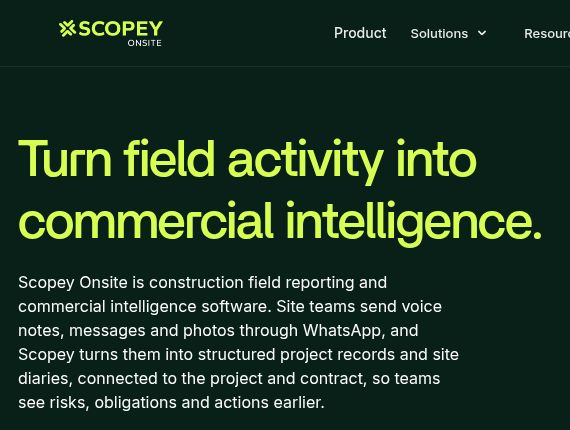
Screenshot of the official Scopey Onsite homepage, captured October 17, 2026.
Scopey’s current public offering is Scopey Onsite, an AI-assisted construction field-reporting and contract-administration platform. Site teams send messages, voice notes and photos through WhatsApp; the service organizes those updates into project records and helps commercial teams identify matters that need attention.
Important product update: the original Scopey website at scopey.co now redirects to Scopey Onsite. Earlier descriptions of agency quoting, service libraries and upselling should not be treated as a current feature list. Scopey’s official founder profile describes its origins in professional-services scope creep and the subsequent construction focus. This article follows the current offering while retaining the existing article URL.
What does Scopey Onsite do?
The platform addresses a practical gap: information about work, delays and changes can remain scattered across informal conversations rather than becoming a usable project record. Scopey’s product documentation describes three connected stages:
- Capture site information: teams send updates directly to Scopey using WhatsApp. Its capture workflow can ask for missing detail and organize submissions into searchable records and site diaries.
- Connect events with project context: the decision-support features relate reported changes, delays or disruption to possible commercial effects and contract obligations.
- Prepare a response for review: the action workflow highlights relevant actions and prepares draft communications from the captured information. People review the material and decide what to issue.
This overview is based on public official pages checked on October 17, 2026. We have not run a live construction project through Scopey, tested its interpretation of a contract or measured time savings. The capabilities above are vendor-documented, not independently demonstrated results.
Outputs, integrations and human control
Scopey’s current product page lists site-diary synchronization with Procore, email summaries and records exported to Word and PDF. Microsoft Teams capture is marked coming soon, so it should not be assumed available in a purchasing decision.
The official FAQ also describes issue, technical-query and notice registers. Technical queries can be prepared in a company’s own template, with a reference number and reply-due date for tracking. Ask the team to demonstrate the outputs and integration setup your project actually needs.
Crucially, Scopey says it does not send contractual notices automatically. The project team reviews, edits and issues them. A generated draft is not proof that a notice was delivered, met the contract’s requirements or preserved a particular entitlement. The supplier’s terms of service require authorized review of outputs and state that Scopey does not provide legal, engineering or regulatory advice or guarantee contractual outcomes.
A practical example to discuss in a demo
Hypothetical workflow, not a tested Scopey result: a delivery arrives late, preventing a crew from starting a planned task.
- Record the facts: an authorized team member submits the date, location, affected work, relevant times and an appropriate photo. Separate what was observed from assumptions about who is responsible.
- Check the record: review the structured entry for transcription errors, missing context, incorrect project assignment or an inaccurate duration.
- Review the possible impact: the responsible commercial team checks the event against the actual contract, programme and supporting records. An AI flag should start that review, not determine liability.
- Approve any communication: an authorized person checks the draft, recipient, deadline and required delivery method before deciding whether to issue it.
- Keep the evidence together: confirm how the project retains the record, related correspondence and any subsequent response, including what is exported to existing systems.
A useful demonstration should show how corrections are handled, how reviewers trace a draft back to the submitted information and which steps remain manual. Agree on a way to measure record completeness and review effort instead of assuming the tool will prevent every missed event or dispute.
Pricing and onboarding
The current FAQ describes annual licensing per project, with company-wide licences for organizations running multiple projects. It says customers commonly begin with a paid initial phase. A fixed public subscription amount was not verified, so the former article’s freemium and monthly-plan prices have been removed.
The terms allow agreed pricing arrangements, including project-value-based metrics, and distinguish the subscription from additional services such as bespoke integrations or migration. Request a written proposal that identifies the currency, taxes, covered projects, billing schedule, setup charges, usage limits and renewal or termination conditions. Annual licensing should not be read as a verified statement that every customer receives the same invoice schedule or price.
Privacy and project information
Scopey says it processes what teams intentionally send to it, rather than reading existing private WhatsApp conversations. That is a limit on how information is collected, not a claim that submitted records remain only on a phone.
Its privacy policy describes cloud processing of messages, photos, documents, voice notes and related metadata. It states that platform data is hosted in the European Union and that third-party providers support the service. The FAQ says a data processing agreement, security policies and a sub-processor list are available to procurement and IT teams on request.
Before a pilot, clarify who may submit and view records, which worker or client details are appropriate to include, and how export, retention and deletion work for your contract. We did not independently audit Scopey’s security controls or verify a certification, and this overview does not promise zero retention or that submitted content is never processed by a third party.
Who should consider it?
The current product is aimed at construction contractors, client-side project teams, commercial teams and site personnel. It may be relevant when important field information is already exchanged through WhatsApp but needs a clearer route into project records and review workflows.
Teams mainly seeking agency proposals, automatic pricing suggestions or an e-signature sales tool should verify those requirements separately; the current Scopey Onsite materials do not establish the old feature bundle. For construction use, start with a demonstration using a sanitized project scenario and confirm your contract configuration, integration permissions and human approval process before relying on it.
Explore the official Scopey Onsite website, or browse our AI tools directory for other business workflows.