
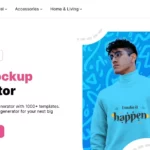
Mockey mockup generator homepage with an apparel design preview
E-Commerce

Mockey

Visit website

Create product mockups with Mockey. Compare free watermark-free JPG downloads with paid PNG exports, supported uploads and practical preview checks.

Mockey mockup generator homepage with an apparel design preview

Updated October 24, 2026

Name Mockey
Overview Mockey is an online mockup generator for products such as t-shirts, hoodies, sweatshirts, stickers and tote bags. Its website lists more than 30,000 templates. Users can upload PNG, JPG or WebP designs and adjust their placement on a product. The free plan exports watermark-free JPG files; PNG downloads require a paid plan. It can help e-commerce businesses, D2C brands and content creators prepare product visuals.
Key features & benefits
  • Extensive template selection for diverse products.
  • Easy design upload process for custom creativity.
  • Support for transparent image uploads.
  • User-friendly mockup editor for personalized designs.
  • Option to download professional mockups without watermarks.
Use cases and applications
  • Create professional mockups for e-commerce products.
  • Develop high-quality mockups for D2C brands.
  • Design tailored mockups for social media promotions and advertisements.
Who uses?
  • Graphic Designers
  • Product Managers
  • Marketing Teams
  • E-commerce Business Owners
  • App Developers
  • Freelancers
Pricing A free plan is available for creating mockups and downloading watermark-free JPG files. PNG exports require a paid plan. Check the current plan and checkout details for premium features and billing; free access does not mean every format or AI feature is included.
Tags AI mockup generator, Custom mockup creator, E-commerce tools, Product mockup tools
App available? Yes, Mockey is available as a mobile app on Android.

Choose the right mockup and export

Choose a template that matches the product you actually sell. Upload a clean design, using a transparent PNG when you need to avoid a rectangular background. Adjust placement, size and color, then check small lettering, seams and edges before exporting. A transparent upload does not make a free JPG download transparent.

Before using a mockup in a listing or advertisement, confirm that you have permission to use the uploaded artwork and that the selected template and plan suit your intended use. Compare the preview with the real product so customers are not shown an inaccurate print size or finish.

Official sources: Mockey features and export-format FAQ.
KEEP EXPLORING

More tools to discover.

Review the historical Oxolo e-commerce video tool, its 2024 termination notice and how the current construction-documentation product differs.

E-CommerceExplore
SoStocked homepage introducing Amazon inventory management and forecasting software

Review SoStocked for Amazon inventory forecasting, reorder planning and onboarding, with Inventory + Profit pricing and practical forecast checks.

E-CommerceExplore
domyshoot

Explore DoMyShoot for guided product photography, AI-assisted editing and custom retouching, with verified iPhone access and service-specific pricing.

E-CommerceExplore
plumy

Discover Plumy, the AI-powered tool for enhancing content creation and SEO within your Shopify eCommerce store. Perfect for businesses seeking efficiency and high-quality outputs.

E-CommerceExplore
Historical ProductScope homepage with its logo, seller-tool marketing headline and a partial promotional-video thumbnail.

Review ProductScope AI’s documented seller tools, Chrome extension and changed website destination, with clear pricing, privacy and product-image limits.

E-CommerceExplore
Find your next starting point