Updated October 29, 2026
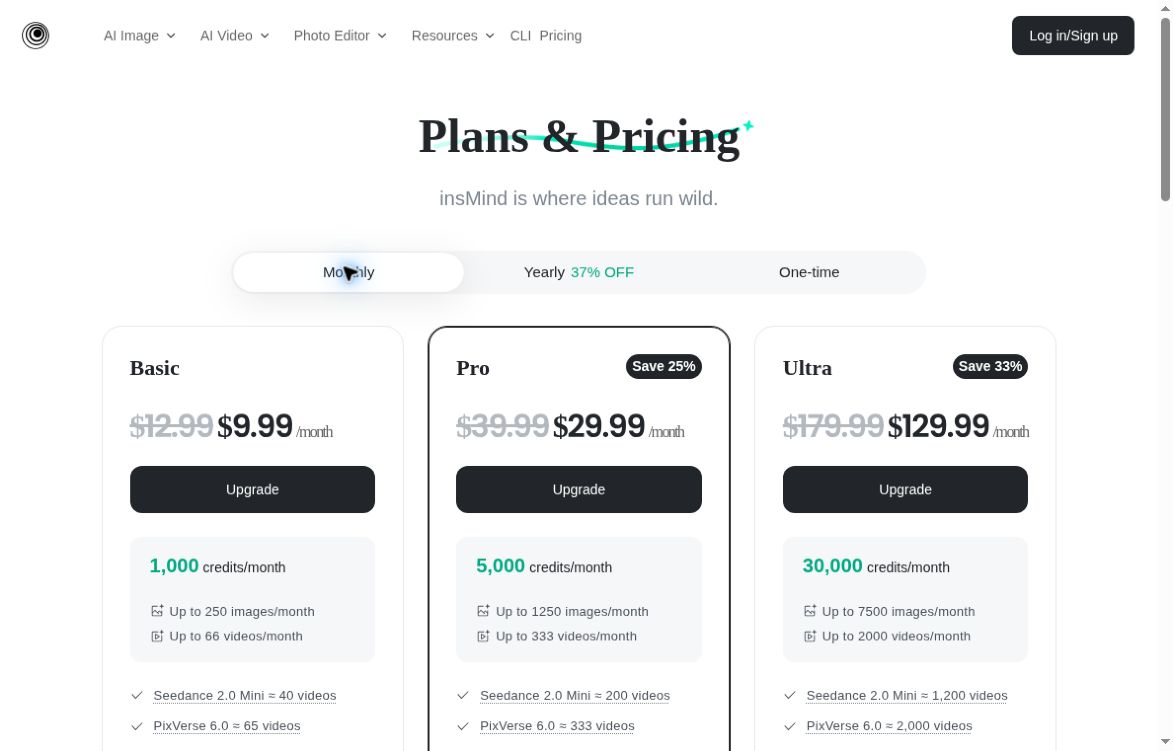
Image source note: Retained screenshot of insMind’s official pricing page with Monthly selected, reviewed October 28, 2026 (UTC). The original capture date is unknown. It shows shared-platform plans and promotional rates, not verified Image Extender-specific output allowances. The dollar symbol shown does not establish an ISO currency. Check current prices and conditions before subscribing. This is a pricing-page view, not a hands-on tool test or generated output. Source: insMind pricing.
Link context: The X/Twitter, Facebook, Discord and YouTube links in “Find them online” are retained from the earlier listing. Their current affiliation or availability was not independently confirmed; they should not be treated as verified support channels.
Features, uses and access
| Name | insMind Image Extender |
| Overview | insMind Image Extender uses AI outpainting to add surrounding content beyond an image’s existing borders. It can help change framing or aspect ratios for product photos, social posts and design layouts. Expansion creates new pixels rather than recovering the original missing scene or simply increasing resolution. |
| Key features & benefits |
|
| Use cases and applications |
|
| Who uses? |
|
| Pricing | Free trial access is advertised, with limits depending on the account. On October 28, 2026 (UTC), the selected Monthly plans displayed promotional prices of $9.99/month for Basic (1,000 credits), $29.99/month for Pro (5,000 credits), and $129.99/month for Ultra (30,000 credits). The page uses the dollar symbol without an explicit currency code. These are platform plans, not a verified number of image expansions. Monthly credits do not roll over. Yearly and one-time options are also offered; check current prices and conditions before purchase. |
| Tags | AI Image Extender, Image Enhancement, Outpainting, Photo Editing |
| App available? | Available online and through insMind’s iPhone/iPad and Android apps. Official app listings include image expansion; features and subscription terms may differ by platform. |
Review the newly generated edges
For example, expanding a tightly cropped product photo can add space for a banner, but the new background is generated rather than recovered. Check edges, shadows, faces, text and repeating patterns. Complex scenes may need another pass or manual cleanup. Use only images you have permission to upload.
Official sources checked October 28, 2026 (UTC): Image Expander, selected Monthly pricing, iPhone/iPad listing and Android listing. No image was uploaded or generated for this review.