
Updated October 15, 2026. This is a documentation-only review. We did not open a Devin account, run a coding benchmark, or deploy an application.
Devin AI is Cognition’s software-development agent. This guide focuses on Devin Cloud: delegating a defined task, following its progress, and reviewing the resulting code. The useful question is whether it can prepare a change your team can verify, with acceptable review effort and usage cost. Generated code still needs engineering judgment, tests, and release controls.
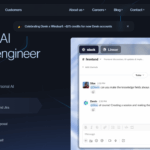
Historical Devin homepage image retained from the original July 2025 listing. Its +$75 promotional banner is historical and is not a verified current offer. The illustrated Slack conversation is vendor marketing, not a GPTOnline test.
Cloud and desktop
The official introduction describes web access at app.devin.ai, integrations, an API, and a local CLI. Cloud sessions provide a working environment where the agent can edit and test code while you monitor or intervene.
Devin Cloud belongs to the same Cognition ecosystem as Devin Desktop, formerly Windsurf. They are connected ways of working with agents, rather than competing products from different companies. Desktop downloads are available for macOS, Windows, and Linux. Our Windsurf AI / Devin Desktop guide covers the editor lineage; this article covers delegated cloud work.
Prepare the environment
Before assigning repository work, configure access, dependencies, and test commands. The environment guide describes sessions starting from a saved snapshot, with Linux as the default and configurable Windows or macOS environments. Each session receives a fresh copy; changes within a session do not update the starting snapshot. A missing dependency or inaccessible test service can prevent verification, even when the proposed code looks plausible.
For GitHub, an administrator connects the organization and selects accessible repositories. The integration documentation supports creating pull requests and responding to review comments. Grant access to the repositories needed for the task, and keep branch protections enabled. A prompt asking for a draft PR should be reinforced by repository permissions and required checks.
From task to review
The first-session guide distinguishes Ask mode, for codebase questions and planning without code changes, from Agent mode, which can edit files, run commands, and create PRs. Start with Ask when the scope is unclear. Before implementation, name the relevant repository, expected behavior, allowed changes, and evidence required for completion.
During execution, session tools expose the shell, IDE, browser, and progress log. Inspect actual command output rather than relying only on a conversational summary. You can intervene in the environment when needed. Read-only side chats let you ask questions about a session without changing its work.
Cognition’s development-workflow guidance places Devin’s contributions inside existing PR and branch-protection processes. Review the final diff, test changes, dependency changes, and unresolved warnings before merging. Treat an automated review as additional evidence, not a release decision.
A small cloud task
Fictional example: a Python CSV importer silently overwrites values when two columns have the same header. This is an original task-design example, not a Devin test result.
- Define the boundary. Use a test repository and synthetic CSV files. Ask Devin to locate the importer and existing tests, explain the failure, and propose a narrow change before implementation.
- Specify acceptance. Try: “On a new branch, reject duplicate column headers with a clear error. Preserve existing behavior for valid files. Add regression tests for duplicate and valid headers. Do not change dependencies, unrelated importers, or deployment settings.”
- Request a reviewable handoff. Ask for a draft PR, the exact checks run and their outputs, any skipped checks, and remaining uncertainties. If the environment cannot run a required test, the report should say so.
- Make the final decision. Independently rerun the relevant checks and inspect whether the new test catches the original defect. Confirm that the error is useful to callers. Keep merging and production deployment behind the team’s normal approval process.
Compare the time spent specifying, supervising, and reviewing this task with doing it yourself. A small accepted change is a better evaluation target than a broad request to rebuild an application.
Pricing and limits
The pricing page lists Free at $0, Pro at $20 monthly, Max at $200 monthly, and custom Enterprise pricing. Pro explicitly includes cloud-agent access. The reviewed pages use dollar signs without explicitly identifying the currency; confirm currency, tax, and billing terms before subscribing.
Teams pricing is inconsistent across official pages: the pricing page displays $80 per month plus $40 per full developer seat, while the billing guide describes an $80 minimum toward which seat charges count. Obtain the applicable quote before budgeting. That guide gives Pro daily and weekly allowances, Max a larger weekly-only allowance, and self-serve users prepaid on-demand credits beyond included usage. Administrators can set default session spending limits and auto-reload controls.
The usage guide distinguishes self-serve quota/credits from Enterprise Agent Compute Units (ACUs). Consumption depends on the work performed, with VM and networking costs also contributing. There is no reliable fixed conversion from a subscription price to developer hours. Sessions normally sleep after 30 idle minutes and consume no usage while sleeping; concurrency depends on the plan.
There is also a continuity limit: sessions cannot be continued after 30 days. Preserve important decisions and work in your repository or issue tracker, then provide the relevant context to a new session when necessary.
Privacy and fit
The platform terms, updated June 30, 2026, permit training use of customer data. Paid customers can opt out; Teams administrators make that choice. Opting out enables zero data retention with model providers, with safety, abuse-review, and legal exceptions. It does not promise that all service data is never stored.
The security guide separately says Enterprise data is not used for training without prior written consent, subject to the customer agreement. It also warns about hallucinations, bugs, and insecure suggestions. Review the terms and account settings before connecting proprietary code.
Devin Cloud is worth evaluating when you have bounded tasks, a working test environment, and someone responsible for reviewing changes. It is a weaker fit when acceptance criteria are unclear or nobody can validate the output. Start with a reversible task and measure the complete path to an accepted PR.