Review Box GitHub PR reviews bring pull request review to a fast desktop app for macOS, Windows and Linux. The app launched on Product Hunt on 18 November 2026, and it is built for developers who review a lot of pull requests and want a focused workspace instead of a browser tab. Review Box talks to GitHub directly, with no intermediate server in between.
What Review Box Does
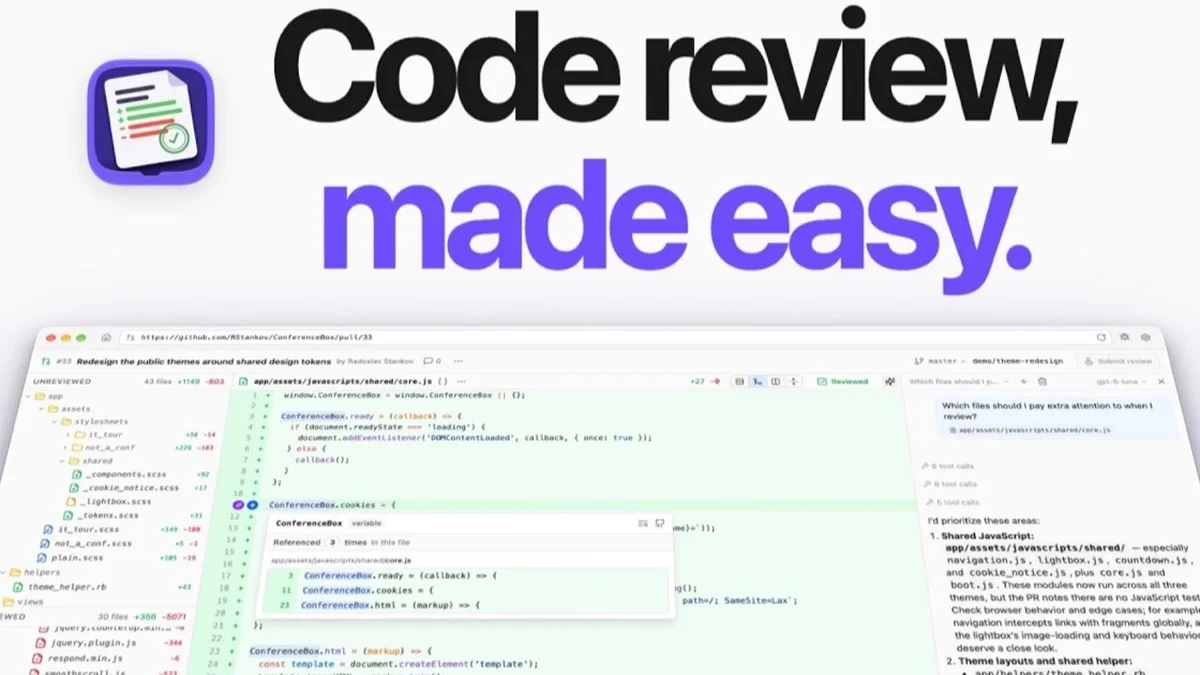
Review Box is a desktop app for reviewing GitHub pull requests. It shows a dashboard of the pull requests waiting for you, the ones you already reviewed and your own open requests, so you can start the day with a clear list instead of hunting through notifications. Each request opens in a focused review view where you can move through files, leave comments and track what you have already covered.
The app is built for speed. It is a native desktop app, not a web page, and it keeps your place across files and reviews, so a long review session does not lose track of where you stopped. Because it connects to GitHub directly, your comments and approvals go straight to the pull request. The dashboard also separates the requests you own from the ones assigned to you, so a lead can see both the team queue and their own work at a glance.
Key Features
Review Box is built around the review workflow rather than repository browsing. Its dashboard, progress tracking and code tools all serve one job: getting through a pull request carefully and quickly.
- PR dashboard with requests to review, already reviewed and your own
- Review-progress tracking per file, so you always know what is left
- Code intelligence with jump-to-definition and global search inside the diff
- Result diff view for checking the outcome of a review
- Integrated AI, using a model you bring yourself
- Talks to GitHub directly, with no intermediate server
- Native desktop app for macOS, Windows and Linux
Who Review Box Is For
Review Box fits developers and engineering leads who review pull requests every day. If your review queue is long and browser-based review keeps losing your place, a dedicated desktop app with per-file progress tracking makes the work calmer and harder to lose.
It also suits teams that care about review quality. Jump-to-definition and search inside the diff help a reviewer understand the code instead of skimming it, and the progress view makes it obvious when a file was skipped, so nothing slips through unreviewed. Because the app stores no code on a middle server, teams with strict security rules can review without sending their source through another service.
Review Box Pricing
Review Box has one plan with everything included, priced at $45 per year. The app offers a 30-day free trial, and no account or card is required to try it. Check the official website for current pricing before signing up, since prices may change.
Getting Started With Review Box
Starting is simple: download Review Box for your system, connect your GitHub account and open your review queue. The trial needs no account and no card, so you can try the real workflow on a real pull request before paying. Try it on one pull request first, work through the files with the progress tracker, and use jump-to-definition on any call you do not recognise. Review Box is worth a look for any developer who wants pull request review to feel like a focused workspace instead of another browser tab.
Image: official Review Box product visual, via review-box.rstankov.com.