
Updated October 24, 2026
Existing screenshot from Twig’s website; original capture date unrecorded. It depicts the earlier Tier 1 support positioning and trial marketing, not independent proof of human-quality answers or every current Sera plan entitlement.
| Name | Twig AI |
| Overview | Twig AI is a specialized enterprise “AI Brain” for B2B customer support and success teams. It ingests your documentation, knowledge bases, ticket history, and even APIs to generate draft responses for review. Its support materials describe integrations such as Zendesk and Salesforce; confirm the particular email or browser connector before choosing a workflow. It also powers chatbots to deflect common queries, and includes a quality workbench for checking answers and escalating uncertain cases to people. Its current homepage also emphasizes Sera, an AI receptionist for phone, text and web chat; this front-desk offering should not be confused with every legacy support integration. |
| Key features & benefits |
|
| Use cases & applications |
|
| Who uses? | Support agents, CX/SaaS success teams, FinTech, lending, tax-prep companies, community banks, B2B SaaS. Sera also targets front-desk teams; regulated decisions remain with appropriately qualified staff. |
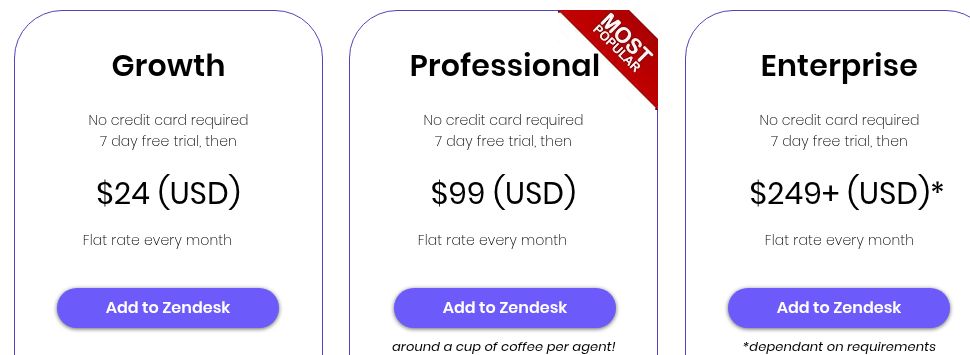
| Pricing | The current public pricing is for Sera, Twig’s AI receptionist:
The official page offers a 15-day trial with voice included and no credit card. Paid plans bill monthly. These Sera prices do not establish the terms of a legacy B2B support contract; confirm any support-specific integration, allowance or order form instead of relying on the former $19/seat or per-resolution figures. |
| Tags | #CustomerSupport #SupportAI #AgentAssist #AIChatbot #TicketTriage #QualityWorkbench #SecureAI #B2B |
| App available? | Web dashboard, website widgets, APIs and supported integrations. Current support materials list Zendesk, Salesforce, Intercom and Confluence. Sera handles phone, text and web chat; verify any separately advertised Chrome, Outlook or Gmail extension before depending on it. |
Test the handoff before rollout
Connect a small approved knowledge set and try routine questions, an unknown answer and a request that requires a person. Check citations, escalation and any calendar/API action before expanding access. Configure call-recording and AI disclosures for your use case, obtain required consent, and do not submit protected health information. A support or booking assistant should not make binding regulated decisions for your staff.
Official sources: Sera and plan scope · Monthly prices and usage · Continuing support capabilities · Output, consent and sensitive-data limits