Updated on October 20, 2026.
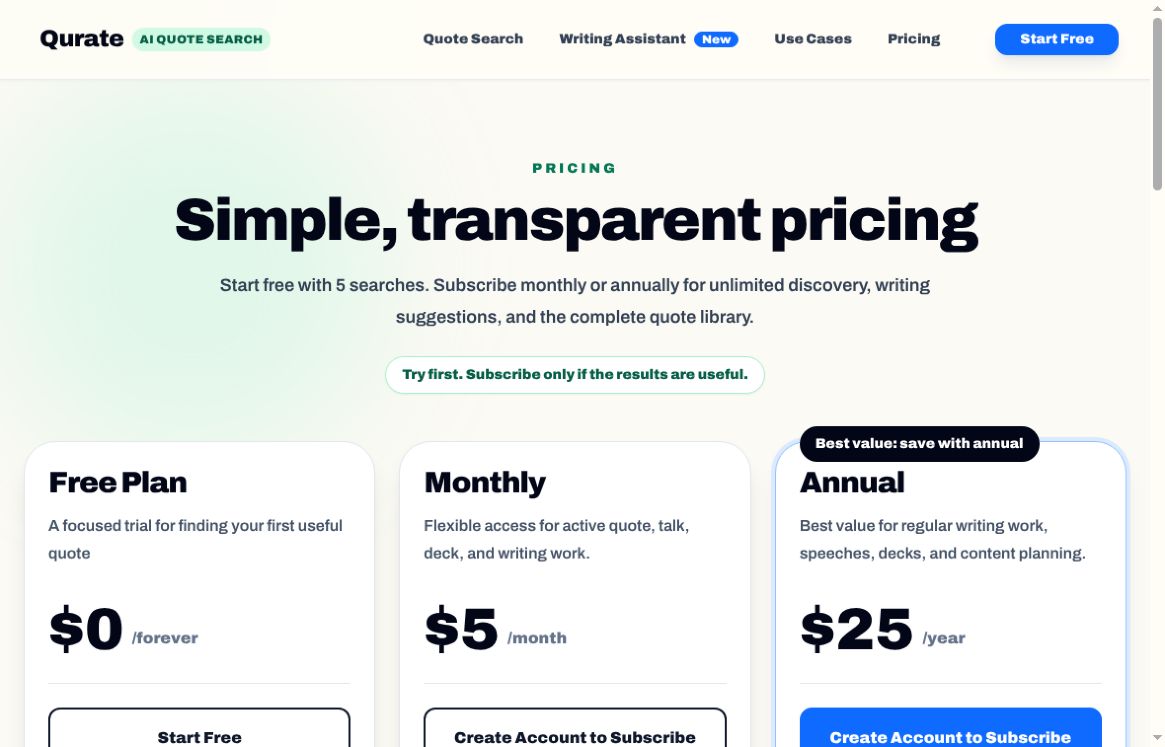
Featured image: screenshot of Qurate AI’s official pricing page, captured October 20, 2026. Provider presentation for editorial identification; no hands-on product test. This dated excerpt shows the free, monthly and annual offers; it does not include all plan terms. Headline and access claims are provider presentation, not a verified quote-accuracy or output guarantee.
Qurate AI is an AI-assisted quote-search and writing service at qurate.appcradle.net. It helps you look for a quotation by describing the idea, audience, and tone of a message, rather than relying only on an exact phrase. The official product description focuses on speeches, articles, presentations, social posts, and similar writing tasks.
What Qurate is designed to help with
The central workflow is finding a quote that supports a specific point. A speaker might need an opening about perseverance for a professional audience; an editor might want a restrained quotation for a reflective article. Giving that context should be more useful than searching a single broad word and choosing an unrelated famous line.
Qurate lists personalized quote search, discovery of similar quotations, and sharing with a custom message. It also has a separate writing-assistant area. Paid-feature descriptions include writing and quote suggestions plus document export to PDF, Word, and Markdown. These are the provider’s advertised features, not functions tested for this review. A library size or AI-search label does not prove the authenticity of every quotation.
How to use a quote-search tool thoughtfully
- Describe the point first. Include your subject, audience, and desired tone. For example: a short line about patience for a graduation speech, with an encouraging rather than sentimental tone.
- Compare the meaning. Read the candidate beside the sentence you are writing. A memorable line is not helpful if it changes the argument or sounds out of place.
- Verify attribution. Find the original book, speech, interview, or a reliable primary record. Check the exact wording, speaker, date, and context before crediting someone.
- Keep a source note. Save the original reference alongside your draft. Distinguish a paraphrase from a direct quotation, including when translation changes the wording.
This workflow is especially useful for public presentations, newsletters, and educational writing, where a mistaken attribution can spread beyond the initial draft. Quotation availability also does not automatically grant permission to reuse a long copyrighted passage.
Free searches and paid access
The official pricing information currently available to this review describes five total free searches, with up to 10 quotes per search. It should not be read as the older allowance of 1,000 searches every month. Paid descriptions offer 20 quotes per search, a library advertised as more than 500,000 quotations, and broader search and writing access.
The fully loaded pricing page now shows $5 per month or $25 per year for a paid subscription. Both advertise unlimited searches while subscribed, unlimited writing sessions without a word limit, real-time quote suggestions, and PDF, Word, or Markdown export. The free trial does not include the writing assistant. An older indexed $25 lifetime offer is not the offer shown on the current page.
The page uses a dollar sign without an explicit currency code. Confirm currency, the full amount charged, taxes, renewal and cancellation terms, and account eligibility at checkout. Annual access is a yearly subscription, not a permanent licence. No checkout was opened or payment made.
Who should evaluate Qurate?
Qurate is most relevant when finding an appropriate quotation is a recurring part of your writing. Use the small free allowance on real work and judge whether the candidates add value after source checking. The sources reviewed do not establish automatic publishing, social scheduling, guaranteed engagement improvements, or independent fact-checking of every result.
The service is accessible on the web; a current official native-app listing was not verified. For other writing and creative products, explore our AI tools directory.
Official sources checked October 20, 2026. No logged-in searches, writing sessions, or payment flow were tested.