lot-map is an independent Claude Code plugin that turns session activity into a live map. It helps answer a practical question: what kind of work is the assistant doing right now? It does not explain why a model chose an action, reveal private reasoning, or act as an approval system. Think of it as another view of the session, not a security boundary.
What the live map shows
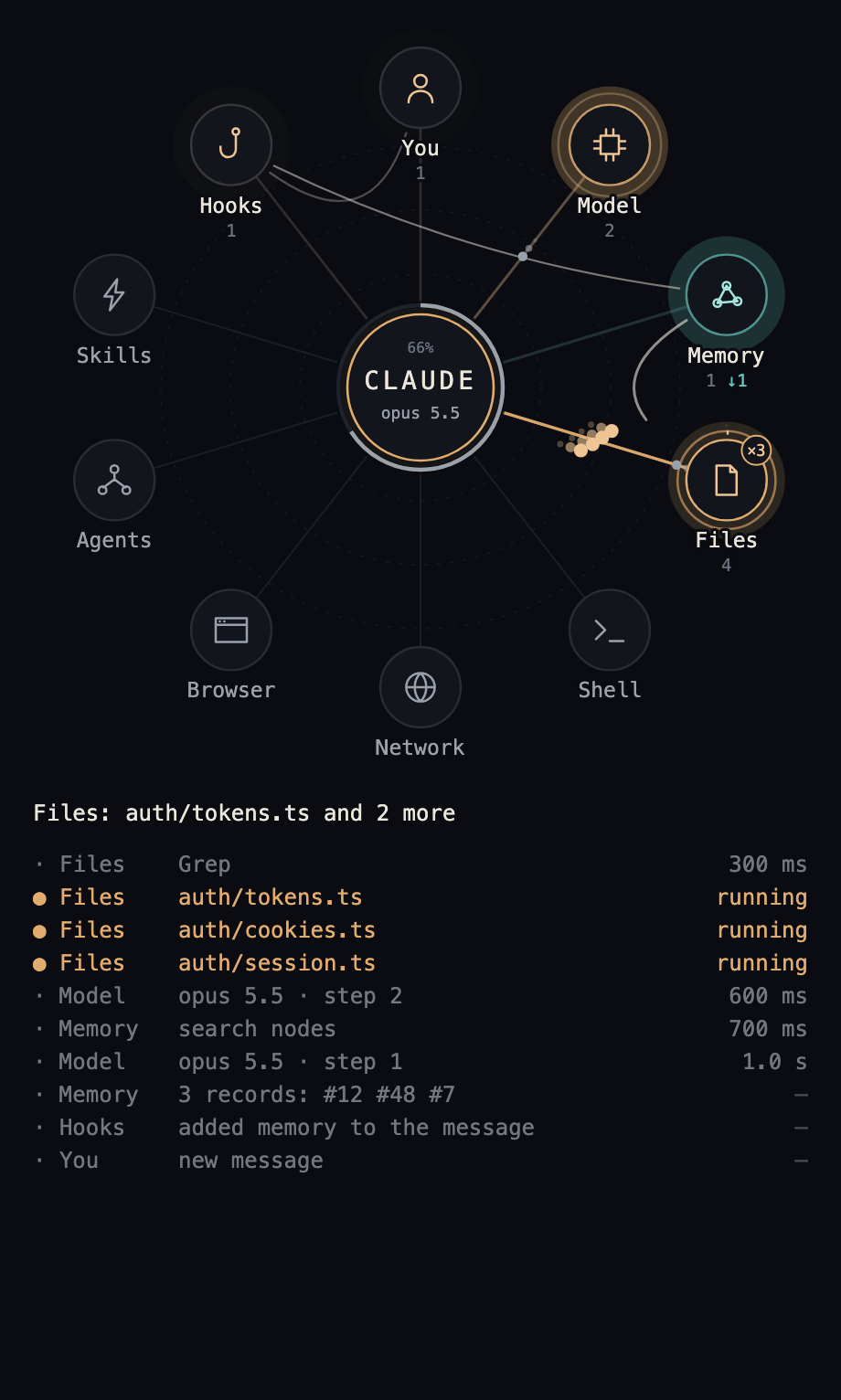
The official repository shows stations for files, the shell, network activity, browser tools, agents, hooks, and other activities. Events cause the corresponding station to light up, and the feed below the diagram shows recent activity. Some related events fold together, so the feed is better for a quick overview than for recording every event in order.
The November 14, 2026 version 0.8.0 notes add a Braille-dot map option for terminals that do not display images, and optional shortened subagent labels. The project says the ordinary terminal view remains text by default. Whether you see a pane or use the slash command depends on the surface and terminal layout. Check the current README for the behavior of your client rather than assuming the desktop demo matches a terminal.
Example: Check what a documentation review is waiting on
Imagine asking Claude Code to find references to an old command in a non-sensitive sample repository, without making edits. A pulse at Files can help you recognize that it is still searching or reading. If activity shifts to a network or browser station unexpectedly, check the actual command, permission prompt, or tool transcript before deciding whether to continue. A station name is a classification, not enough to determine which destination was contacted or what data a tool sent.
Suppose several more entries appear while a background activity is running. The feed can help you distinguish that running work from a completed turn, but use the native transcript and actual tool result to determine what finished. This is an illustrative workflow, not an independent test of the plugin.
Local processing and compatibility
The maintainer describes processing as local, with no network calls by the plugin itself. In the privacy notes, the developer distinguishes the full event the host hands to a hook from the short labels it displays or keeps. Local does not mean invisible: file names, snippets of labels, or activity can still appear on a shared screen. It also does not change any network use by Claude Code or its other tools.
The plugin is distributed under MIT; it does not include a Claude Code account or credits. It is most useful when a condensed overview would save time in a busy session. Keep the native transcript for exact troubleshooting, and follow your own approval and access rules regardless of what the map displays.
Featured image: the developer’s simulated session, not GPTOnline test data. Copyright © 2026 Aleksei Volodin; distributed under the MIT license.
Featured image license notice
MIT License

Copyright (c) 2026 Aleksei Volodin

Permission is hereby granted, free of charge, to any person obtaining a copy
of this software and associated documentation files (the "Software"), to deal
in the Software without restriction, including without limitation the rights
to use, copy, modify, merge, publish, distribute, sublicense, and/or sell
copies of the Software, and to permit persons to whom the Software is
furnished to do so, subject to the following conditions:

The above copyright notice and this permission notice shall be included in all
copies or substantial portions of the Software.

THE SOFTWARE IS PROVIDED "AS IS", WITHOUT WARRANTY OF ANY KIND, EXPRESS OR
IMPLIED, INCLUDING BUT NOT LIMITED TO THE WARRANTIES OF MERCHANTABILITY,
FITNESS FOR A PARTICULAR PURPOSE AND NONINFRINGEMENT. IN NO EVENT SHALL THE
AUTHORS OR COPYRIGHT HOLDERS BE LIABLE FOR ANY CLAIM, DAMAGES OR OTHER
LIABILITY, WHETHER IN AN ACTION OF CONTRACT, TORT OR OTHERWISE, ARISING FROM,
OUT OF OR IN CONNECTION WITH THE SOFTWARE OR THE USE OR OTHER DEALINGS IN THE
SOFTWARE.