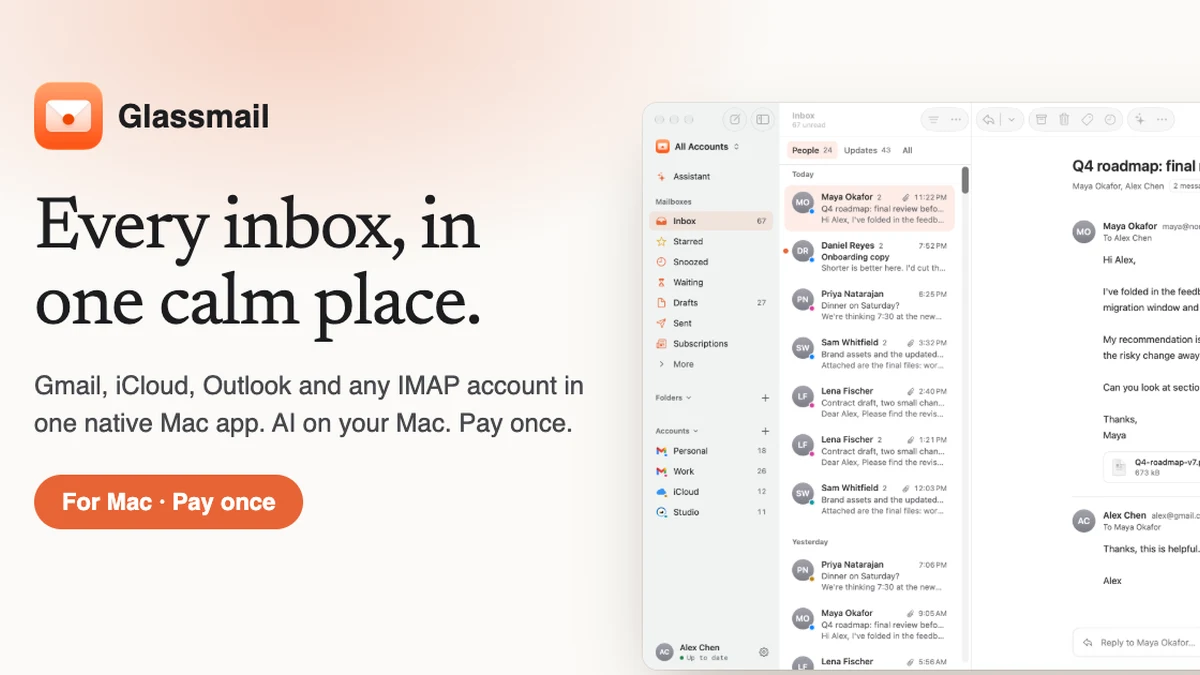
Glassmail private Mac email AI is a fast, native Mac email app with an AI assistant that runs entirely on the user’s Mac, so mail is never sent to a cloud server to be read. It brings Gmail, iCloud, Outlook, Yahoo, Fastmail, and any IMAP account into one calm window, and it is paid for once, with no subscription. The app launched on Product Hunt on 21 November 2026, and it comes from Glassmail.
What is Glassmail?
Glassmail is built in Swift for the Mac, and it opens fast and scrolls smoothly through years of mail. Its built-in AI reads, summarizes, and writes on the Mac itself: on macOS 26 it uses Apple Intelligence, and on any other Mac, including Intel machines, it downloads a small model such as Gemma or Qwen in Settings. There is no Glassmail mail server, no account to make, and no API key. The Mac talks straight to the email provider, passwords stay in the macOS Keychain, and the AI keeps working on a plane with no connection at all.
The inbox splits into People and Updates, so mail from people comes first and receipts, notifications, and newsletters wait in a bundle by sender. The Today view shows who is waiting for a reply, the sign-in code just asked for, and who the user still waits to hear from. Triage puts one conversation in front of the user at a time, with single keys to archive, snooze, reply, or skip. The assistant answers questions such as “What needs me today?” with the actual conversations, summarizes long threads into a few lines, and writes replies in the user’s voice, learned from mail already sent.
Key features
- On-device AI for summaries, drafts, and inbox questions, using Apple Intelligence on macOS 26 or small downloaded models on any Mac, with no extra cost.
- Every inbox in one window: Gmail, iCloud, Outlook, Yahoo, Fastmail, and any IMAP account, on Apple silicon and Intel Macs running macOS 14 or later.
- People and Updates split, a Today view, and one-key triage for reaching inbox zero without the noise.
- Replies in the user’s voice, with one-click options to say yes, decline politely, ask for more time, or make it shorter.
- Natural-language search across people, files, and dates in every account, plus scheduled sending, undo send, snooze, and follow-up nudges.
- Claude, Codex, and Cursor can search and read mail on the Mac; every change asks first, and they can never send or delete.
- One-click unsubscribe, tracking pixels stripped, scam warnings for look-alike domains, Markdown writing, and save as PDF.
Who is it for?
Glassmail is made for Mac users who want a modern mail app without handing their inbox to a remote AI. Someone with three accounts and a full inbox can triage with one key at a time, ask what needs attention, and get drafts that sound like their own writing. It also fits people who already use Claude Code or Cursor and want those tools to search their mail on their own machine, under their own permission. And it fits anyone tired of paying every month for email: one payment covers every account, every feature, and every version 1 update.
Pricing
Glassmail costs $29 once at the early price for the next 100 buyers, then $49. The founding price of $14 for the first 15 buyers has already sold out. One payment covers every feature, every account, all 1.x updates, and use on up to 3 Macs. Every feature can be tried free for 14 days, with no card needed and no account to make. Purchases are not refundable after the free trial, except where the law requires it. Prices were checked on the official site on 22 November 2026 and may change, so confirm them on glassmail.app before you buy.
What to know before you try it
Glassmail is Mac only: it needs macOS 14 or later and does not run on Windows, Linux, or phones. The AI features depend on the Mac: Apple Intelligence needs macOS 26 with Apple silicon, while older Macs download a small model instead. Gmail, iCloud, and Yahoo ask mail apps to use an app password, and Glassmail walks the user through making one in about a minute. Mail stays readable even after the trial ends without a licence; only the full app asks for a key.