Interview Coach AI mock interviews let you rehearse for a job interview by answering out loud, in a simulated video call, and then read a coaching report on what to improve in your next answer. You pick a role, provide the job description and choose an interview style, then answer the interviewer’s questions with your voice. The product comes from Interview Coach, and it launched on Product Hunt on 20 November 2026.
What is Interview Coach?
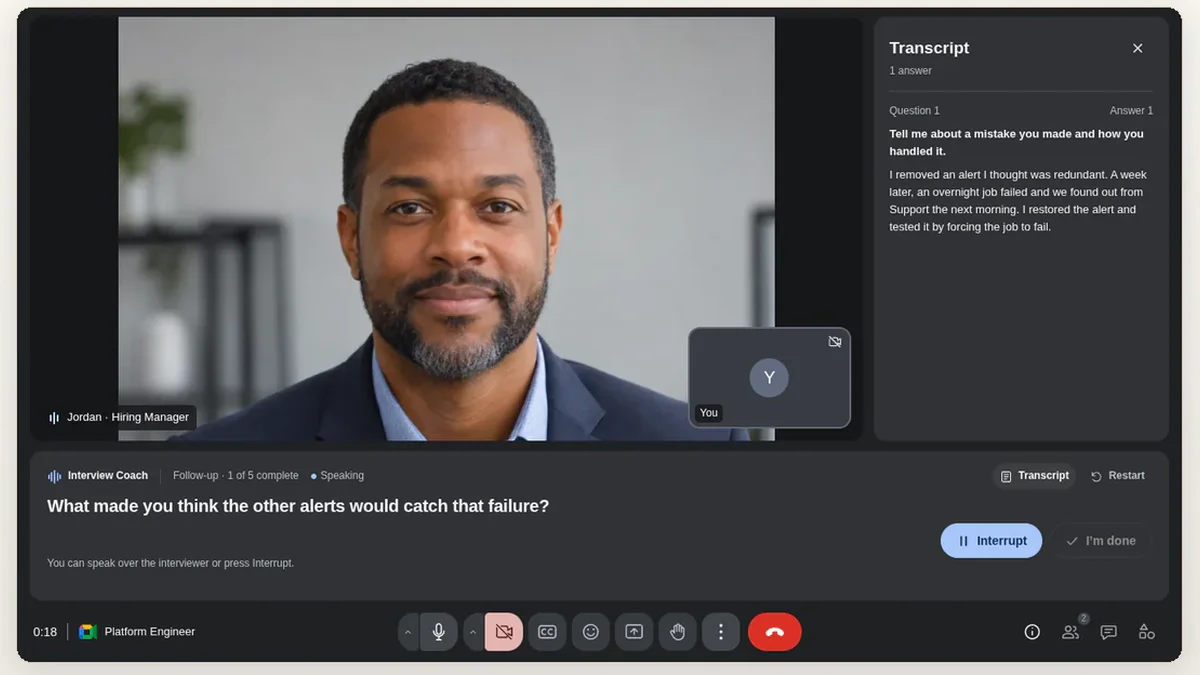
Interview Coach is built for the part of interview prep that is hard to do alone: answering out loud and handling the next question. A standard session runs up to 20 minutes, with 5 main questions and up to 4 follow-ups. In the demo, a platform engineer explains removing an alert they thought was redundant, and the interviewer, Jordan, asks why the candidate thought the other alerts would catch the failure. The coaching report then helps the candidate explain that assumption and what they would check next time. Your speech is processed on your device with Gemini Nano and English speech recognition, your camera stays off, and Interview Coach saves no audio or video recordings.
Key features
- Mock interviews in a simulated video call, with an interviewer who asks follow-up questions based on what you said.
- Role, job description and interview style you choose before the session, so the questions match the work you will do.
- A written coaching report and text transcript, with sample feedback on how to frame your next answer.
- On-device speech processing: Gemini Nano and English speech recognition run on your computer, not in the cloud.
- Privacy by design: no audio or video recordings are saved, and the camera stays off during practice.
- Recent practice list, so you can revisit your feedback before the next interview and pick an area to practice again.
- Unlimited practice sessions at launch, with no sign-in needed to begin.
Who is it for?
Interview Coach is for job seekers who know their resume but stumble when they have to explain a decision out loud. It fits engineers rehearsing incident stories, managers practicing stakeholder questions, and anyone who wants to hear their own answer before a real interviewer does. It also fits career changers who need to explain a move, and new graduates facing their first behavioral interviews. Because the coaching report is written, it also fits people who want to study the feedback after the session, not only react in the moment. You need a microphone and a compatible desktop Chrome, and Chrome will likely ask you to download its on-device model and English speech resources the first time.
Pricing
Interview Coach is free at launch. You can start as many practice sessions as you like, with no sign-in needed to begin. Sign in when you are ready to view and save your written coaching report and transcript. There is nothing to install beyond Chrome itself, and no account is needed until you want to keep a report. No paid plans are listed on the official site, and no prices are published, so the honest pricing note is that the product is free to use at launch. Prices were checked on the official site on 21 November 2026 and may change if paid plans appear, so confirm them on interview.604apps.com before you rely on them.
What to know before you try it
Interview Coach works in a compatible desktop Chrome only, and you will need a microphone. Chrome may need a first-time download of its on-device model and English speech resources, so allow a minute before your first session. Your speech is processed on your device, your camera stays off, and no audio or video recordings are saved, which is the whole point of the design: practice freely, then read the report. Sign in only when you want to keep a report or transcript, and your first saved report will appear under Recent practice.