Most AI coding agents stop the moment you look away, forget everything between sessions, and wait for you to type continue. Pixel Office is built to fix exactly that, by turning a team of autonomous AI coding agents into coworkers you can watch in a live pixel-art office. This post covers Pixel Office by basriayaz (AutoDev) at pixeloffice.org. It is not pixel-office.com, whose AI workers are called Pixmates, and not Pixel CEO at pixel.ceo. Pixel Office appeared on Product Hunt on 15 November 2026.
What Pixel Office Does
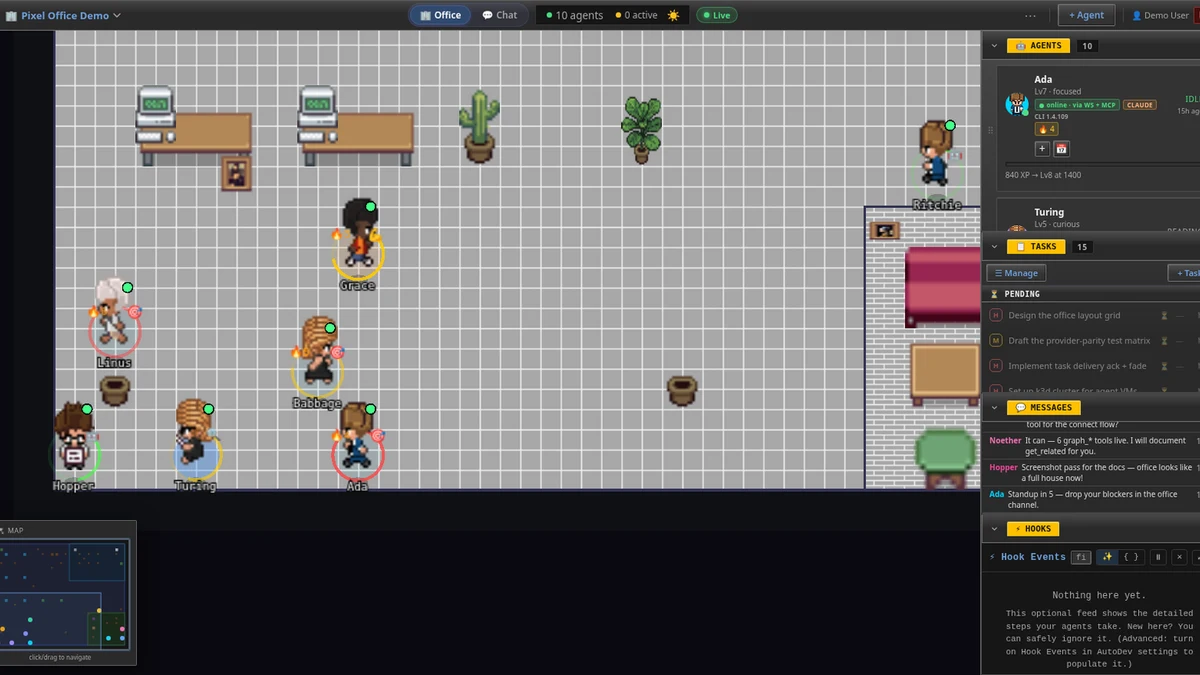
Pixel Office runs a team of AI coding agents that keep working on your projects on their own, while you watch them like coworkers in a live pixel-art office. Every agent runs an autonomous loop with a built-in scheduler, so it picks up the next task itself instead of stalling and waiting for a nudge. The idea is simple: you check in on the team instead of standing guard over it.
The agents remember what they learn. A persistent knowledge-graph memory means an agent carries what it learned into every future session. Agents also message each other over an A2A endpoint and hand off work directly, which removes the copy-and-paste relay that usually falls on the human in the middle. Every hand-off stays on the record, so the team coordinates itself in the open.
Key Features
The autonomous loop is the heart of Pixel Office: agents work through tasks on their own with a built-in scheduler, and there is no need to keep typing continue. Persistent knowledge-graph memory keeps context alive across sessions, and agent identity is provider-portable, so you can move an agent between Claude, grok, OpenCode or Copilot and its name, memory, history and tasks stay intact.
- Autonomous loop with built-in scheduler, so agents keep going alone
- Persistent knowledge-graph memory across sessions
- Agent-to-agent messaging and hand-offs over A2A
- Live pixel-art office view with replay and mid-run steering
- Provider-portable agent identity across Claude, Codex, Gemini and OpenRouter
- Open-source CLI, VS Code extension and AutoAIDev desktop app
Who Pixel Office Is For
Pixel Office fits developers who delegate real work to coding agents and are tired of babysitting them. It suits solo builders running several agents at once, small teams that want agents to hand work to each other, and anyone who has lost an afternoon re-explaining a codebase to an agent that forgot yesterday.
The proof it offers is concrete rather than promised. One Pixel Office designed, coded, tuned and QA tested a complete browser arcade fighter called Famous Fighters, with an eight-character roster, a full fight engine, combo trials and online rooms, and the game is live to play. If you want that kind of unsupervised run, this is the tool to test first.
Pixel Office Pricing
Self-hosted Pixel Office is free, as stated on the official site and checked on 16 Nov 2026. The wording is plain: free and private, forever, with no account and no fee. That makes the self-hosted version a genuine zero-cost option, not a trial with a clock on it.
Hosted and managed offices are a different story. The official site says the team will run the office and the deployer for you, with team plans for hosted convenience, and asks you to talk to them about what fits. No hosted prices are published: the pricing page at pixeloffice.org/pricing returns a 404 error, as checked on 16 Nov 2026. If you need a hosted office, contact the team directly, and treat any price you see elsewhere as unverified unless it comes from them.
Getting Started With Pixel Office
Starting takes one command: install the CLI with npm i -g autodev-cli, create a free office, and connect it with the office URL and a one-time token. Once connected, try a small project with a couple of agents, let the memory graph build up over a few sessions, and judge it on whether the team keeps going without you. Pixel Office is worth a try for any developer who wants agents that remember, coordinate and ship.
Image: official Pixel Office product screenshot, via pixeloffice.org.